Problems with cursor placement
Completed
I'm not sure the problem with the placement of the cursor (see https://multimarkdown.zendesk.com/hc/en-us/community/posts/360037703213-Possible-Bug-Emphasis-for-marker and https://multimarkdown.zendesk.com/hc/en-us/community/posts/360037398494-Typing-backwards) has been solved in Version 1.0.0 (41). The behaviour may not be exactly like it was in the previous version of nvUltra, but it's still weird.
When I type in the middle of a document, the cursor seems to jump to a position where it has been previously, leading to backwards typing in some cases, but jumping . As far as I can see, the cursor only works correctly when it's at the very end of the document.
And yes, I use _ for emphasis (because I use * for other purposes). I don't use Karabiner.
-

You didn’t state whether changing the emphasis markers to “*” solves the problem you’re seeing.
0 -
Good point. No, the cursor behaves strangely even when I change the marker to “*”. I guess this means there must be something else at play, as I assume not everybody is having this problem.
0 -
Hmmmm....
Everyone is definitely not having the problem (we would not have pushed the beta if they were.... ;)
Try this after quitting nvUltra:
1. `defaults read com.multimarkdown.nvultra > ~/old.txt`
2. `defaults erase com.multimarkdown.nvultra`
3. Relaunch nvUltra and see if you still experience the problem.
If that fixes it, slowly adjust your preferences back to the settings you like. Try to make one or two changes at a time so you can detect when it "goes bad." If it's fixed, you can also send me `old.txt` and I can take a look and try to see if I can figure out what is going on.
If that doesn't fix it, then we'll need to experiment with other approaches...
0 -
I am at my home computer now. I installed nvUltra for the first time and changed my settings one after another. It turns out (perhaps unsurprisingly) that it’s chosing __ as “Marker for strong” that causes the problems now.
Thanks for your help!
0 -
Stupid 2's complement integers....
The emphasis flag is 1 right-shifted by 32 bits (which is higher than a 32-bit integer). Fixed that previously.
But the strong flag is 1 right-shifted by 31 bits. Which flips the "top-most" bit in a 32 bit integer. Which in this case is *not* an unsigned integer, so that breaks it. Fixing for next release.
Thanks for helping me catch this...
(I really wish C allowed unsigned `enum`'s larger than 31 bits....)
0 -
Cool, thanks so much for the explanation (which I think I understand the gist of) and for fixing it!
0 -

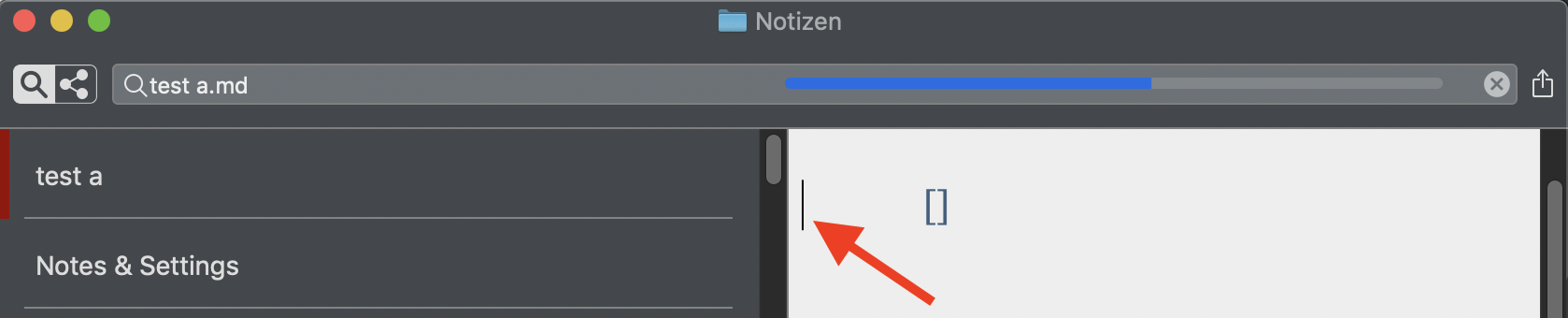
Hm … should be completed, but:
- Make a new file.
- Type [ or (
- Cursor jumps to the very left in the margin:
 0
0 -
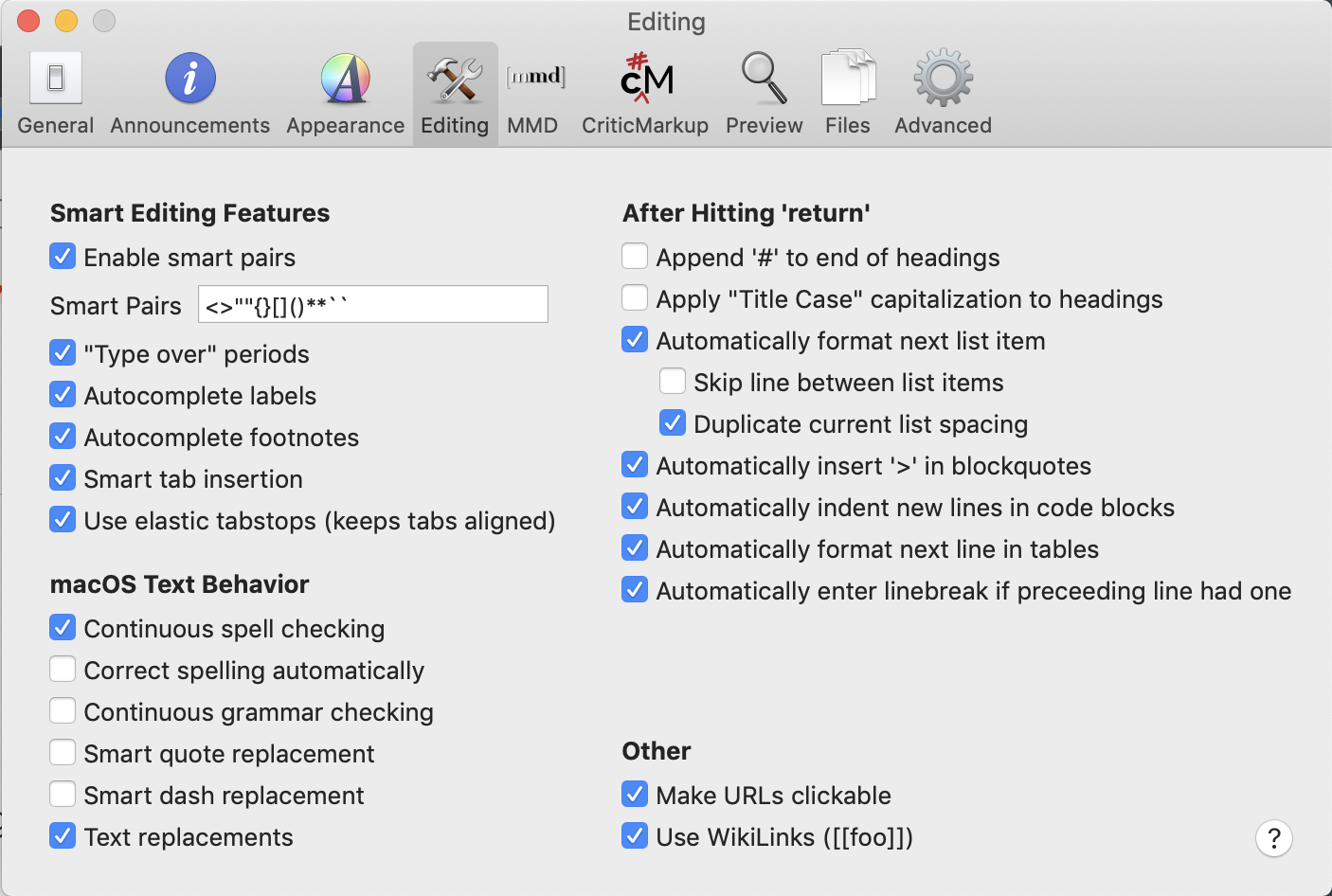
listen -- this is a separate issue. I'm not able to replicate what you're seeing and will need more information (appearance, editing, and mmd preference settings, for example).
0 -
Here are my preference settings:

 0
0 -
listen -- what version of macOS are you using? Have you tried restarting nvUltra (I assume you have)? Have you tried rebooting your mac?
0 -
Mojave 10.14.6 – nothing worked, not restarting nvUltra nor rebooting my MacBook Pro, sorry.
0 -
Ha, since I’ve tried another theme (I’ve used the unchanged built-in Modern Red), the error is gone in every theme, even in Modern Red! Thank you!
But – suddenly it came back again, while I was typing here … Another change to Default and back to Modern Red, and its gone again. Hm.
0 -
I haven't found any more information on this. The best guess is that it may have something to do with the scaling?? (e.g. you use 180% as your default zoom).
I've changed mine to be 110% with a smaller font size (so I have basically the same appearance for my documents, but am not using 100% zoom) and will see if I can replicate this.
0 -
Zooom, goood idea! Yes, I’ve changed to 100% (in the preferences, I couldn’t find a menu item to get the screen back to 100%, though) and a bigger font, and now it seems to be good. I will tell you if it happens again. Thank you!
0 -
Too funny. I had to use nvUltra for a note, and (possibly unrelated) the bracket test file popped up. So I decided to test it since I had zoom at 110%.
This time, I had the same issue with the cursor being shifted to the left. As I typed further, the cursor eventually moved out of the margin, and trailed where it should be by a fixed amount.
I reapplied the theme (Modern Red), and the problem went away. I'm going to try and test it in my debugging app to reproduce. But a thought that occurred to me is that *if* the zoom is changed *after* a theme is applied, then there may be a measurement that is not properly updated (e.g. margins?). Reapplying the theme (which resets more variables than changing the zoom) might properly recalculate that number which fixes the problem.
0 -
I still haven't found a solution, but am increasingly convinced the issue is a default zoom not equal to 100%.
I've also found that if the cursor gets offset horizontally, typing return to trigger the creation of a new line of text in the textview seems to reset the math and everything goes back to normal.
I'm going to need to dig further into this, but my suspicion is that some of the changes made to adjust scaling occasionally happen in the wrong order, causing some value to not be updated correctly.
If anyone else is experiencing this, can you verify:
1. That it only happens if the zoom is NOT equal to 100%
2. That hitting return fixes the issue
Thanks!
0 -
Coordinating discussion for this thread here -- https://multimarkdown.zendesk.com/hc/en-us/community/posts/360041945193--Cursor-shifting-problem-Consolidating-here
0
Please sign in to leave a comment.
Comments
17 comments