RTL Support

I'm writing notes on both Hebrew and English on a daily basis.
Hebrew is a RTL language and in order to see the text aligned correctly while editing, I had to go to Menu Bar--> nvUltra-->Preferences...-->Appearance and change "Text Alignment" to "Right"
This is ok if I only used Hebrew but since I use both languages it's not an intuitive way to switch the alignment.
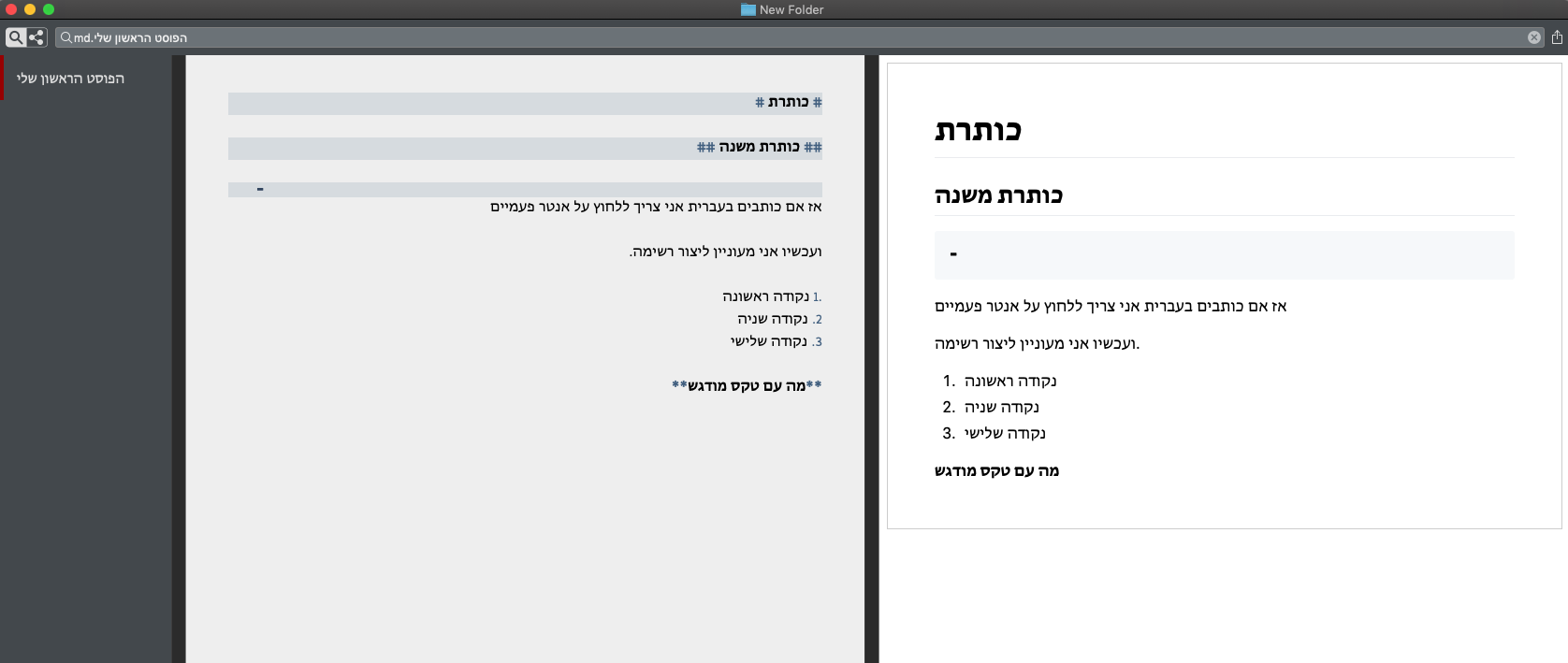
Another issue I've found is in the preview window, while the text in Hebrew is aligned correctly in the editing windows, it is not the case in preview.
I've attach a print screen.
Gabriel.
-

I'll be working on a solution for the preview side of this, I have a couple of options there. As far as access to text direction settings in the editor, I assume you'd rather see that as a menu item (and/or contextual menu item)?
0 -
I don't know how complicated it is to implement, but usually in RTL supported apps (like Apple Notes or MS Office), it is done automatically when switching between the languages.
0 -

There are differences between word processor behavior and text editor behavior. The editor in nvUltra is fundamentally a text editor, but the syntax highlighting adds a few word processor features (e.g. fonts, colors, bold, italics, etc.). This means that some features that would be used in a word processor are not available in nvUltra.
When I test in TextEdit and Apple Notes, I don't see the behavior you describe. Hebrew character runs are displayed RTL (and typing works that way), but text alignment uses one value for the entire document (unless I manually change it). My understanding is that the default is based on your OS localization (e.g. English localizations default left aligned, and Hebrew-using localizations default right aligned.) From what I can tell, I have to manually change the alignment on a per-document or per-paragraph basis. Can you send a video showing the behavior you see (e.g. with QuickTime player)?
As an aside, the "Format->Text" menu bar item doesn't work here, because the editor is fundamentally a plain text editor, not a rich text (RTF) editor. This is what would normally be used in Notes/TextEdit, in addition to the ruler in TextEdit. If you convert a TextEdit document to plain text, this menu essentially becomes disabled except for writing direction.
What might be reasonably feasible would be to remember per-document alignment settings. You could override the default alignment this way (for example, if I had a file containing Hebrew, I could set it to be right aligned, even though I normally use left aligned/justified). But any lines of English text in the document would also be right aligned. At this time, I don't think it's practical to change this aspect of the behavior.
Note -- I have not tested Office/Pages/etc, because they are not directly relevant as they are a different breed of program altogether. The best comparator is usually TextEdit (keeping in mind the plain text/rich text differences.)
0 -
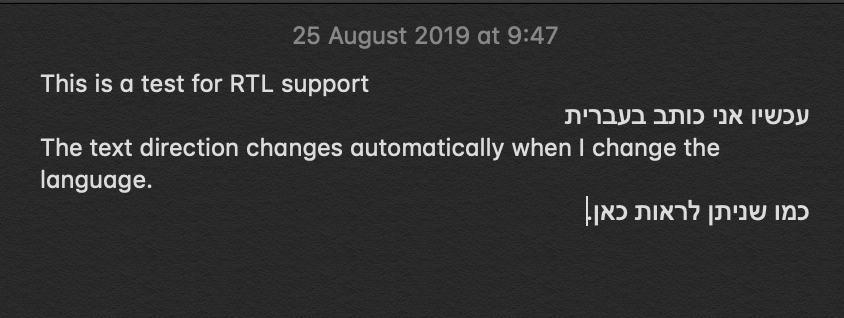
I've recorder a small video showing how the text direction changes automatically in Apple Notes when I change the language between English and Hebrew, I can share it with you view Google Drive if you want.
0 -
This is a screenshot of the end results
 0
0 -
Notes is Rich Text, and that's a nice feature, but this can't be done in a plain text field.
0 -
Notes seems to only do that when typing using a RTL keyboard (or simulated keyboard), pasting Hebrew text doesn't trigger it.
I'm not sure this is going to be reasonably feasible to implement, but will think about ideas. As Brett mentioned, it's not possible in plain text field, and nvUltra is a quasi-hybrid of plain text/rich text editor (and the files are strictly plain text, not rich text like Notes).
It would require a method that detects the "ideal" writing direction for each paragraph of text based on the characters included. And if a paragraph includes both English and Hebrew, which direction should be used?
The more I think about it, the less likely it is to be feasible, but remembering alignment on a per-document basis is feasible.
0 -
I didn't realise it is that complicated.
Maybe a context menu option or a keyboard shortcut to change the text direction would be more feasible?
Anyway thank you for the effort.
0 -
Even then, you would have to reset the alignment every time you opened the document.
0 -
I prefer this than:
"Menu Bar--> nvUltra-->Preferences...-->Appearance and change "Text Alignment" to "Right""
0 -
Ok. I added the first step of this. There is a new menu item "Format->Text" that allows overriding the default text alignment (including the default keyboard shortcuts for left/center/right options.)
This means you can toggle left/right very easily. As above, this is applied on a *per-window* basis, not a per-paragraph basis. Also, new windows revert to the default text alignment.
To reiterate for others who find this thread:
1. Unless there is an algorithm out there to apply left/right alignment to plain text on a per paragraph basis based on the contents of the text file, it is unlikely that multiple text alignments in a single document will be feasible. If you know of such a thing, let us know!!
2. I considered remembering this on a per document basis, but I'll need to rethink this. Documents in nvUltra represent folders, and it would be inconsistent to apply some settings on a per folder basis and some on a per note basis. This might bring more complexity than is worthwhile, especially if the most common use case will be LTR and RTL in single notes, or LTR notes and RTL notes in single folders.
0 -

I've just tested Hebrew with a Hebrew-English text, nvUltra version 1.0.0 (44). Thank you for having me as a beta tester!
What worked in nvALT, doesn’t work in nvUltra: In the editor window (left side in the screenshot) Hebrew text at the beginning of a paragraph is pushed to the right as soon as English text follows.
Since it works in nvALT and in BBEdit, it has nothing to do with RTF and can be fixed. Nobody can work with just the correct preview, so this must be fixed.
Screenshot (left: editor, wrong; right: preview, correct):
 0
0 -
Can you send me the file you are using in the sample? When I copy/paste Hebrew text into nvUltra and write English near it, I get the same text in the editor that I do in the preview.
How does it work in TextEdit? I get the same behavior in both apps, though of course TextEdit doesn't have a preview.
(PS> Upgrade to version 45 -- it won't affect this, but will fix a couple of other issues)
0 -
I don’t know how to send a md-file via Zendesk, so you find it in your email inbox. Thank you for your interest.TextEdit does it wrong in plain text, but can be corrected (writing direction left-to-right).
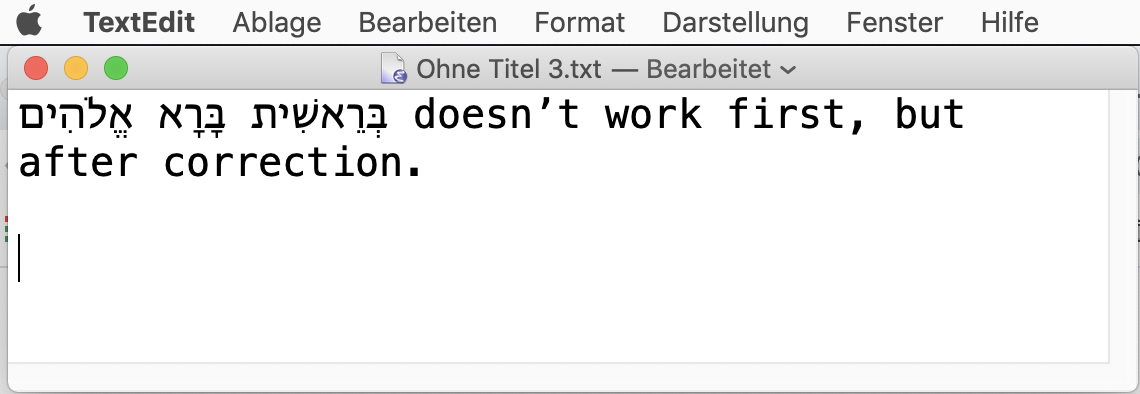 Maybe the different behavior comes from type vs. copy/paste (eventually depending on the source of your Hebrew-English text).It should also work right in this field:
# nvUltra Beta Hebrew Test:
בְּרֵאשִׁית בָּרָא אֱלֹהִים are the first three words in the bible.
No problem in this field, no correction of the writing direction necessary after typing.
0 -
Thanks for the sample file. It allowed me to better understand what is going on.
1. I am not an expert in Hebrew, so forgive any incorrect terminology (corrections appreciated.) . I am writing from the perspective of someone who only knows LTR languages, but has *some* experience working with RTL characters/languages in text editors and troubleshooting what is going on from a computer perspective.
2. The file (as examined with a binary file editor such as Hex Fiend) confirms that the order of characters in the file is Hebrew followed by the English.
3. nvUltra uses a rich text view (in order to display syntax highlighting), but is fundamentally a plain text editor. It does not track/maintain any information outside of the text characters contained in the document. Additionally, because of the syntax highlighting, it frequently "wipes the slate clean" and applies default macOS layout to the text. This includes correcting the writing direction of text.
4. Right or wrong, TextEdit is generally a good demonstration of the way that the macOS text engine is designed to work. I make deviations from that only when I have a good reason (which is usually centered around the core functionality of MultiMarkdown and syntax highlighting.) I also use it as a reference point to know when I have screwed something up, or when I have simply stumbled into something I didn't expect in macOS
5. It seems that what happens is that the file is loaded, and the macOS text engine "sees" the leading Hebrew in the body paragraph, and triggers RTL writing direction for that paragraph. Which means that the beginning of the text (which is in Hebrew) properly starts at the right side of the editor.
6. Moving "down" the file (to avoid left/right in this context), we then get to ASCII characters (used here in English), which are treated as LTR. So macOS switches the writing direction so that the English words appear in order (`are the...` instead of `...eht era`).
7. The preview knows nothing of RTL (since you did not specify any HTML to change the writing direction), so it defaults to an overall LTR writing/display direction. In this case the Hebrew characters are displayed RTL since modern web browsers do that even when the overall direction is LTR.
So technically, I think the correct thing is happening here (and in TextEdit, and, BTW, also Mail if you want to test it there as well as another example of default macOS behavior that I did not write), it's just not what you expected. If you force the writing direction in the editor to be LTR (you can use the context menu inside the editor near the Hebrew characters and choose LTR), then the visual appearance of the editor will match that of the preview. Note, however, that once you edit the file which triggers an update of the syntax highlighting and allows macOS to fix the layout, it will revert to the correct but unexpected appearance (since plain text does not store any stylistic information, such as "change the writing direction for this paragraph). This meshes with what you describe as TextEdit doing the "wrong" thing, but allowing you to "correct it" by changing the writing direction to left-to-right.
I no longer have BBEdit, but my suspicion is that it does not support RTL writing direction in this context (just RTL layout for spans of RTL characters), so the document is always forced to be LTR, hence showing the appearance that you expect. I suspect the same is true of the editor on this web page. nvAlt is a rich text editor with a different model than nvUltra, so it works differently. I am not familiar with details of how it handles RTL vs LTR writing directions.
An alternative is to always start "LTR paragraphs" with a LTR word, and "RTL paragraphs" with a RTL word. Typing an English word "in front" or "above" the Hebrew will flip the overall writing direction for the paragraph, which again mirrors the display of the preview, but this time it will "stick" when you edit the file. This will force your expectations to align with what the computer's expectations are.
Another way of thinking about this is that you seem to believe that this paragraph is a LTR paragraph that happens to start with a RTL phrase. macOS treats it as a RTL paragraph that happens to end with a LTR phrase. (Since macOS seems to define the default writing direction for a paragraph as a whole by the first character) . (And yes, I realize that you wrote the paragraph, so in a metaphysical sense it is what you say it is....)
Not speaking/writing Hebrew, my understanding is that *if* this is a Hebrew/RTL paragraph that happens to contain an English/LTR word or phrase, then the visual display of the editor would be correct and the preview would be wrong. Am I mistaken in that? If you believe I am wrong here, what would the expectation be when writing in Hebrew but using an English proper name in the middle of the paragraph? What about when writing in English but using a Hebrew proper name in the middle of the paragraph?
0 -
As an aside, the approach used by macOS does cause interesting things to happen with Markdown lists:
(Paste the following into TextEdit or nvUltra)
1. אֱאֱאֱאֱאֱאֱ
2. FooSo again, I understand that you don't see the intended result, but *if* the macOS rule is that the first characters determine the writing direction for a paragraph, then nvUltra is doing the right thing, to the best of my knowledge.
The only possible (partial) solution I can come up with is to force the entire document to be displayed with the same overall writing direction (assuming this is possible.) I don't know what that would do to spans of characters that don't match (e.g. would "John" in the middle of a RTL Hebrew document be displayed as "nhoJ"?) My suspicion, however, is that this will simply lead to other problems, but perhaps not.
0 -
PS> It's probably obvious from the above that the *best* way to get this fixed is to bring it up with Apple. They certainly have more resources than I do, and access to the macOS codebase.... ;)
0 -
Ummm … Let me explain what I think, maybe this helps to understand me better and get to a solution. Besides, I'm not a programmer, just a user.
nvUltra is a plain text editor. So it should display typed text correctly. If I type something at the beginning of a line is has to stand at the beginning of this line, not at the end. There is nothing metaphysical in this. Pure physics. (By the way, I know how to deal with metaphysics … :o)
Since over thirty years I work with text editors (like BBEdit) that are able to display Hebrew (RTL) correctly in English (LTR) texts. Since the coming of Mac OS X, its language management and the Unicode standard this wasn’t a problem anymore (no Nisus dongles needed); even on iOS there are plain text editors that do it right (like Textastic). So I don’t understand why it should be a problem today, but I see that it is a problem for many programmers that I've written to in the last few years. No evolution here. Strange. Being an unknowing user, I’m confused …
But now to a solution: Before you try to invent the RTL wheel again, why don't you talk to programmers that know how to do it?
One programmer spoke to the BBEdit programmer and told me that he said he doesn’t know why it works. So you may be right about what BBEdit does. But it works for most of my needs.
There is another plain text editor called Katib from Abdullah Arif (https://apps.apple.com/de/app/katib-%D9%83%D8%A7%D8%AA%D8%A8/id925418571?mt=12 ), and this programmer knows very good why it works, because his editor is made for RTL and LTR writing. Maybe he can help.
Not a plain text editor, but a XML-based editor is Mellel from Ejal Redler (https://apps.apple.com/de/app/mellel-4/id1251731073?mt=12 ). Yes, maybe irrelevant for the plain text problem, but he and his brother Ori live in Israel and do their programming and writing in Hebrew and English, so they should know all the tricks of the RTL/LTR trade. Both are very kind and responsive, so maybe an email from programmer to programmer would be helpful.
Again, I’m not a programmer. But when you try out Hebrew you should not copy/paste Hebrew, but choose the input source Hebrew and type Hebrew (e.g. random keys on the home row). You will see the divided cursor that makes the next character appear on the left side of the first. Maybe nvUltra could detect the input method change and react the right way: first typed, first displayed?
Most of the writers have texts that flow LTR with words or phrases or (seldom) paragraphs in RTL text. So maybe it is possible to tell nvUltra the document orientation (LTR or RTL) in the preferences?
For RTL flowing texts (e.g. pure Arabic or Hebrew texts) everything should be orientated to the right, so the uncorrected TextEdit behavior is wrong. The right behavior you can see in Mellel (https://www.youtube.com/watch?v=uAriVdRJEPI ). They use the overall direction button and a special direction space to create the perfect solution.
In my opinion, it would be satisfying if the text in nvUltra would just appear in the sequence of typing (first typed [RTL or LTR], first displayed).
Now to your list:
1. Okay.
2. Yes.
3. If it would "correct" the writing direction, the Hebrew would be werbeH (Sublime Text does this, bah!) or all paragraphs would begin at the right side/margin. But nvUltra or the text engine takes all the Hebrew and pushes it to the end of the line in the LTR document and LTR paragraph. That is not a correction, but a distortion.
4. I understand.
5. Yes and no. If RTL writing direction would be triggered for the paragraph, it would begin not at the left, but at the right margin after typing the first Hebrew letter (or word or whatever triggers the flow recognition).
6. Yes, the English text appears in divided cursors; the text engine "thinks" the document language would be Hebrew (but, again, it doesn’t make the paragraph begin at the right margin what would be necessary for a normal Hebrew paragraph).
7. If only nvUltra could do what a browser can do … :o)
Like I wrote before: The status quo is not even technically right. Apple Mail (plain text mail) does the trick, by the way. Even Microsoft Visual Studio Code does it.
So let the user decide what the correct direction for document is, maybe in the preferences.
To your last long post paragraph (Not speaking…): No, a normal Hebrew paragraph would always begin at the right margin, so the whole paragraph should be aligned right by (Hebrew paragraph) default; but yes, on the right side of the line there would be the Hebrew text and on the left side of the Hebrew there would be the English text. And the display of a Hebrew word or phrase in a paragraph that begins with English text (one character is enough) is already correct.
The ordered list behavior in nvUltra (and TextEdit) is wrong as expected, because modern Hebrew uses not only the Hebrew alphabet as numbers but also the Arabic numbers (1, 2, 3 …) that English uses, so the 1 and the point are not recognized as English or Hebrew as long as a word in English or Hebrew follows. For this problem there is in Mellel the direction marker space as explained in the linked Mellel video above. Again, the first line should then be aligned to the right.
So again, it might be that nvUltra follows the macOS rule, but then both do the wrong thing. And it is weird that other editors do it right.
Hm … since the input of the characters follows the chosen input source, a writing direction default for the document should do the trick.
Now I hope all this helps to a solution and didn’t make you angry. These are just my two cents, no offense intended! I just want nvUltra to become a great tool. I appreciate your effort.
0 -
I am not reinventing the RTL wheel -- I am using the default macOS behavior, which is (generally -- see caveat below) consistent in nvUltra, Mail, TextEdit. The other applications are reinventing it (which is fine, and there is certainly a need for more flexibility in combining RTL/LTR text in single documents). nvUltra uses the built-in NSTextView behavior specifically because I did not want to reinvent this.
Re: numerical points:
3. Your assumption that this is a LTR document and paragraph is just that. According to macOS rules as they seem to be implemented, it is a RTL paragraph. We can certainly argue that the rules are not correct, but they seem to be the rules based on my experimentation.
5. But that is what is happening here, no?? The paragraph starts with Hebrew characters (at the right), and then the English characters appear to the left (since this is a RTL paragraph) (though the *span* of English is shown LTR within the larger RTL paragraph -- in my tests, nvUltra always gets the individual spans correct -- for example, I never see `werbeH`, and I never notice the equivalent happen to Hebrew characters, but I could easily miss that.)
6. You do realize that writing direction and alignment are two different things, right? nvUltra applies alignment to the entire document based on your preferences. This is independent of writing direction. And since this is a plain text editor, there are not different alignments on a per-paragraph basis. But you can quickly change the alignment for the document using the Format->Text submenu.
7. It's not nvUltra, it's macOS.
As to "No, a normal Hebrew paragraph would always begin at the right margin, so the whole paragraph should be aligned right by (Hebrew paragraph) default; but yes, on the right side of the line there would be the Hebrew text and on the left side of the Hebrew there would be the English text." -- I don't understand. That is what is happening here -- the Hebrew begins on the right, and the English follows to the left.
Oh, and just to make it more fun -- it looks like the behavior is different between macOS 10.14 and 10.15 (in TextEdit at least). Pasting the same text gives different results in TextEdit, e.g. for the list example.
Editors like Mellel obviously offer more fine-tuned control (which is great, but a bit out of scope for a plain text editor like nvUltra.) And other plain text editors (BBEdit) get it right in this instance simply by being "dumb" about the distinctions between RTL and LTR. So that is not a fair comparison either.
I'm definitely not angry. Just trying to make sure I understand, and also to make a few points clear (specifically that this behavior is controlled by macOS more than nvUltra, with a few special caveats that are mentioned above.)
"So let the user decide what the correct direction for document is, maybe in the preferences." -- I can consider this, but keep in mind that it is a hammer, not a scalpel.... This sort of a setting would be applied either to all documents, or all documents in a folder. So it may cause other unintended consequences as well. Due to the nature of nvUltra's syntax highlighting, more fine-grained control (e.g. controlling individual paragraphs) is not feasible.
0 -
Okay, I understand that NSTextView does it wrong, so Apple is to blame. You just use it and try not to change it too much to avoid weird problems. Reasonable.
What you "don't understand" is that the right way to write Hebrew text always has to be right aligned, it is not possible to write a Hebrew text (not just Hebrew words within an English text) without align it to the right margin (it is just like all your text would always be right aligned--just wrong). An indentation in a Hebrew text is an indentation from the right margin (to the left). The first page in Hebrew and Arabic books is what in an English book would be the last.
I know that in the text engine writing direction and alignment are two different things, but that must not be if the text is Hebrew text. So the NSTextView always displays the Hebrew text as it was English text with Hebrew words, even if the first word is Hebrew, since it doesn't change the alignment. To do it right, it has to combine writing direction and right alignment. But it doesn’t. Now that is for just Hebrew texts.
Now I don't write Hebrew texts, I write English or German texts with (ancient) Hebrew (and other) words or phrases in it. nvUltra is a text editor for English or German texts. I just want it to let me write what I want to write without making me think about the editor. That would be great. Since nvUltra would be an electronic index card box (Zettelkasten) for me where I write my thoughts in, I maybe could avoid a Hebrew word at the beginning of the paragraph or always write a Latin character before I write Hebrew. But who could want that?
You see, I don't have a solution. But maybe the mentioned programmers have one, since they live in the Arabic or Hebrew language world and know how to do it right even if Apple doesn't. Why don't you just ask them? They don't produce software that is in the same category as nvUltra, so they have nothing to loose if they help you.
Thank you for your patience and effort. It would be great if nvUltra would let us type the text we want. :o)
0 -
Oh, and I didn’t know that Catalina does it different than Mojave. I’m on Mojave and don’t know if I ever make the next step. It seems that Apple is not able to make macOS better anymore, so they make it worse. But that is their fault, too, not yours.
0 -
For the next release, I added an additional preference to allow the user to force an override of the writing direction from natural to RTL/LTR. This is the "hammer" and it is applied everywhere. It will allow you to specify the default "Natural" writing direction, or to force LTR or RTL.
The same caveats as above apply -- nvUltra is fundamentally a text editor, which means it does not support manually editing styles inside a document (you can customize themes to control styling, but you can do it within the editor like a WYSIWYG app). You can also add a `writingDirection` value to themes (0 = natural, 1 = LTR, 2 = RTL), so you could theoretically have separate themes for RTL folders and LTR folders.
This is *not* the same functionality that an editor like Mellel has, but again, they are different apps with different purposes.
0 -
Thank you for your work! We will see how the hammer works. Can’t wait for the next release …
0 -
If you have other suggestions after trying it out, I'm happy to hear them. Can't promise I can/will implement them, but happy to hear them nonetheless.
0 -
Yes, I will. :o)
0 -
I’ve just tested the new release with RTL preferences:
GREAT !
THANK YOU !!!
For LTR texts with RTL phrases this is wonderful! If only my MultiMarkdown Composer could do the same … (I wonder if you could arrange a little copy/paste in Xcode? :o)
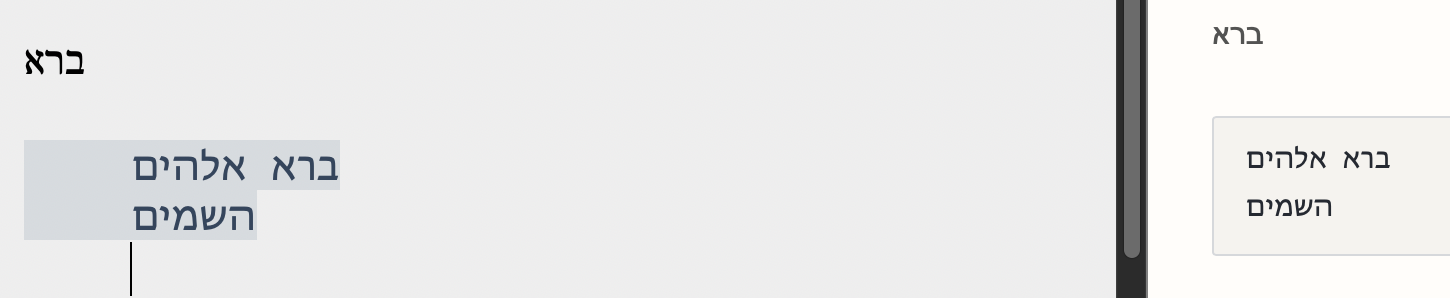
For RTL texts with LTR phrases (everything is right aligned) I’ve found just one minor issue: After typing a tab (from the right margin to the left) the Hebrew text is inserted to the right side of the cursor (into the space of the tab), but it should be inserted to the left side and run further into the left direction. I’m pretty sure that Gabriel (see above) would like it this way. :o)
For what I need I’m absolutely happy with your work. Thank you so much!
0 -
Glad this helped!
The plan has always been to use the revised text engine I am using in nvUltra in the next version of Composer (as well as an iOS app hopefully....)
Do you have elastic tabstops enabled? If so, turn those off for your RTL tests and let me know if that is any better. I'll have to look at this to see if anything can be changed.
0 -
Good to hear about engine transfer to Composer macOS (and iOS)!
And no, without elastic tabs checked the result is even more weird:

All the Hebrew jumps to the left. The cursor in the last line shows where the text sould begin. These are the (Mojave) preferences:
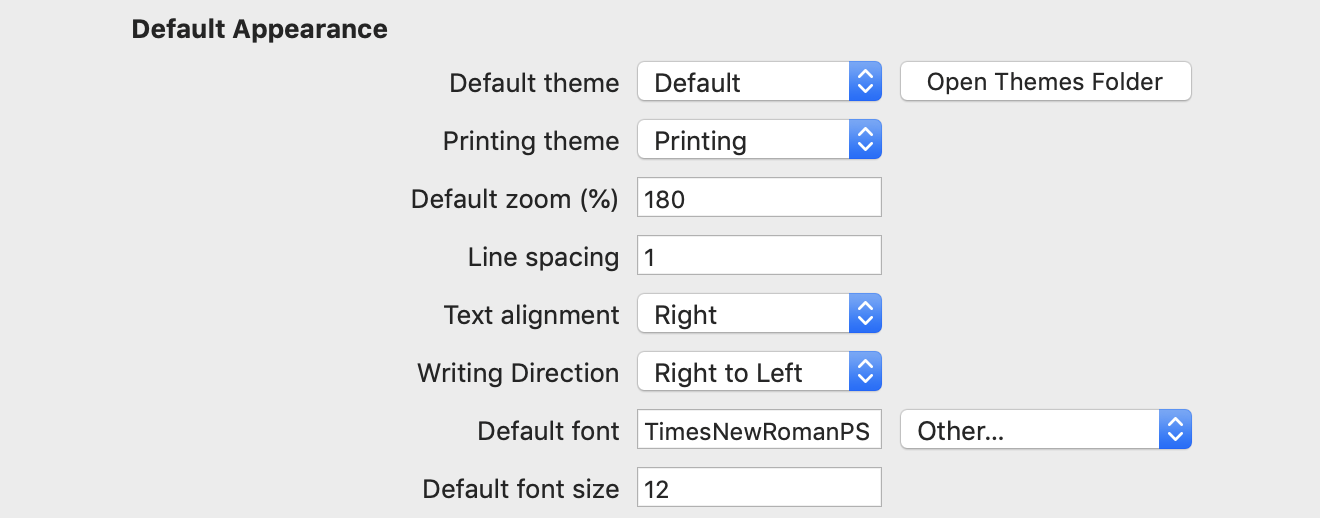
With "Left" and "Left to Right" it looks very good, though:
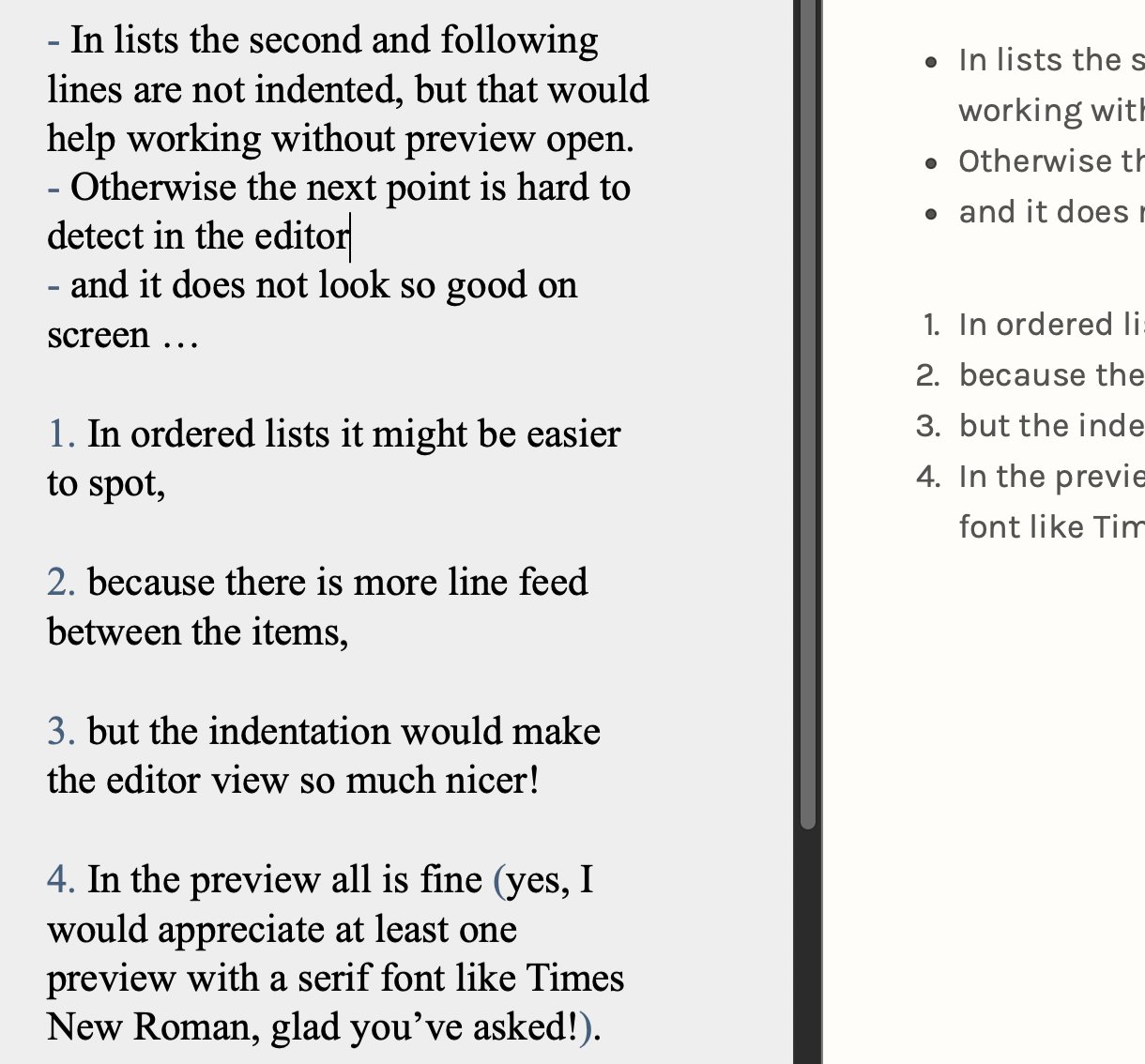
It may be a different topic, but why isn’t the list text indented in the editor?
 0
0 -
… or maybe it would be easier in the editor window to outdent the list markers into the left margin?
0 -
List text is not indented because you used a space instead of a tab between list marker and list text.
0
Please sign in to leave a comment.
Comments
37 comments