When dock icon disabled, editor disappears when app loses focus
Completed
Hi. When I am working in the editor with the dock icon disabled, the editor disappears when I switch to another app. When I enable the dock icon, the editor stays put when app loses focus. This became an issue because I wanted to try dragging and dropping an image from Safari into the editor, as advertised in documentation, and I couldn't (with dock icon disabled) because the editor kept disappearing.
-

This is a valid point. I love the way the menu bar mode behaves in general, but not that it disappears when I click away (and don't intentionally dismiss the window). I'm not sure what the ideal situation would be, though… because it shows its Dock icon when it's active, switching away and _not_ hiding it would mean that it ends up just running in the Dock, contrary to the menu bar preference.
We could make it only hide when manually dismissed by hotkey or clicking the menu bar icon. We could also *possibly* attempt to hide the Dock icon without hiding the window when Ultra wasn't focused. Any thoughts on how you would prefer the situation to be handled?
1 -
Thanks. Ideally, I'd like menubar functions always visible, even when dock icon is disabled. I reckon that does not jibe with OSX. Not having the dock icon seems to be, for me, mostly an issue of aesthetics (desire to minimize dock icons). What about, instead of this workaround to keep menubar functions visible (dock icon appears/disappears), there was a way to invoke, from the menubar icon, a pop-up (or a pane of the preferences window) that displays at least a limited sampling of key menubar functions available via keyboard shortcut? Sounds a little janky, but.... I would be content with your setup, except that the editor abruptly disappearing is very jarring, and I often want to be able to look at and reference text in a note while interacting with other apps.
0 -
I forgot to clarify in my "ideally" comment that, ideally, I'd like the editor to stick around even when app loses focus, with or without the dock icon enabled, and of course would like the menubar functions to stick around too.
1 -
I agree that it's jarring, we just need to think about the ideal way to fix it. A subset menu would be a pain and would never include everything it should, and the only way to keep the full menu is to show the icon. So concessions have to be made… or we just have to run it with the Dock icon…
0 -
I would be content with having it run with the Dock icon.
0 -
Which begs the question, then (for both of us), why not just enable the dock icon?
0 -
Yes, yes, it does. And I have in fact done it. Problem solved.
0 -

After discussions with Brett, we agree that disabling the dock icon is equivalent to a "transient" mode. nvUltra will automatically hide to get out of your way when you switch focus to another app. If you want to be able to drag and drop between applications, then you will need to leave the dock icon enabled. Either way, you can still make use of the menu bar icon.
0 -

New here, and also got jarred by this.
FWIW, I am mostly happy with the way nvAlt handles this. Any reason nvU doesn't do the same?
0 -
Hi Alesh,
As mentioned above, the difference from nvALT is that Ultra shows its dock icon temporarily when coming forward. It's an intentional decision that allows full access to the entire menu. But it means that if the Ultra window stays open when you switch to another app, it just continues running in your Dock. At that point, you've completely defeated the point of having the Dock icon hidden. We're willing to consider other approaches, but based on our discussions so far, the ideal solution for people experiencing this concern is to just not disable the Dock icon at all.
0 -

Ran into this behavior and had a heck of a time figuring it out. Reinstalled, looked at every option in the preferences, I would have started clicking different boxes in the preferences to see what they did, but none of the explanations gave me any indication that it would solve this issues. I had searched the User Guide early on, but went back and started looking through all the preference pane documentation and I finally found that the dock icon has to be enabled to keep it from disappearing immediately when focus is lost.
I understand the technical limitations, but I think there really (really) needs to be a simple statement in the preferences about the consequences of disabling the dock icon, e.g.
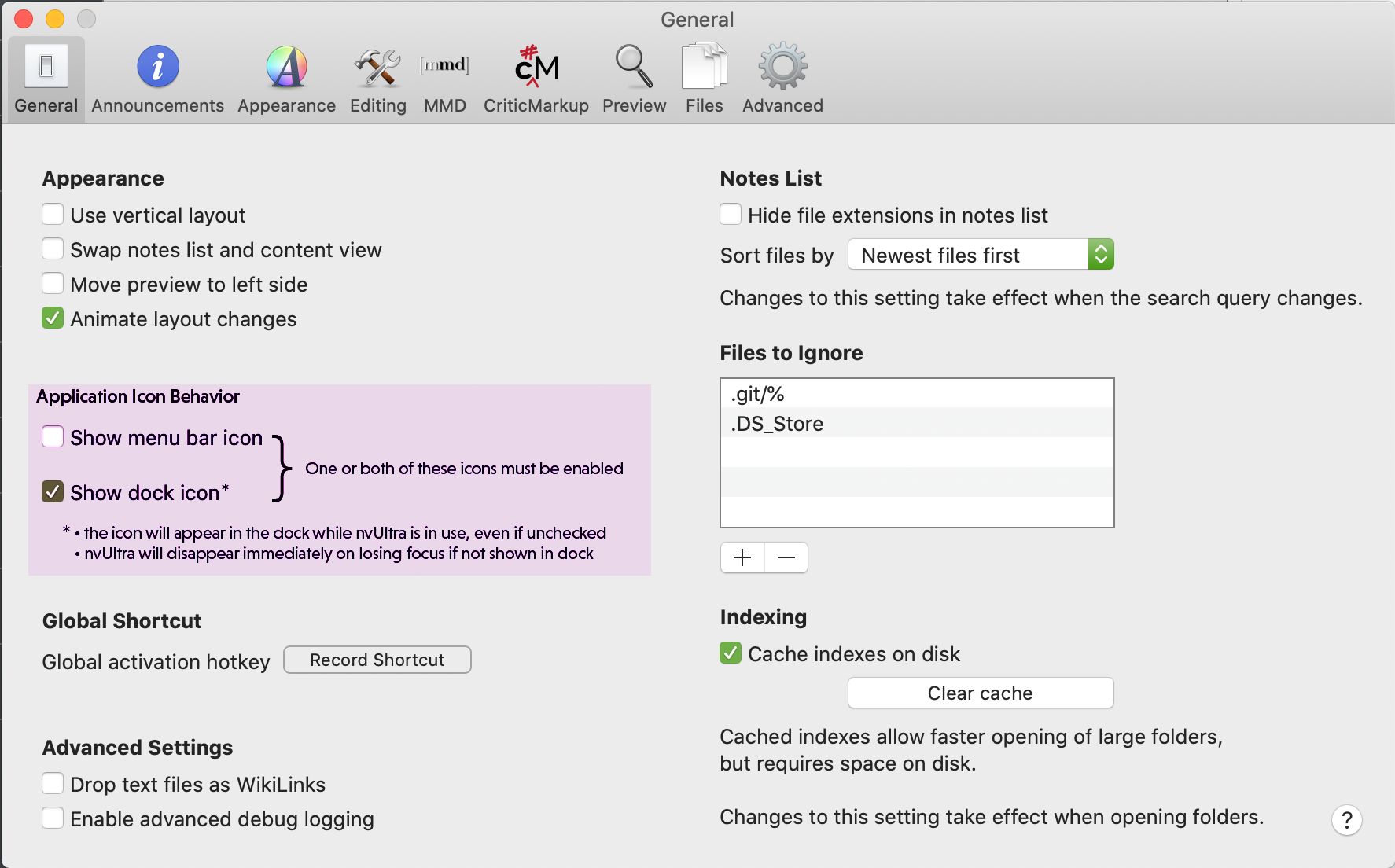 0
0 -
We've changed the wording of the preferences to provide additional information.
2
Please sign in to leave a comment.
Comments
12 comments