Crash on opening a specific folder after reinstall
Completed
Hi! On one of my two laptops, I can't currently open a particular folder in nvUltra. It crashes instantly (after showing a partial "open" animation), no reporting option or dialog box or anything. How can I troubleshoot this?
The folder in question is in Dropbox. The structure is simple. I have a Notes folder, with Work and Personal subfolders. The crash occurs when I try to open Personal. If I open Work or the parent folder Notes, it works fine. On my other laptop, syncing the same Dropbox folders, it's fine.
I very recently had to reinstall everything after a visit to the Apple Store. I'm fairly sure that this problem started later, but I'm not certain. (And regarding my recent post about trying to symlink the CSS/theme directories: I'm not doing that anymore.)
Any suggestions? I'm at a loss without even a crash report to pull.
-
Additional data point: after copying the entire Notes directory to another location, I was able to open the copied Personal folder just fine. The original one still crashes.
0 -

Strange to crash and not generate a crash log...
First step is to go to the Troubleshooting preferences and see if there is anything useful in the Event Log. Can also turn on "Enable debugging features" to see if any further information gets logged with the next crash.
Can also use the "Open Log Folder" there and go up one level to "Caches" => nvUltra-Indexes and navigate to the relevant index file and send me that file. It will have file paths, but no file contents. I can look and try to figure out the last successful indexed file.
0 -
Your updated comment suggests there is a file in there somewhere that is causing the crash (e.g. a hidden dot file or something that was not copied? Or a corrupted file? Can try using Disk Utility to diagnose/repair the drive?)
0 -
I did try running cat on everything in the directory looking for corruption, without success. I'm not sure that was a good test. Disk Utility is a good idea.
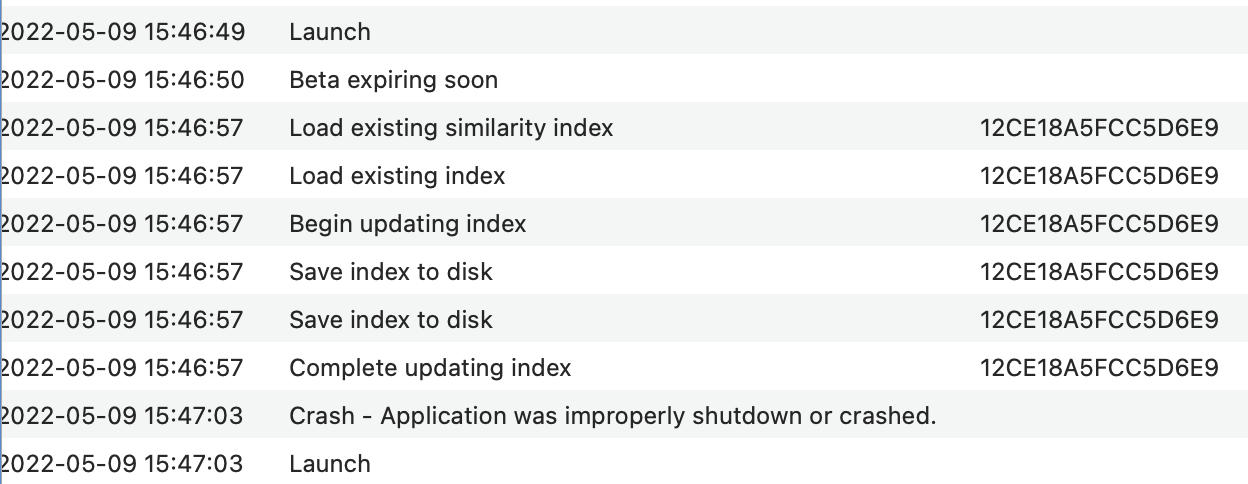
Here's the event log output — not much to go on. (Sorry, if there was a way to copy text I couldn't find it!)
What's the best and safest way to send the index files from the cache?
0 -
Never mind, I just rediscovered the Submit a Request function.
0 -
Interesting find. Trashing com.multimarkdown.nvUltra.plist (once I figured out where it was) solved the problem. Restoring it repeatedly caused the crash again. I've saved a copy of the plist in case it would be useful to you?
0 -
It's almost assuredly not the plist. It might be a preference that changed after restoring the default prefs that you have not reset back to your prior value?
A copy of the "troublesome" prefs and the new working prefs would allow me to "diff" them and see what has changed? You could submit both of those via a request and I could look? That would lead towards figuring out the problem.
Thanks!
Fletcher
0 -
That's what I meant — I didn't mean to suggest the plist itself was corrupted, rather that some setting contained in it might be causing the crash. I'll send you both copies via Submit a Request.
0 -
Done — attached to the prior thread. https://multimarkdown.zendesk.com/hc/en-us/requests/231?page=1 Thank you for looking at this by the way!
0 -
Thank you for the time you're taking to help resolve this!!
Sorry -- sometimes people seem to think that preferences become corrupted and that magically causes problems. I suppose that is possible for some applications certainly, but not really applicable to nvUltra unless you were intentionally trying to mess around, I suppose. But you did not say that.
I don't see anything obvious in the preferences. Nor any obvious problems in the index files.
The log snippet you pasted suggests that updating the index worked properly, so it was something after that.
More response in the support ticket....
0 -
A few points for posterity.
Technically this wasn't a crash -- the text included a malformed MultiMarkdown table that resulted in an improper parse tree that caused MultiMarkdown to quit, not crash. That's why there was no crash report.
I'm working on addressing that in MultiMarkdown, which will then fix it nvUltra and MultiMarkdown Composer.
Thanks!
1 -
Fixed in MultiMarkdown develop branch, and will be in next release of apps.
And technically the line in question was not "right" in that it had more columns than it should, it should still be a valid MultiMarkdown table, and should not have caused problems.
Thanks again!
0 -
You're welcome, and thank you for so quickly helping me track down the problem document so I could get up and running again!
0
Please sign in to leave a comment.
Comments
13 comments