"File > Edit File(s)" does not always work
Completed
When I attempt to edit nvUltra files in an external editor using the "File > Edit File(s)" command, sometimes the file launches into the external editor, sometimes it does not. If it's not working and I restart nvUltra, it usually works properly again at least once.
FYI, I use a custom keyboard shortcut for this:
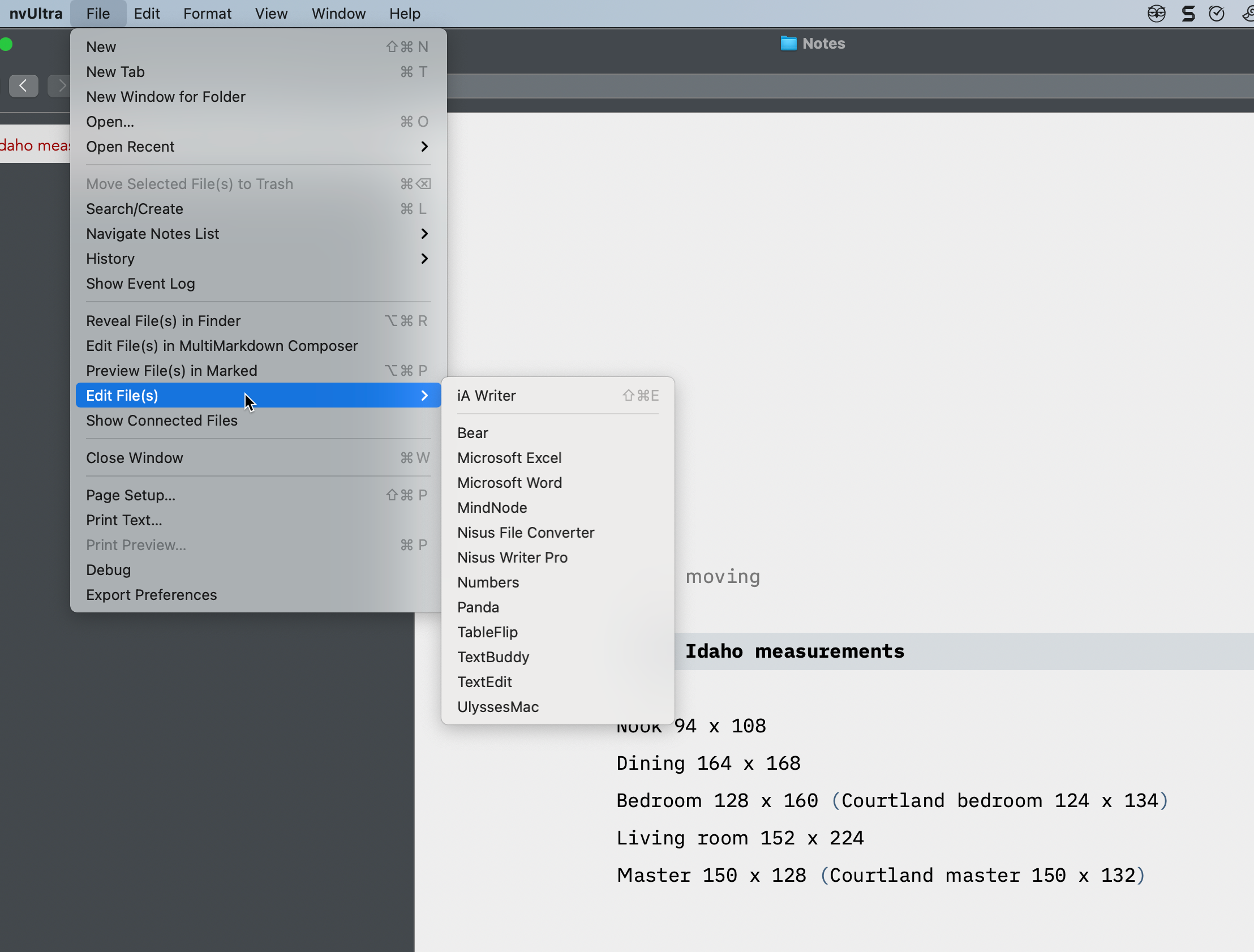
-

I can't replicate.
Can you leave console running while you try to do this and see if anything strange happens?
What about when you use a different application instead of IA Writer?
0 -
> It happens with other apps, too, I just discovered.
> How do I leave the console running?
Run the console application and don't quit it... ;)
(Apparently newer versions of Console don't let you scroll back to see log messages that occurred before launching the app?? So you have to open Console, then replicate the troublesome behavior to see what happened. You can dig through log files in terminal to try and find messages, I assume, but this may be easier.)
0 -
I think I found the issue and it is fixed for next release.
0 -

I am having the same problem (or a similar one) today, but only with certain external apps. OS goes into a loop (whirling beachball) and a forced quit is needed to get back to nvUlt editor (using version 2022.03.30.16.40). I did not use console to let it play out, or simply wait. Occurred with Nisus Writer Pro and MultiMarkdown Composer (which surprised me). Though I could save as an RTF file that opened in Nisus WP. I have a copy of the "detail" in the Apple Error Reporting window that allows reopening nvUlt, when trying to open note in Nisus Writer Pro.
0 -
Howard Dinin -- Not the same issue (which is both good and bad, I guess...)
After you mentioned this, I was able to replicate once when opening Hex Fiend (which I had not used in quite a while), but then could not replicate. Have not seen it with Composer (which I use all the time).
It *seems* to be that nvUltra makes the request to the OS to open a file with an application, and then waits and waits and waits for the OS to respond. If that doesn't happen, then nvUltra is stuck waiting....
It would be possible to spin that request off into a separate thread, and just wait to see if it ever finishes, but that doesn't seem like a great solution.
It looks like the method used for this is deprecated and will eventually stop working. Maybe it's already not working great in newer versions of macOS??? I was able to figure out a replacement method, and that replacement seems to be non-blocking, so perhaps it fixes this? Will be in an upcoming release (though possibly not the next build)
Thanks!
0 -
Fletcher, thanks!
For the sake of full disclosure, I should say that opening a note in MultiMarkdown Composer for editing is not a problem using the dedicated link in the dropdown of the File menu, only a problem with the list of myriad editors listed in the "Edit File(s)" sub-menu. It just seemed surprising that this possibly no-longer-supported OS method did not work with MMC. But the apparent reason explains the non-functioning. Any idea of when the next build (i.e., the current "update") will drop?0 -
Fletcher, also, and I neglected to mention. I am running Monterey 12.3.1 on an M1 powered MacBook Air (the device that is showing this deviant behavior). I also run a M1 Max powered Macbook Pro (16") under Monterey 12.3.1 and the function operates in this configuration without a hitch... (!) I tried to open the note for editing in every app in that sub-menu I have on this device (most of them... I sheepishly admit) and they all opened without a problem. ??
0 -
New build coming out today. See if that works.
0 -
Sorry to say, the new build now renders the MacBook Pro 16" also inoperable accessing file editors from the "Edit File(s)" sub-menu. The previous build as I just reported a while ago was working fine. Now the behavior is identical to my other device (still running the previous build) wherein calling the function with any of the third-party editors (or MMC from that sub-menu) only produced an eternally spinning beachball. I changed nothing other than to install the update to the 2020.05,13 build you just posted.
0 -
The new method uses the same approach that the dedicated Composer menu item uses. I can't find any trouble on my 12.3.1 machine (or 11.6 machine, but that may be irrelevant.)
I assume you've tried the basics -- rebooting your machine, running disk utility to check for errors, etc.?
0 -
Hmmm, yeah, thanks. I guess I did only half-due diligence. I rebooted the machine, but did not do a First Aid diagnostic from Disk Utility in Recovery mode. So I quit, did the diagnostic... no errors, everything operating normally, and rebooted.
This time however, it's all working. Probably some vagrant rogue code that had to be purged. Anyway, it works. On one device anyway. I'll try the other device the next time I have a session on it.Thanks again.
0 -
If it weren't happening for you on two separate machines, I'd say we're done with this issue.
If it happens again, I would try running on a new user account and see if that resolves it. If so, look at any other applications/extensions that are running as a possible issue...
0 -
I've tried again on the original problem device (MacBook Air M1 2020). Running Monterey 12.3.1. I tried, after installing the latest update 2022.05.13, quitting the machine. Restarted in Recovery mode and ran First Aid on both sectors of the startup disk (Base OS, and Data) with no errors reported. The problem persisted. I tried restarting in Safe Mode. The problem persisted. The only external editors the note will open in from that sub-menu are MMC (from the dedicated menu line, but not the list of apps) and Byword, which is at the top of that list, with a rule drawn beneath it to separate it from the other apps listed. I also tried a temporary new user account, opening a new folder for notes for the nvUltra app for that "user." I created two dummy notes. The problem persisted. That's all I have to report. Beyond re-installing Monterey, which I am loathe to do on this device, I can't think of anything else to try. nvUltra seems to be running nominally on the other device (MacBook Pro M1Max).
Sorry.0
Please sign in to leave a comment.
Comments
13 comments