Problems with file pane continuously refreshing
Completed
dear all,
I'm running NVUltra Version 1.0.0 (2021.09.01.20.19) on MacOs 10.15.7 (Catalina), on a folder with multiple subfolders and I'm experiencing something that makes NVultra not usable anymore:
When I'm typing some text in a document (right-side pane) the left-pane is constinuously refreshing, with file names changing of location. In some cases (when the file is in a sub-folder at least), I can only type a few characters then the cursor leaves the pane. This is very strange. I've reinstalled the app without changing anything.
Any thoughts?
best,
ph
-
me again,
Simply restarted my computer; the behavior is less problematic; the cursor keeps writing in the writing pane; however, when writing in the right-pane the highlighted file in the left pane often changes, which is weird.
can you help me? maybe a Preference that has been ticked improperly,
best
ph
0 -

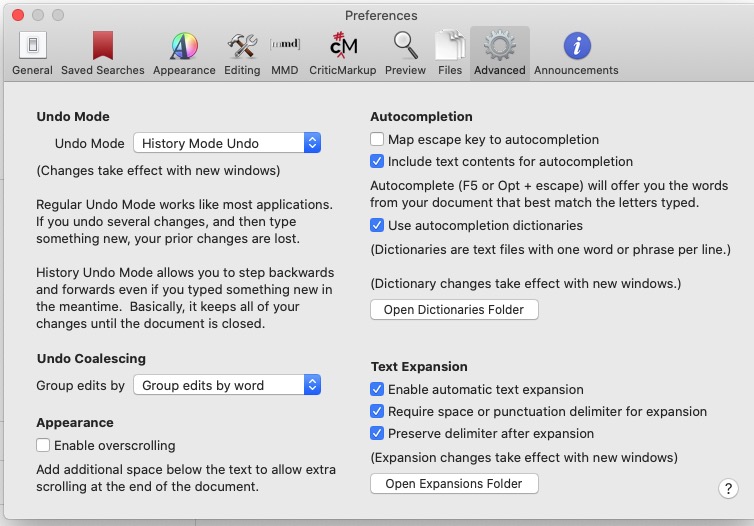
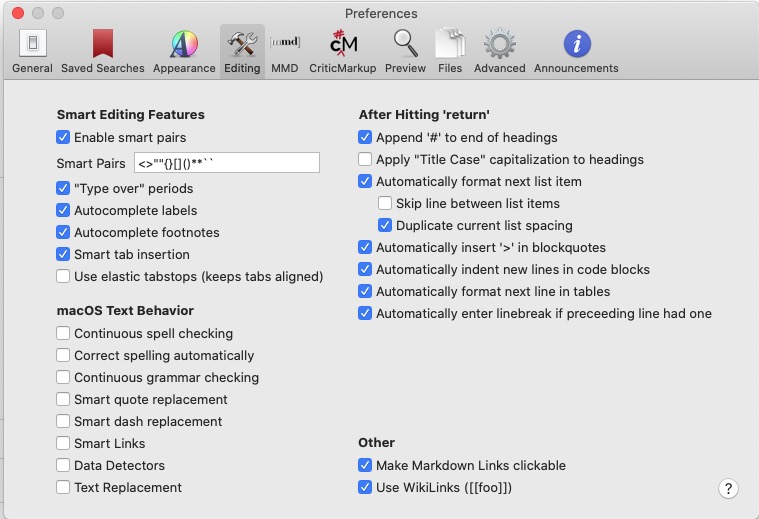
Can you post screenshots of your preferences? Specifically Editing, Files, and Advanced?
Thanks!
0 -
dear Fletcher,
the 3 prefs panes are attached
thanks!
ph
 0
0 -
dear all,
In order for you to have a better view of this annoying problem, I've posted there : https://www.dropbox.com/s/wrq7xkmiopmtc9h/nvpb.mp4?dl=0 a short video of what's going on: when I'm typing the list of files in the left-side pane is continuously changing (refreshing). No idea about how to fix this. I've a pretty large set of files, with different folders.
I've obfuscated the left pane with a rectangle; I think it's still legible;
would you like to tell me what the problem is?
best,
ph
0 -
Dear all,
I further investigated in this problem and I think I have found the problem (partly): this refreshing of the left pane may be caused by iCloud (or the interaction between NVUltra and the latter). I've simply added the "nosync" suffix to my NVUltra folder and the problem doesn't appear any more.
Would you like to investigate where the problem is, since I've more specifically pointed it out?
best,
ph
0 -
Dear all,
as an update of the problem reported here: I've installed the latest version of NVUltra (Version 1.0.0 (2021.09.30.13.09) and the problem persists.
Is anyone encountering this problem?
would you like, please, to dig where the problem is?
thanks and best,
ph
0 -
I can't replicate, even with your settings. The latest release (yesterday), had many changes to the indexer to improve performance.
If you can send me a zipped version of your folder, I can take a look and see if there is something specific that is triggering an edge case? You can send via a support ticket instead of posting to the forums...
0 -
Dear Fletcher,
thanks for your reply. Will do asap.
best,
ph
0 -
Try your test folder, but replace any accented characters in the filenames with plain ASCII variants (e.g. `é` becomes `e`).
If you replace all the filenames like that, does the problem go away?
0 -
If that indeed fixes it for you, I think I found the issue and it should be fixed for upcoming release.
Thanks!
0 -
dear Fletcher,
thanks for the hint; will do that asap (pretty large number of files in my nvu folder), and will tell you.
best,
ph
0 -
You should be able to test with the same sample folder you sent me. Should not have to rename but a handful of files.
0 -
dear Fletcher,
I've removed any diacritics in my files' names (not the sample, the whole folder); and, after a short-duration try-out, this works!
no refresh any more !
thx; hope you'll be able to fix the problem so that next versions of NVU would allow the use of accents in file names...
best,
ph
0 -
Glad to hear that worked.
As mentioned above it’s already fixed for upcoming release.
0
Please sign in to leave a comment.
Comments
14 comments