Stops Indexing on main folder
Completed
I just downloaded Mark II version and opened it on my MD files and it hanged. I can open and index each of about 8 subfolders that comprise it. I went back to prior version and it had same problem.
I also use Obsidian on this set of MD folders.
Are there any known conditions where the loading and indexing freezes like this?
Also, How do i open a second window of the same folder as discussed elsewhere?
-
Ignore last question, i found New Window. I was looking for a right click on the Folder Navigator.
0 -
It seems when I let it run for 15 minutes, it makes it through. Not sure what it gets hung up on... Is there any log file I can look at?
Thanks!
0 -

You can use Debug (specific to folder) and Show Event Log (general) to get some behind the scenes information.
You could look at the indexing date for the files to see where the delay was.
0 -
Debug shows this:
2021-08-16 15:07:09.247 nvUltra[67810:1563289] ERROR: Attempt to update preview without <body>
I don't know if that is the primary error or if something else is going wrong.
EDIT:
Then a second run:
=======
2021-08-16 15:09:42.638 nvUltra[68027:1567903] ERROR: Attempt to update preview without <body>
2021-08-16 15:09:43.985 nvUltra[68027:1567903] +[NSSavePanel _warmUp] attempted warmup
0 -
That's nothing.
You'll want to look at the debug log for the folder to find a gap in the indexing dates.
0 -
I believe I am in the Debug app, I am running from the application folder. Where does the Debug log for the folder go? I don't see that?
EDIT: I also copied my files over folder by folder to a new folder and that worked without a problem, a copy of the original files.
0 -
Thanks for your support Fletcher. I have a new clue. I found the Debug command under File. Not sure how it could be any more obvious, duh.
I use Obsidian on these files and I think a plugin file is causing problem. I don't know how Ignore works but should those be 1's not 0's?
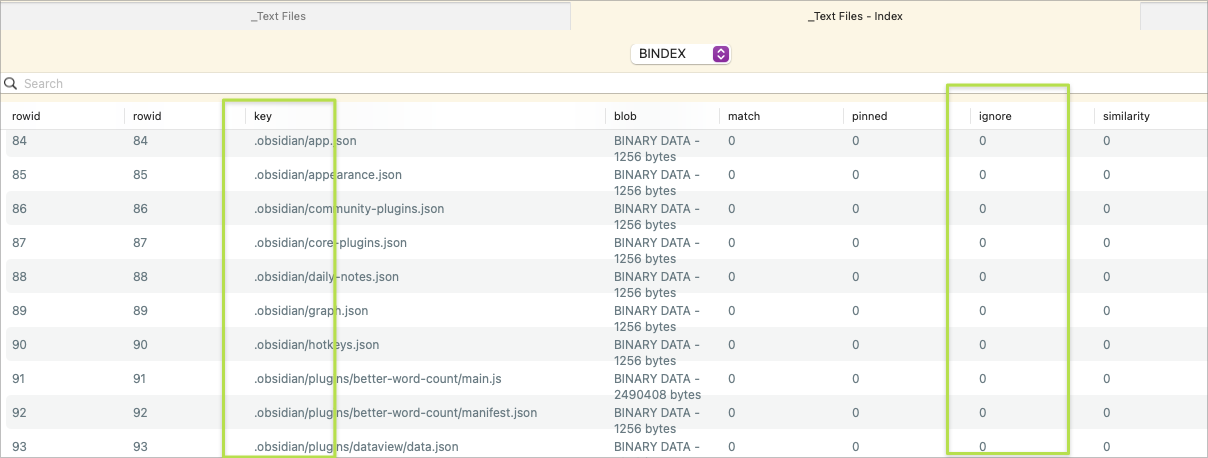
Here is my Ignore list:
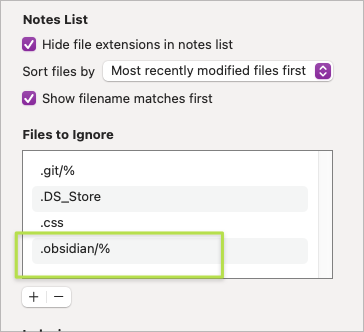 0
0 -
OK, now i go back to that panel and all the 0's turned to 1's, and the process finished.
Weird things going on, but i do think it is that hidden folder with JSONs and other wonky files.
Let me know if you want any more information.
0 -
There is a bug in the ignore logic at the moment that needs to be fixed.
Sort the files by date and look for the first one to appear after the prolonged delay -- that should be the one that took so long to index.
0 -
Yes, it was a JSON file containing Readwise extract references. Readwise can extract Amazon highlights, saved Tweets, and saved Articles. Some of the saved tweets had emoticons i the "name" (i write it like that as it uses the first line of the tweet as the name).
I don't know why it would go half an hour on a relatively small file though. If you are curious I can send it to you, but it seems a pretty unusual case.
Here is an example of one line in the JSON:
"Sources/Tweets/And IT’S OFFICIAL!! 🤠#Wy....md": "10375885",
I am going to be excluding them from my files, am not expecting you to deal with that!! LOL
0 -
If you don’t mind sending it, I’d love to test it. Sounds like it’s either something I should index differently or a degenerate edge case I should figure out how to catch and simply not index.
0 -
You can submit a support ticket and attach it as a file rather than including as a comment.
0 -
Submitted!
0 -
Closing the loop -- the problem disappeared without a clear cause. Can revisit if it returns.
0
Please sign in to leave a comment.
Comments
14 comments