Primary notebook read only

Something happened within the last week or two and my install is really kinda screwed up and I’m not sure how / why. I tried reinstalling to no effect. ’m on 15.3.2 where it’s being weird and everything is still fine on my other computer running 14.6.1.
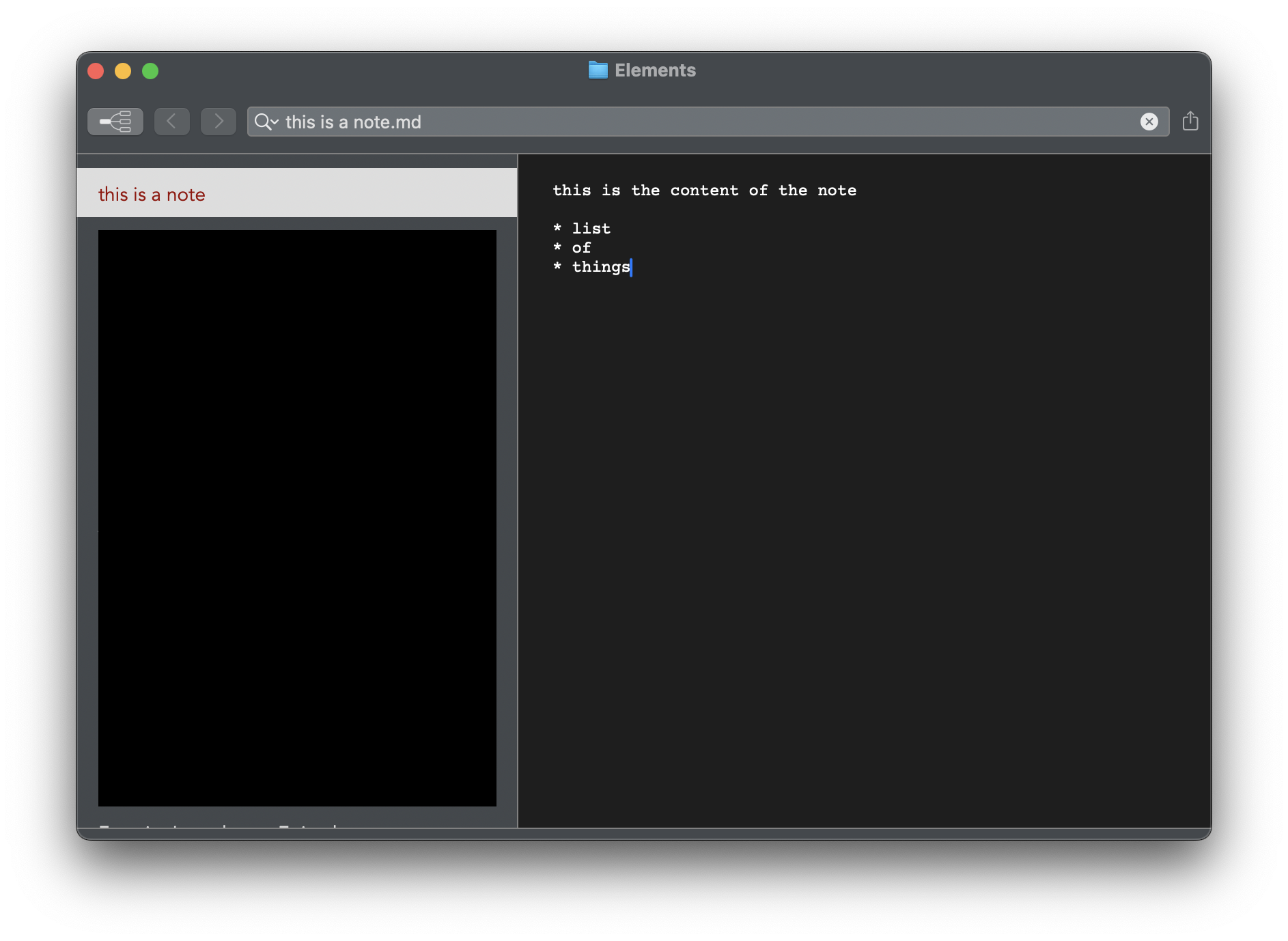
My primary notebook (Elements folder in dropbox) appears to be locked. All the notes are read only. I can create notes with the search and create input, but can’t modify them as soon as they’re created. My theme disappeared but only in the note pane, which was my first indication something was off. It’s just a grey bg with white text in a monospaced font and does not change when the theme is changed.
Also, trying to toggle preview, or file info does nothing and I can’t right click in the note pane. If I open a different folder of notes (also in dropbox), preview will work, the notes are editable, and my theme appears. It appears to just be my Elements folder of .md files that is locked and acting up. Is there something I did to brick this particular folder on this particular computer? How can I…reset things so it unlocks again. I’ve gotta be missing something somewhere.
-

Hmmm…
nvUltra doesn't really work like that. It doesn't lock files or unlock them. And if the code gets into an “error state" in some way, closing the window and opening a new window completely resets it.
More likely you selected a theme and then deleted or corrupted it in some strange way, but did not select a new theme for the affected folder. Select a new theme for that folder and see if that fixes the appearance. (To be clear, that should not affect whether the files are editable.)
Can the files be edited in other applications?
You can try resetting the cache (it should be reset and updated whenever the folder changes or whenever you reopen a folder, but it might be worth a try.). The General preference pane has a button in the lower right to clear the cache, which will cause all folders to be re-indexed the next time they are opened.
You can also try the Troubleshooting preferences. Enable the check boxes on the top and then watch the log for any “interesting messages.”
Let us know what happens!
0 -
Yeah, this whole thing is very odd, I don't know what to say. I removed my custom theme from the themes folder, picked a new theme, restarted, still the same. The files can be opened and modified in other apps. I use Sublime for most of that.
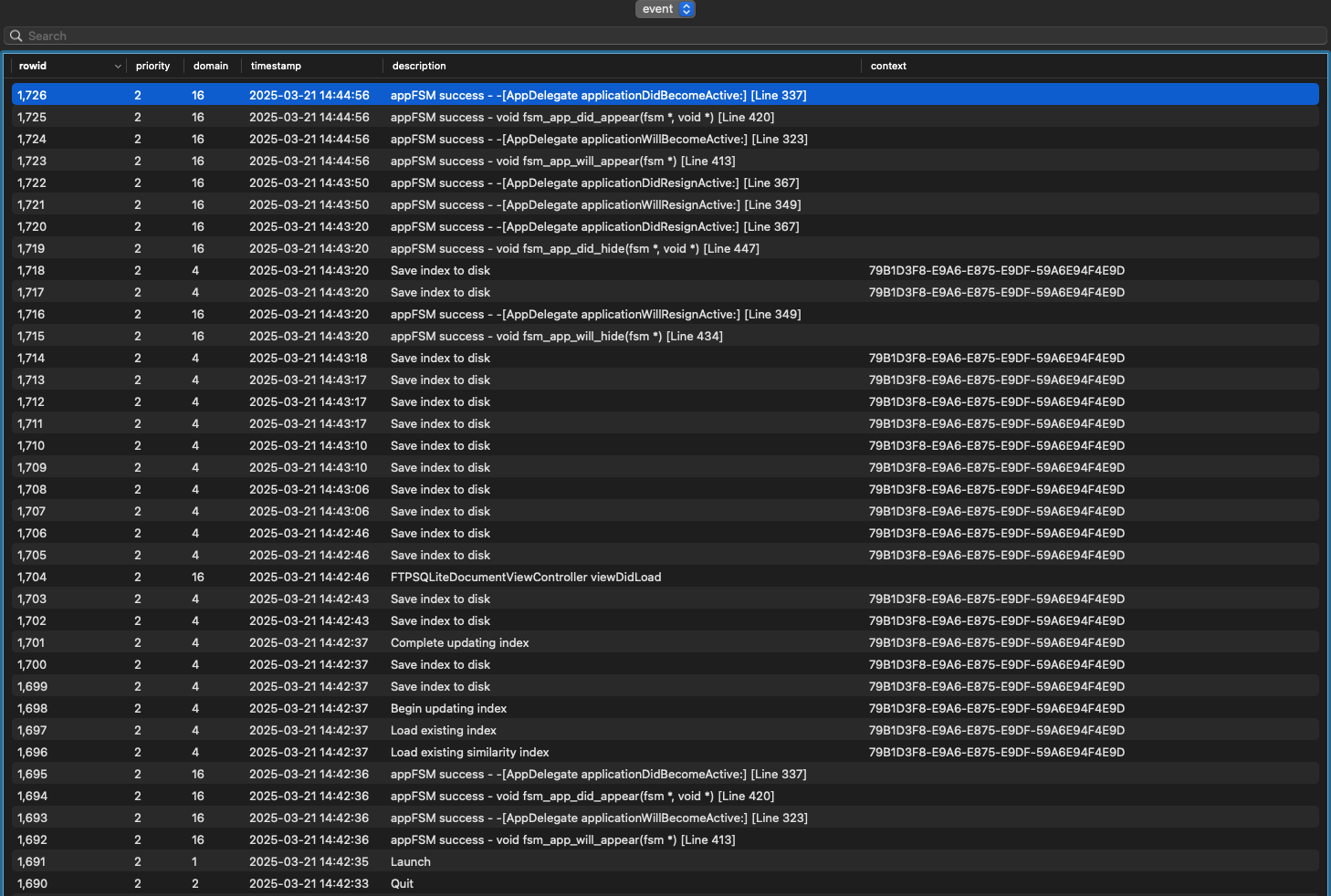
Clearing the cache also didn't do anything. The event log seems very un-interseting, unless you see something in this image that I don't?
 0
0 -
This is what every note looks like, regardless of the chosen theme (pardon the redaction)
 0
0 -
Also in the troubleshooting preference pane is “Export Application Defaults”. This exports a partially redacted set of the user defaults for nvUltra. It won't include any of your file data, but will include the *names* of some folders and files. Sometimes this will point to the cause.
You can also delete the Preferences completely, which is likely to fix the issue, but of course doesn't help to explain what happened.
0 -
Here's the exported application defaults if you want to take a look: https://asor.us/q7p
How would I go about deleting all preferences if I wanted to try that?
0 -
`defaults read com.multimarkdown.nvUltra > your_file.txt` would save them to a text file first, in case you need to recover them.
`defaults delete com.multimarkdown.nvUltra` will delete all of them.
I've downloaded your preference, in case you want to delete them. I'll delete once we resolve this.
0 -
I saved and deleted my preferences. It started back up like it was new, with the splash screen, gave me the dialog about the changed group ID thing in Library/Group Containers, but it's still doing the same thing. So weird. It's gotta be me, then, right?
0 -
That is strange.
If you delete the preferences and the cache files, then that deletes everything that nvUltra “knows.” At that point is should be reset to a brand new install state.
Using an invalid Theme or CSS file will cause problems of course, but it will reset to one of the valid defaults when you reset everything.
Your defaults showed that the themes were all built-in versions, but to be extra certain you can delete the files in the support folder. (Appearance Preference Pane => Open Themes Folder, then move up one level to the MultiMarkdown Software folder and delete or move everything (keeping backup copies of any customized files of course). But a corrupted file would affect any folder using it, not just one.
0 -
Before I get to that, I think I found half of the answer.
I copied all the files into a new folder on my desktop to see if it was some sort of weird dropbox permissions thing. It was not, they were all still locked. Then I put each file in a new folder one by one, hoping to find a corrupt file or something. Nope, all the same.
All of these files are .md files. I changed the extension on all of them to .txt and, boom, unlocked, fixed, they work again as normal. Renamed them back to .md, locked again. What on earth.
In the file's Get Info window, I noticed .md was set to open in xcode by default. Seemed weird, so I set it back to Sublime to see if that did anything. Nothing, they're still locked.
I don't know what this tells me, but it seems like the file type is the main issue here and I have no idea why.
0 -
Ahhh.. Then yes. Sounds like you messed it up. ;)
In all seriousness, it sounds like you installed an application that “took over” the UTI information for files with the `.md` extension.
`mdls <one of your files.md>` will give you information about the kMDItemContentType and kMDItemContentTypeTree on your system. It might allow you to figure out which application messed things up.
If you paste the relevant results here, I can look and see if it is a strange edge case that should be picked up by nvUltra and fix it. If it is something truly egregious however, then the recommended solution may be to remove that application, or to start using `.txt` extensions. (Or to get the other developer to fix their app.) To my knowledge, there is still no way for a user to control which UTI information is considered “definitive” on your machine when there are conflicts.
0 -
Here's what it says. Does any of this look odd to you?
kMDItemContentType                 = "net.daringfireball.markdown"
kMDItemContentTypeTree             = (
    "net.daringfireball.markdown",
    "public.plain-text",
    "public.text",
    "public.data",
    "public.item",
    "public.content"
)
0 -
I just took a look at the same file on my other computer where nvUltra is working correctly and the
mdlsis basically identical. The only 2 items that differ between them are:kMDItemContentCreationDate_RankingkMDItemDateAddedThe value of both of these are the same on each file, but they're about a year apart in value. I'm not sure if that has anything to do with the issue, but that's all I see in here.
0 -
Dan Sturm – the mdls info you pasted is fine. As long as you're certain it's from one of the files that cannot be edited.
I am now back to a complete loss as to what is going on.
One cause that I have seen multiple times over the years, but less so in recent years, was corrupted systems. This was likely, but not definitively, caused by multiple OS upgrades on the same drive, without ever doing a full "wipe and reinstall" (which was an option “back in the day”). Users would write in with bizarre “bug reports”, and ultimately after rebuilding their drive, the problem would magically go away. I am NOT highly suspicious that is what is happening here, though I suppose it is technically possible.
Have you tried creating a new folder using the `.md` extension for files? Are your other directories using `.txt` or `.md` (or something else?)
Have you tried copying the troublesome directory to a new macOS user account and seeing if the problen persists?
Have you tried turning off all third party software you have running? (People sometimes install various utilities, and then forget about them when something stops working properly.). This can easily be done with trying a brand new macOS user account, like the preceding paragraph.
0 -
I have (part of) an answer after some investigation. For some reason, nvUltra is triggering a quarantined extended attribute to all .md files.
I'll clear all extended attributes with
xattr -c, then open nvUltra and runxattr -land it will have re-addedcom.apple.quarantine: 0082;67e2fe17;nvUltra;to the attributes.It doesn't matter if the file is in dropbox or on the desktop, it happens in both places.
I have verified that it does not do this to .txt files, so I'm not sure what combination of nvUltra and .md is making macos freak out, but that's what's happening.
What started me down this path was trying to figure out why it wasn't happening on my laptop which is running the same macos 15.3.2. As soon as I opened nvUltra, I watched all the files lock.
0 -
I'm not certain that this is related.
I see that on my files as well (including .txt), but have never been unable to open or edit them (using nvUltra, MMD Composer, or any other app).
If it was something like that, and nvUltra was to blame, it would seem to have caused a problem for other users, which has not been reported….
I assume you've tried the usual restart and try again. Have you tried a new user account on your Mac?
0 -
That's so odd. I've restarted, but I haven't tried another user account. But since it's now happening on 2 15.3.2 Macs (both apple silicon fwiw), I don't think it'd be a user thing, but I can try making a new user and testing that.
Other than 15.3.2, the only major system change I can think of occurring in the last few weeks was that thing that required we move all the stuff from the old Library location to the new named version. I'm not sure how I could do any tests related to that causing the issue.
0 -
One way of looking at it is that it is now happening on 2 separate computers, making nvUltra more of the common denominator. The other way of looking at is that now you are having trouble with 100% of your computers and nobody else has reported a similar problem thus far. Meaning that to the best of my knowledge, 100% of computers not owned by you do not have the problem…. :)
I have been running 15.3.2 for quite a while on an M4 Mini and M3 Macbook, and neither has had any problems. The library location issue could cause an issue with invalid themes if you had bad files that were “hidden” somewhere and got revealed. If you delete (or move) the current files, nvUltra will replace them with clean versions so you can verify that is not the issue. (You would lose any customizations you made of course, so backup the files first if you are concerned about that.)
I would still be considering whether any new new applications have been installed and try testing getting rid of those. A new user account is a shortcut for testing that, since you end up with a completely new preferences folder. That's why I recommend that as an early step because it helps mostly rule out a whole category of problems in a few simple steps. (And nowadays with Apple Silicon and easy virtualization with something like UTM, it's even easier to build a whole new machine for testing in minutes that simulates a brand new machine…)
….In fact…. be right back….
I downloaded nvUltra to my virtual machine to test it there really quickly. No problems, but it was only 15.1, not 15.3.2. So I created a new VM with 15.3.2 and did the same thing. No issues. `xattr -l` reveals the quarantine attribute.
Of note – it looks like macOS 15.4 is out. So maybe that fixes an issue you're having??? I haven't tried upgrading yet.
0 -
I just had the same thought about trying 15.4. I'm going to update and see what happens. I'll see if I can come up with anything else that might have changed recently, too, but I can't think of anything off the top of my head.
Also, this is just ⅔ of my computers, the M2 Air and M4 Mini. The ole 2020 iMac on 14.6.1 works fine.
0 -
Give it time. It sounds like the infection is spreading, so I suspect your remaining holdout computer will succumb any day now…. :)
I will be curious if 15.4 fixes the issue, though disappointed that I might not ever get an answer as to exactly what happened if it does…. “Your operating system is corrupted” has always been the least satisfying answer to finally arrive at, even if it is true.
0 -
And to complicate matters further, a new version of nvUltra just pushed. So it's worth upgrading that as well, though I did not do anything that should fix the issue you're having.
0 -
I just saw the new version pop up, so I tried that first. Immediately got "Attempted to apply non-existent theme "Dan-Dark". Check your Appearance Preferences." and the theme changed to a default theme.
I went it to the app settings and clicked “open themes folder” and the path is:
/Users/dansturm/Library/Containers/com.multimarkdown.nvUltra/Data/Library/Application Support/MultiMarkdown Software/Themes v2That seems…different?
0 -
Yeah, previously, I think the preferences path was:
/Users/dansturm/Library/Group Containers/X37R9F43BE.com.multimarkdown/Library/Application Support/MultiMarkdown Software/Themes v2Which still exists with my theme in it.
0 -
Updated the laptop to 15.4 first, as a test. Files were still locked on the previous nvUltra build. Updated nvUltra, it did the same thing as above with the theme breaking (above was Mac Mini). Files still locked.
Updated nvUltra on the 14.6.1 iMac. Theme broke like above but files still work.
0 -
The Group Container issue is a typo in the latest release; new build coming soon. Not related to the main problem at hand (unfortunately….)
0 -
Dan Sturm – any updates?
0 -
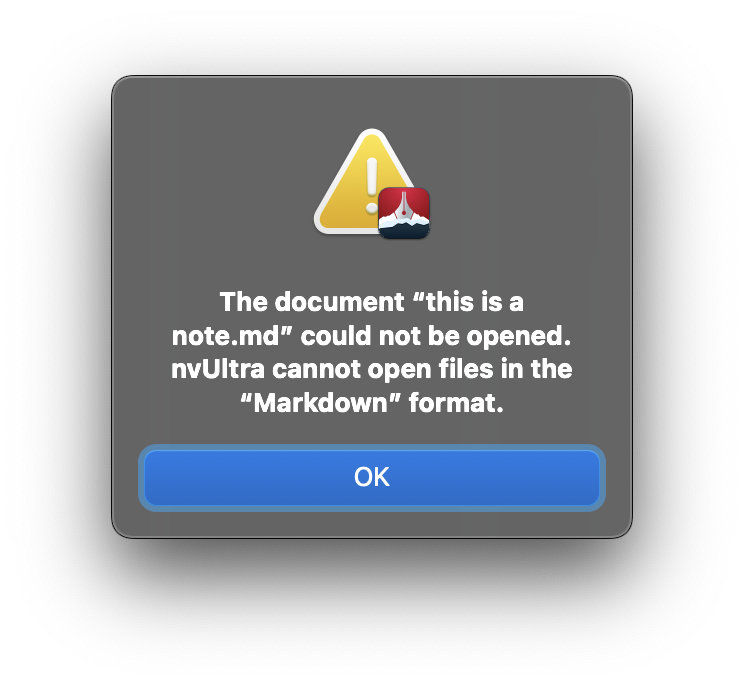
No, not really. At the suggestion of some googling, I tried opening a .md file from finder in nvUltra via “Open With" to see if that would work around the permissions issue (like right click opening an app downloaded from the internet) and I got an error saying "The document "this is a note.md" could not be opened. nvultra cannot open files in the "Markdown" format." So that's weird. Maybe just because it opens folders, not notes? I don't know, I don't really have any other ideas.
 0
0 -
Correct - the “document” unit for nvUltra is a folder, not a document.
0
Please sign in to leave a comment.
Comments
27 comments