Editing Preference pane layout error
Completed
Should be self-explanatory. The first subhead seems to have the line height set to about 2 px.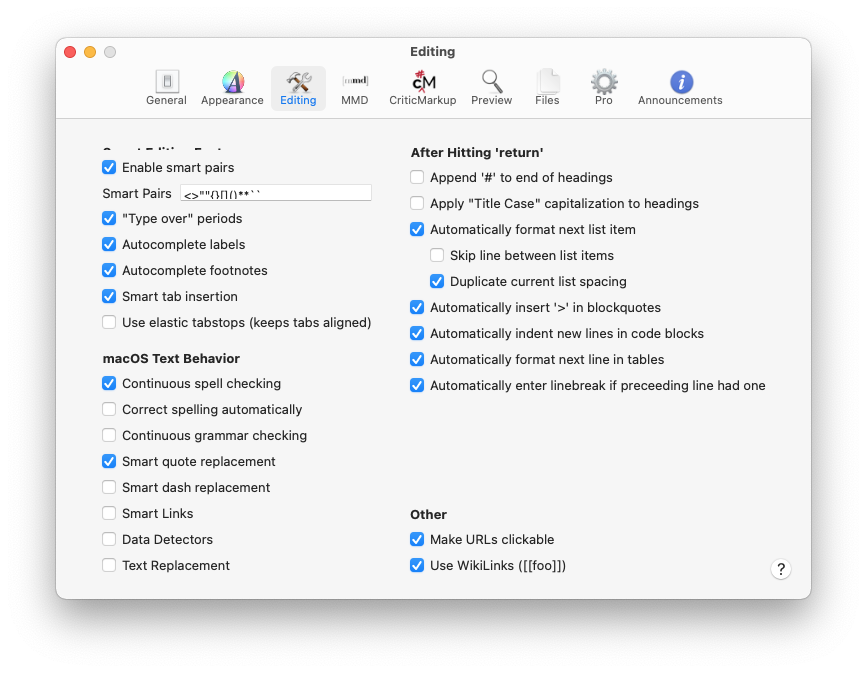
-

I see the same layout error with nvUltra 1.0.0(72) on OSX 11.0.1
1 -

Adam Rice - what version of macOS are you using?
On 11.1 it works fine for me. The entire layout is configured with really basic auto layout constraints. It's of course *possible* I screwed something up, but would have expected to find that out before now. If working for others in 11.1 but not 11.0.1, then I suspect it's a bug in macOS that was fixed.
0 -
I'm using 11.1
1 -
Thanks for response. I'll keep digging.
0 -
I upgraded to 11.1 and still see the same layout error.
I checked syslog for nvUltra messages and found these two:
Jan 5 12:47:29 machine nvUltra Beta[5242]: getattrlist failed for /System/Library/Extensions/AppleIntelBDWGraphicsGLDriver.bundle/Contents/MacOS/AppleIntelBDWGraphicsGLDriver: #2: No such file or directory
Jan 5 12:47:29 machine nvUltra Beta[5242]: getattrlist failed for /System/Library/Frameworks/OpenGL.framework/Resources//GLRendererFloat.bundle/GLRendererFloat: #2: No such file or directory1 -
This seems fixed for me in 11.2.3
0 -
See additional discussion -- https://multimarkdown.zendesk.com/hc/en-us/community/posts/1500000874042-Almost-missing-line-in-Preferences
Troy Pesola, Adam Rice -- were using a laptop with external monitor?
0 -
Yes, I would have been using a 2014 Macbook Pro with an external monitor.
0 -
Adam Rice -- thanks. That may be the common factor, and why I was not seeing it in later versions of macOS. I *believe* I saw this issue in an earlier macOS 11 version on laptop without external monitor (I very rarely use my laptop with an external display, and use my desktop for that instead).
My working hypothesis is that there was an autolayout bug in macOS 11 that was partially fixed somewhere along the way, but still occurs when a laptop is paired with an external display. Alternatively, it's just my fault, but I have been unsuccessful in finding my error in that case.
0
Please sign in to leave a comment.
Comments
9 comments