Indent for Unordered lists
Completed
I would like my bullet lists (not numbered) to have a hanging indent look, is that possible, maybe in a Theme?
Thanks!
-

Use a tab after the list marker and before the list item text (for bulleted or enumerated lists) to indent subsequent lines of the list item.
0 -
I would like to change this to a Bug report then. Does it work for you? I don't think I am doing anything unique.
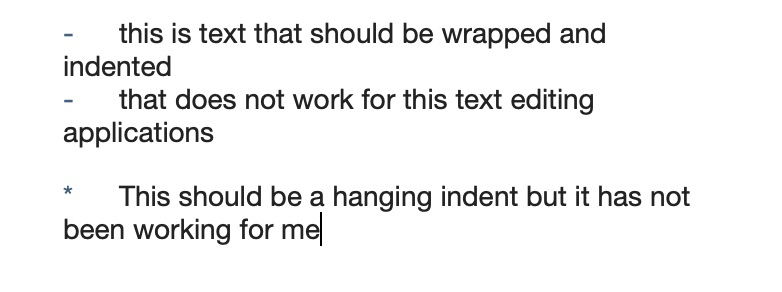 0
0 -
Sorry, my bad for maybe not being clear....
I mean can i have the Hanging Indent in the edit area (not talking about the Preview).
0 -
You didn’t disable elastic tabstops, did you?
0 -
Somehow, yes, I did have elastic tabstops unchecked. I don't think I would have done that on purpose - thank you for pointing me in the right direction!
0 -
Glad that solved it!
All the "fancy" tab/alignment work happens with elastic tabstops. They're useful for tables, hanging indents for lists, and a few other places. On rare occasions, some documents require them to be disabled (usually wide tables with multiple columns that are two wide for your display).
0 -

I have elastic tabstops enabled, which means I do get a hanging indent but the text aligns with the list marker, not the actual text:
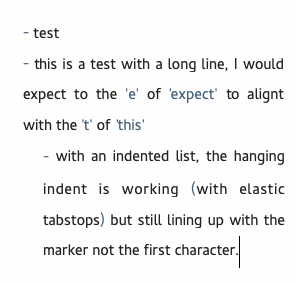
Is it possible to get the aligned like this:
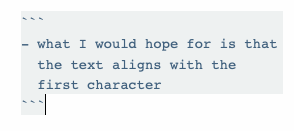 0
0 -
Again, as above -- use tab between list marker and item text instead of space.
0
Please sign in to leave a comment.
Comments
8 comments