Missing files
Completed
The newest version (66) is not showing all the files in a folder.
macosxguru
-

Seems like maybe only recent files w/in a certain date? Or, it's only showing me the most recently edited in my folder.
0 -

Go to Preferences>General> Testing. Select Feature Set "Paid App". Restart. All files will then display.
(Found this by poking around, using the clue Brett gave about Testing: Paid App toggle)
3 -
That works! Thanks for that - I should've looked a bit more as well!
0 -

The 'free app' feature set only shows 8 files for me, which I would find far too small to be usable (but then, barring NVUltra only being available as an expensive subscription, I fully intend to buy it anyway…)
I think I'd set the limit to something like 50 files? Enough for someone to get used to the app and dependant enough on using it, such that when they reach the limit, they barely have to consider typing their credit card number in. Whereas, the earlier you force them to make a decision, the more hesitant they are likely to be.
(Caveat: I have never sold software…)
0 -

Correct -- we are experimenting with which features will be available in the free version of the app, and which will be paid. Some of the parameters (e.g. the number of files visible in the notes list of the free version) are not the actual final values that will be used, but instead are values that are useful in testing.
For example, limiting the free version to 100 files doesn't intuitively show a difference from the paid version since the notes list is likely to be completely full in both instances. Testing with a limit of 5 files, however, makes it immediately obvious whether the version being tested is free or paid.
1 -
Thank you.
Excited to realize that nvUltra is getting ready for launch.
macosxguru
0 -

This definitely bit me this morning. I only saw a few recent files, but could successfully search for older ones. I was getting ready to compile details and screenshots for a bug report, then ran across this thread. It would have been nice for the beta to have defaulted to the paid featureset.
0 -

Glad to see this mentioned here so I didn't spend (more) time trying to figure out what was wrong. You might consider warnings for changes like this that'll make the app appear broken when people update.
0 -

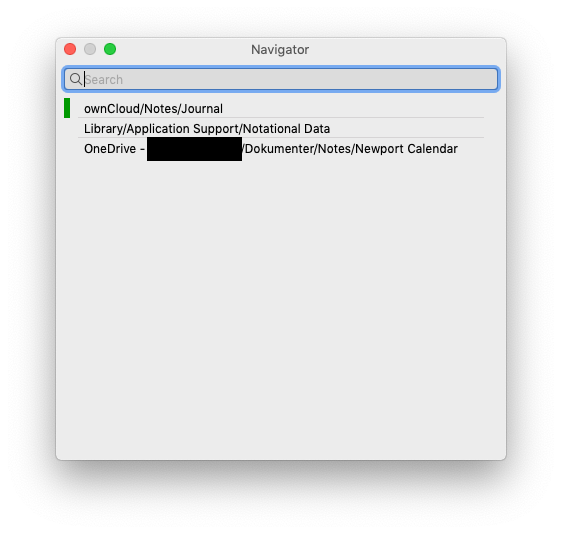
I'm guessing that another feature that was implemented for testing free/paid is a limit of only one subfolder per folder? In that case, it's working ;)
Free: (I was starting to worry until I read this thread!)
Paid: (whew, all is back to normal!)
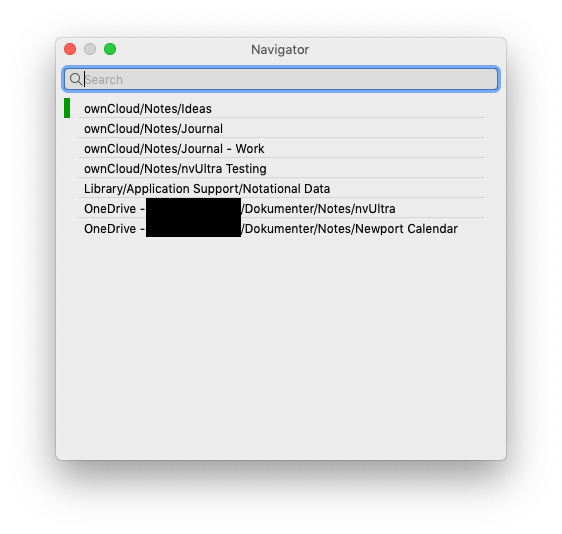
Seems to me that this is a good/fair limitation to have in free vs. paid. It lets users test having (for example) a personal notes folder in Dropbox, and a work notes folder in OneDrive. On the other hand, it seems rather generous - perhaps the limit was meant to be one and only one notebook/folder.
0 -
What is the full list of differences between the free and paid feature set (at the moment)?
0 -

I found it quite confusing to only see 8 files in the sidebar, even though I could access all files. I would suggest adding a line like "and 249 more files, which are accessible in the paid version" or something else. Otherwise, it looks like a bug.
1 -
Jona Hölderle -- The next version has a placeholder line at the bottom indicating that the file limit has been exceeded
James Allan Lodberg -- There is not a limit on subfolders, there is a limit on total number of folders that are remembered in the navigator. You can still use the File menu to access all folders on the disk.
William Turrell -- this is still in development, so all lists are tentative until final release.
* Access to saved searches
* Limited number of notes per folder and per search
* Per folder default themes and CSS
There are additional differences yet to be coded.
0
Please sign in to leave a comment.
Comments
12 comments