Error "...opened folder no longer exists." (When renaming in Finder)
Completed
When I have a directory of files open in nvUltra, and then rename the corresponding folder in the Finder, nvUltra correctly updates the name of the tab, but then it also throws a pop-up error which states "Error The opened folder '/example folder/' no longer exists.
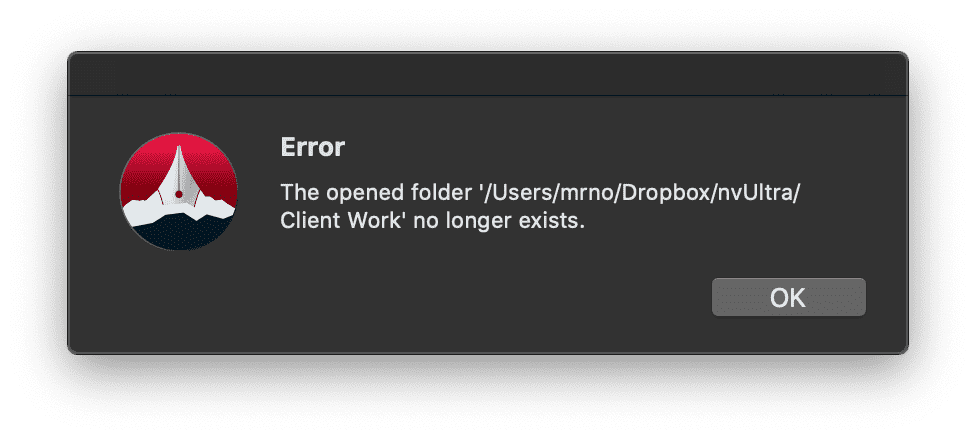
This error seems unnecessary to me, since nvUltra recognizes that the directory now has a new name. All is well.
Now, if a folder had been removed, rather than renamed, I suppose I would want to see an error message.
Would it make sense to differentiate between the two? Is there a use case I'm missing? Do other people want a notification that they've renamed an opened directory?
-

Actually all is not well. The folder still thinks it is at the old location so any new files result in a new folder with the old path.
I'll have to look at the best way to safely handle this. I had not assumed that people would move an open directory.
1) This is NOT SAFE to do at this time.
2) For now, the alert stays. If you see the alert you should close and reopen the folder. Or just close if you have deleted the folder.
I'll look to see what else can be done, but it will probably involve "locking" the folder window in nvUltra to force you to open a new window.
Thanks for pointing this out!
0 -
BTW, this is fixed in the Mark II beta series...
0
Please sign in to leave a comment.
Comments
2 comments