Visual indication if wiki-linked file does not exist / is broken

It would be helpful if there is some visual indication if a wiki-link led to an existing file or if it doesn't exist and clicking on it would create a new file.
I saw other posts about the problem with renaming files breaking wiki-links, and it would be helpful to see when such links are broken (for any reason) so that I can remedy the link.
Currently, if I click on an orphan wiki-link it creates a new file, which is great if I was planning to create the file but not great if I was expecting a file and wouldn't have known about the problem unless I clicked on it.
This indicator could also apply to other linked items like images.
In fact, this could even be a hygiene check for any broken links within a notebook. I was curious if there are such tools and found this one for the remark.js project.
Personally though, I would be happy if it worked for just the wiki-links since their validity depends on me.
-

I agree, but for a different reason.
In mediawiki, it makes it very clear, via coloring, when i link does not yet exist, (and they also uses a visual cue for links that are internal vs. external).
When I am composing a series of notes, that are related, I work on a single note and leave links to yet-to-exist notes everywhere. I like it being very obvious which notes do not exist yet, and need to be written still.
-JElliott
1 -

I found this thread while looking for a discussion about the link behavior of wiki-links. I am used to how nvAlt handles these, but nvUltra handles them differently and less helpfully than nvAlt.
There are two wiki-link behaviors from nvAlt that I have come to depend on, which I think many users would find helpful:
-
A terminal space in the wiki-link results in non-rendering of a hyperlink.
So, in nvAlt, [[foo]] generates a clickable hyperlink, while [[foo ]] does not. This is quite helpful because I can leave the space intentionally, telling me that this is not a file yet. Example: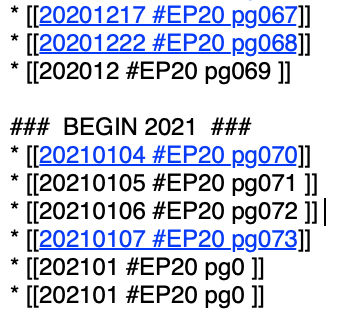
This allows me to tee up a bunch of links (in the above example, a table of contents summary note from a paper notebook called EP20) and then, activate select ones by removing the space. This results in a rendered hyperlink that I click on, thus generating the new note, which I can then complete.
-
Clicking a wiki-link for a note that does not yet exist gives one the CHOICE of making a new note with that name or not.
In nvAlt, this action results in the wiki-link text being inserted in the Search window with the cursor at the end...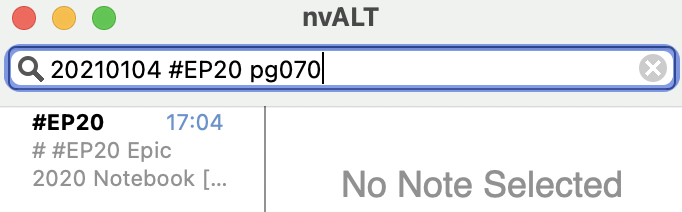
...such that if I don't want to make this new note now, I just click the note it came from (shown above as the #EP20 note) and I am back where I started...
...and if I do want a new note, I just hit Return, resulting in a new note being created...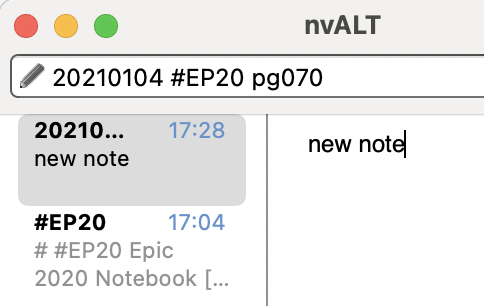
Currently, nvUltra B077 renders wiki-link hypertext even if it ends in a space.
AND, it creates a new note automatically, without waiting for a RETURN to generate the file.As Andrew Mrkva points out, this results in creating a new file if it's an orphan, even though you might not have wanted this action, resulting in now having to delete the newly created empty file.
Is it possible to replicate these two nvAlt behaviors?
0 -
A terminal space in the wiki-link results in non-rendering of a hyperlink.
-

At this time there are no plans for visual indicators as to whether the file on the other end of the wiki link exists.
Can consider change to the behavior when clicking on a link where the file does not exist for a future update.
0
Please sign in to leave a comment.
Comments
3 comments