Dashes don't work in wiki links
Completed
Steps to repro:
- Create a file called `2020-07-22` and write some stuff in it
- Create a second new file with any name
- In the second note, type `[[2020-07-22]]`
- Click the resulting link
Expected behavior: we jump to the first note we created
Actual behavior: a new note is created
I *think* what's happening here is the dashes `-` are being converted to a different type of dash, perhaps an emdash `—` or an endash `–`. It looks like whenever you type a number, a dash, and another number, your dashes are auto converted to something else, which breaks filenames.
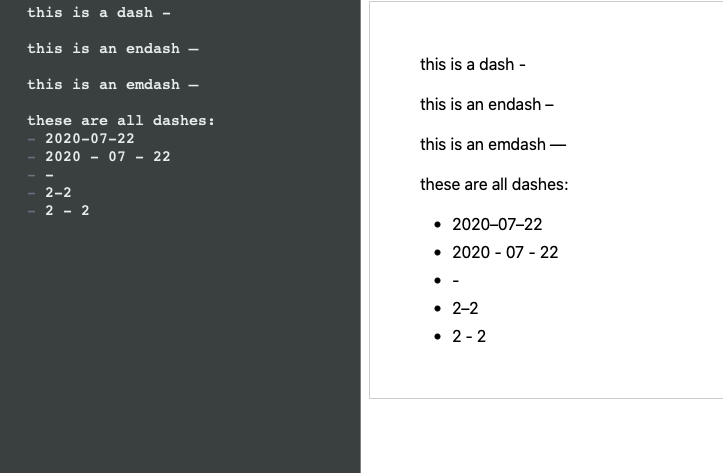
This is a really common workflow for me because I have a textexpander that spits out today's date in yyyy-mm-dd format which i use in every note title.
-

It works fine for me. Can you send me a zipped copy of actual files you are trying to use?
0 -
Ah. You're clicking in the preview, not the editor....
0 -
Sorry, yes, should have clarified this. (I actually didn't know you could also click in the editor – super handy)
0 -

Thanks for catching this. The en-dash is typographically correct between two numbers, so I'll have to tweak the regex to compensate for that in wiki links...
1 -
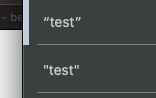
This is probably an issue for other types of character conversions too. I just tested it with quotes and found the same issue: straight quotes in filenames are converted to smart quotes in the preview, so clicking a link to `[["test"]]` (typed with straight quotes) results in a new note being created with smart quotes.
 0
0 -
Looking further at this, Brett and I don't see a clean way to disambiguate between user supplied smart typography (e.g. en-dash) vs MultiMarkdown generated smart typography.
The options are:
1. Turn off "smart quotes" in the MultiMarkdown settings so that what you type is what you get in the preview.
2. Don't use smart quote characters in your Wiki filenames
3. Use the editor, not the preview, when clicking on Wiki links.
At this point, I'm not sure there is a realistic alternative option that doesn't require an undue amount of "hoop jumping"...
Thanks!!
0
Please sign in to leave a comment.
Comments
6 comments