Tags - Disconnect Between nvUltra and 1Writer - Personal Knowledge System
Completed
I am trying to use nvUltra as a knowledge database. I need my database to be in sync with iOS. 1Writer seems to be the best solution for this situation. However, the way nvUltra implements tags is different from the hashtags in 1Writer. I cannot search and navigate tags in 1Writer. Alternatively, I can use #tag but nvUltra will then have ##tag in the search bar.
Any suggestions?
-

I'm not following.
What specifically are you doing in your text files that only works in one application, but not the other?
0 -
nvUltra uses:
Tags: video, health, research
1Writer uses:
#video #health #research
---
Tags assigned in nvUltra are not recognized in 1Writer as tags. Thus, a well organized database in nvUltra is not at all organized in 1Writer.
0 -
nvUltra supports `#video #health` as well.
The former is MultiMarkdown metadata, the second format is just a generic "in-line" hash tag format.
0 -
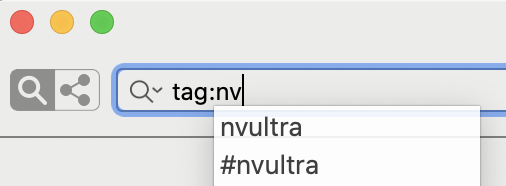
If I use # nvUltra creates a double tag.
Fletcher, any idea how I can convert my current tags into #tags ?
Something that can search the first line of each text file and replace "word," with "#word,"
 0
0 -
Perhaps you should paste an example of your file. Sounds like you're doing it wrong.
0 -
File name: Giant Bike Links
Body:
tags: bike, shopping
### Vaughan
Escape 2 Disc (2020) | Men City bike | Giant Bicycles Giant Vaughan - http://www.giantvaughan.com/ca/escape-2-disc
Escape 3 Disc (2020) | Men City bike | Giant Bicycles Giant Vaughan - http://www.giantvaughan.com/ca/escape-3-disc
0 -
The `tags: bike, shopping` is MultiMarkdown metadata. In that case, `tags: #bike, #shopping` would mean that the tag is `#bike`, not `bike`. Which is presumably not what you want, but MultiMarkdown does not prevent you from doing that.
If you have `#bike` in the text of the document, *not* the metadata, then the tag would be `bike`.
0
Please sign in to leave a comment.
Comments
7 comments