"Cursor shifting" problem -- Consolidating here
Completed
(This post is to consolidate other threads for coordinating discussion.)
I'm trying to narrow down the circumstances under which the "cursor shift" problem happens. This means that the visual indicator of the insertion point (blinking vertical bar) appears shifted to the left. The vertical positioning is fine; it's just the horizontal positioning that is wrong.
Here is what I have been able to do in order to reliably reproduce the problem:
1. Using macOS 10.15.3 (not 10.14.6), with build 52 of nvUltra
2. Set default zoom to 150% (with folder closed)
3. Open a folder
4. Use or create an empty document
5. Type `Test *foo*` (with smart pairs turned on)
6. While typing the `foo`, the cursor should appear shifted to the left. It should go back to normal at the end of the line.
7. You should be able to fix the problem by:
1. Reapplying the current theme or applying a new theme
2. Zoom In/Out
8. After fixing the problem, it should recur if you do one of the following and then repeat step 5:
1. Toggle the File List On/Off
2. Toggle the Preview On/Off
3. Or manually adjust the width of text editor
Some observations that might not mean much to anyone else, but ideally should point to some clues as to what's going on:
1. I can only reliably trigger this when the default zoom is *not* 100%
2. It's intriguing that the cursor shifts when typing inside the emphasis, but not when typing plain text. (Though it does sometimes occur in normal text.)
3. #2 is true even when I disable Syntax Highlighting
4. In addition to italics, I can replicate the same thing with `**strong**`, and with `` `code spans` ``.
If you have anything that contradicts things I have described above, please describe them here. Please be specific. I don't need a bunch of "me too's" on this -- I need to help narrow down the precise conditions required in order trigger the problem in order to help figure out why it is happening.
I've spent several days trying to resolve this problem, and have tried just as much as debugging and testing as I can think of to try and narrow down the problematic code. Every time I thought I had a solid lead, it turned out to be a dead end.
Worst case scenario is that it's a problem with macOS rather than nvUltra, but it doesn't *feel* like that at this point. I still suspect it's a problem with my code, and I just need to find it... Perhaps you have the missing clue to help me do that!
-

I've tested again and here are answers to your questions
- I can't get it to happen at 100% zoom, so you may be right. I know that I had adjusted zoom previously so maybe the problem carried over from that time.
- I had also toggled the file list recently and had been typing things with smart pairs like ()[]
- I'll try the theme change to see if that fixes it. For some reason I can't replicate the problem right now...
0 -
Kevin Arthur -- thanks for the feedback, and thanks for replying to this thread!!
0 -
Still digging into this... More notes for my own use as I continue to brainstorm, and maybe someone else will see something helpful.
To explore further, I looked into it while taking the new engine used in nvUltra and building the next version of MultiMarkdown Composer with it. I started with a simple window including only the text editor, and could not replicate this. I then used the editor/preview split view and could not replicate it.
Once I added another splitview layer around it (in order to allow for the assistants (TOC, References, CriticMarkup)), I could then replicate it, just like in nvUltra (which includes another wrapper layer).
* I can still most reliably reproduce it by typing something like `foo *bar*`. The cursor shifts left while inside the asterisks.
* The cursor shifts left regardless of whether the default zoom is <100% or > 100%
* It doesn't happen with default zoom of 100%
* It seems to only happen if the `foo *bar*` line is the last line of the document
* Turning off syntax highlighting doesn't fix the issue, so it doesn't seem to be related to the font change inside emphasis
* Removing `*` from smart pairs resolves the issue
* Using shortcut expansions that are longer and shorter than the trigger word do not seem to trigger this
* Zooming in and then back out (returning to default zoom factor) before typing prevents the issue from happening and fixes it while it's occurring. Thus far, trying to programmatically zoom in/out while loading a window does not fix it.
* Zooming in and out, but then turning auto zoom back on and adjusting the size of the window causes the bug to reappear
0 -

I have seen this issue right after fresh (initial) nvUltra Version 1.0.0 (62) install (Catalina 10.15.5).
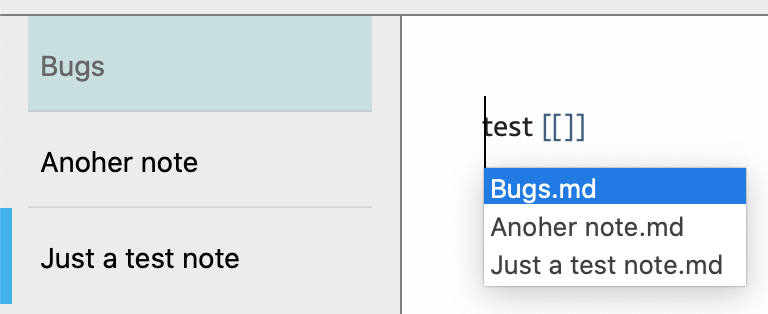
Cursor shifts to the left when there is autocompletion after typing [[. This was reproducible on several notes. It's interesting, that the issue is not reproducible anymore after I changed the zoom of one of the notes (by pressing Cmd+= and then Cmd+-).
So there is a wild guess: nvUltra does not recognise the current zoom level, until it is set implicitly.
 0
0 -
Valery Kondakoff -- thanks for the additional data point.
It's not that nvUltra doesn't recognize the zoom -- the text is properly scaled already.
That said, I did go back and revisit this (yet again), with a fresh perspective and *think* I have fixed this. I need to test some more, but hopefully this will move to the "solved" column!!!!
0 -
With ongoing testing, this appears to be fixed and should be fixed in the next release.
Thanks to all who helped track down circumstances that seemed to trigger it.
0
Please sign in to leave a comment.
Comments
6 comments