Odd highlight in connection-based note list
Completed
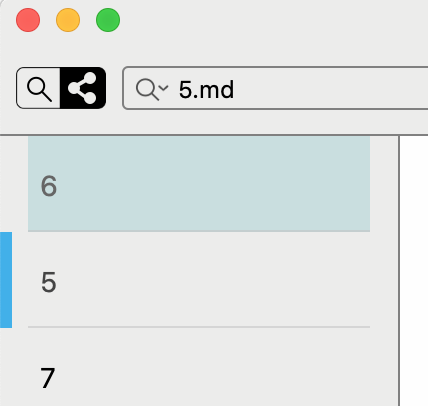
The Connections (Connectedness?) view uses a different highlight colour behind the first item listed in the note list. It is not clear what the purpose of this highlight is for, and it may not even be intentional. But the main problem with it right now appears to be that it has no mechanism for theming, which can cause it to clash with light-on-dark settings. This can be seen more strongly with the built-in Solarized-Dark theme, but curiously the look of this highlight is far more compatible with the Default-Dark theme. I could find no setting in either theme file that seems to address this colour.
-

Using the connected view inverts some of the normal theme settings (e.g. swapping text for background). As things are finalized we will add more documentation for theme functionality.
0 -

So, this highlighting has no meaning and is actually a bug?
 0
0 -
No -- that is the note you selected (`6`) and the other notes are related to it. `5` is the currently selected note.
0 -
Got it: this highlighting marks the note, which was initially selected, when you first enter the connectedness view.
Great, thank you for explanation. Worth mentioning in the docs!
0
Please sign in to leave a comment.
Comments
4 comments