Strange application freezing bug?
Completed
I'm having trouble figuring out exactly what's triggering this, but I have had to force-quit and restart nvUltra several times in the last hour.
I'm writing/editing a note with the preview pane in the middle and the editing pane on the right (which I mention because it's a relatively recent change).
The freezing results in a blinking cursor, but I can't scroll, select or clear the search bar, choose a menu item, etc., and if I Cmd-tab away from the app, I can't Cmd-tab back.
Possible triggers: A first I thought this was triggered by scrolling and/or cutting/pasting material in the note, because that tended to be when I noticed it; it continued to happen after I unchecked synchronized scrolling and the other scrolling checkbox in preferences.
Then I thought it might be triggered by typing Cmd-s (save). I do this reflexively when writing, even in apps like nvUltra that don't require it. I noticed it freeze immediately after pressing Cmd-s and then trying to scroll. But I just intentionally did those steps (with and without cutting/pasting some material to a different place), and it didn't freeze.
I just froze again after Cmd-tabbing to a browser to copy a URL and Cmd-tabbing back. I made it back (nvUltra appeared), but then I couldn't scroll or paste, type, etc.
-
Just did it again. I think the sequence was: Click in text I've already written; start typing; Cmd-S; attempt to scroll (doesn't work).
0 -

There is no Cmd-S menu, so the only effect that will have is to trigger a system beep, unless you have something else intercepting that keyboard shortcut.
Is the app frozen or is the menu bar locked? Are you using the global hotkey to switch back and forth? If so, *only* use the global hotkey -- don't use other means to re-activate the app.
If it happens again, use the Activity Monitor to see what's going on -- is the app listed as "Not Responding"? Is it using excessive amounts of CPU, etc.?
0 -
Yes, I knew Cmd-S wasn’t supposed to do anything, but it’s a reflex, and I mentioned it in case it’s useful.
It hasn’t happened again. I used Cmd-Tab to try to switch back to the app, and only tried using the Dock icon when the app froze. The app did freeze. Although the cursor continued blinking, clicking in the active note, in the note list, in the search bar or in the menu bar did nothing, and I couldn’t Cmd-Tab back to the app once I’d switched away. (I could only get back by hiding or closing any apps in front of it.) Keyboard commands (arrow keys, page up, etc.) did nothing.
If it happens again, I’ll check Activity Monitor. I’m a little surprised not to have encountered it again, given that it was happening repeatedly before. I’m pretty sure it stopped when I put the edit pane back between the note list and the preview pane — I know it only started after I’d put the preview pane in the middle. That said, I didn’t use nvUltra a lot today — mostly just to refer to notes, rather than to add anything.
0 -
Just happened again (with note-list > edit pane > preview pane configuration, so I doubt that's it), again after editing a note, tabbing away and trying to tab back.
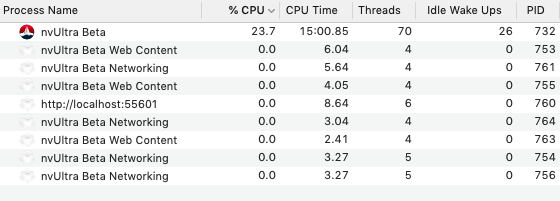
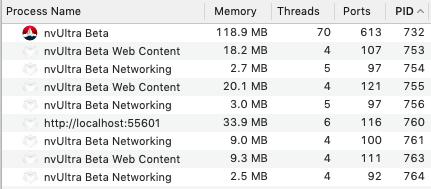
Activity Monitor shows nvUltra Beta using
- 19.5% to 28% of CPU, apparently rising immediately after I try to activate it (e.g., by Cmd-Tabbing to it), but then declining somewhat after a few moments in Activity Monitor. It does periodically decline to as low as 3% to 9%, but still remains frozen.
- ~119MB of memory (I have almost 2,300 notes in my main directory); this seems pretty steady.
Including screenshots.
 0
0 -
If this happens again, try using Activity Monitor to sample the process a few times and save the report you get. (The gear icon near the upper left of the window). That could at least point out what is happening while it is using CPU and non-responsive.
And for reference, CPU usage should be 0% when not being used (after all housekeeping has finished -- preview is updated, everything is indexed, etc.)
0 -
It just happened again — this time I caught the freeze without Cmd-Tabbing away from the app. I noticed that I had typed a bunch of stuff (easily > 200 words) with various formatting (two levels of bullets and then a > quote block), but the preview pane hadn't caught up. I tried to escape out of the note, then click on the note list and the search bar, before realizing nothing was happening.
I sampled the process a couple times. Not sure how to attach the reports. Here are dropbox links to them:
https://www.dropbox.com/s/xtyfkk7nomdabk2/Sample%20of%20nvUltra%20Beta.txt?dl=0
https://www.dropbox.com/s/w3k5jr96aywxme4/Sample%20of%20nvUltra%20Beta%202.txt?dl=0
0 -
And again just after restarting and typing some more ... This time it happened immediately after I hit Escape to try to exit the note (focus was on the editing pane) and I actually got the beachball — Activity Monitor says Not Responding (which is a first; before this, it hasn't registered a problem) and CPU has hovered between 2.1 and 32.
Here are the process-sample reports:
https://www.dropbox.com/s/wihpjpce8s7a2y2/Sample%20of%20nvUltra%20Beta%203.txt?dl=0
https://www.dropbox.com/s/pfsflabebsp0w59/Sample%20of%20nvUltra%20Beta%204.txt?dl=0
And here's the crash report I got when I force-quit nvUltra (it hasn't previously offered a crash report):
https://www.dropbox.com/s/ouyrugyyyqcnoe6/crash%20report.txt?dl=0
0 -
Those samples wouldn't symbolicate for me, so I'll have to dig into that.
The crash shows the `cancelOperation:`, and then seemed to freeze when trying to stop and restart the GCDWebServer process to load a new file in the preview...
It also looks like there are a bunch of WebKit processes hanging around. You're running on 10.14.6, and to the best of my knowledge there is a bug in macOS that prevents me from totally getting rid of the `WKWebView`'s when a window closes. Which means that as you open close windows, they build up.
Do you tend to open/close windows in nvUltra a lot? Do you restart the app very often?
1. Make sure to upgrade to build 49 and see if things get any better.
2. Try preemptively restarting nvUltra periodically and see if that improves things. I've tried and tried to figure out why 10.14 and below won't close out the `WKWebView`, but I have not had any luck. So far the best solution I can find is to upgrade to 10.15, which is not ideal.
0 -
I almost never open/close windows in nvUltra. I switch around in different notes a lot. I generally only work in one folder/notebook — but it looks like I have had a second one open all this time (but haven't been doing anything in it). I could try closing it.
I don't tend to restart the app a lot — except that this freezing is forcing me to force-quit the app and then restart it, usually several times a day (assuming my normal level of use of nvUltra, which is probably a couple times an hour).
I will upgrade to build 49 this evening. I'm avoiding 10.15 for all kinds of reasons, as you might imagine.
0 -
I tend to be slow to upgrade macOS and iOS, but I do eventually get around to it. I often end up "leap-frogging" my laptop and desktop (I'm running 10.14 on laptop and recently jumped from 10.13 to 10.15 on my desktop).
Doesn't sound like your usage pattern should be leading to many zombie objects, but it might be possible. But there are some issues fixed in build 49, and maybe yours is one of them.
0 -
OK, I upgraded to build 49, and experienced a freeze again soon after.
This time, I noticed that as I was typing and adding to a note, the preview wasn't updating. I kept going, and all remained well otherwise until I tried to click away from the editing pane — I think I tried to escape out of the note, or clicked in the search bar.
Unfortunately, I had to get some stuff done quickly and wasn't able to launch Activity Monitor, etc.
0 -
See latest update to another thread for additional thoughts/questions:
0 -
I have just wrapped up a major project at my day job, and am hoping to dive into the few outstanding known issues with nvUltra tomorrow. Any further information anyone else can come up with for this would be great! Thanks!!
0 -
Another tact, since I have yet to find an answer -- if you're experiencing this, can you send the output from `defaults read com.multimarkdown.nvultra` to us as a support ticket. The only personnel information that is really in there is path information about folders and files that you have used. If that concerns you, you can delete those lines before sending.
Maybe this will point towards a way to replicate the problem...
Thanks!
0 -
Hi — what's the best way to send these files? I saw you posted elsewhere an admin email address. Should I use that?
0 -
Can open support ticket and send them via this site.
0
Please sign in to leave a comment.
Comments
16 comments