highlighting


-

You can use CriticMarkup: {==highlight looks like this==}.
0 -
thanks! but in app it doesn't look like highlighted text ... and when i have syntax highlighting turned on it makes the text purple ha ha,
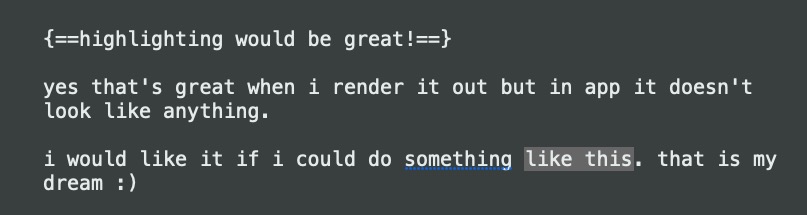 0
0 -
Yeah, I'm a big fan of how FoldingText handles Markdown/CriticMarkup formatting — when you aren't editing that paragraph, it just shows the formatting without showing the Markdown characters (see below).
I would love it if that were an option in nvUltra and Multimarkdown Composer. I know some people are philosophically opposed to that approach, however.
 0
0 -
yes that would be perfect. i am a fan of foldingtext too! and outlining in general.
pity he stopped developing it... problem with it ffor me that it is not standard native mac text so autocorrect doesn't work...
0 -
Lack of autocorrect doesn’t bother me. I will miss the folding and focus features when the app eventually stops working. (I know they probably won’t do it, but I’d love it if folding were an option in nvUltra.)
0 -

You can change the themes to use whatever color you want for CriticMarkup highlighting. But since nvUltra is effectively a plain text editor, not a rich text editor, there is no such thing as "highlighting by itself" -- it has to be triggered by syntax within the text contents.
0
Please sign in to leave a comment.
Comments
6 comments