Double-Quote Behavor
Completed
If I've written a piece of text, and then decide to go back and put quotes around it (as in going from quote to "quote"), I generally put my cursor before the first letter, and type the double-quote. So far, so good. Next, I place my cursor on the OTHER end of the word, and type the second double-quote. At this point, nvUltra attempts to help me out by adding TWO double-quotes. I understand the rationale for this, and it's generally pretty sound, but this paired double-quote behavior should probably only occur when the cursor is between a pair of whitespace characters. (To make matters slightly worse, if I then attempt to delete the first of the double-quote pair by hitting backspace, it deletes BOTH of the paired quotes. Again, I understand the rationale, but in this instance it's kind of aggravating.)
(For what it's worth, this same behavior exists in nvalt. I was hoping it would have been rectified in this version already.)
-

Ok, so I agree there can be some frustration around the quote pairing, we're always looking to improve that.
That said, the easiest way is actually to select the text you want quoted and hit ", which will then surround the selection in one stroke.
If you type a double quote and it gets paired around the cursor, pressing space should delete the second quote and move the cursor forward. So basically you can just keep typing. I've also made a habit of just using forward delete when deleting auto-paired characters, which doesn't trigger the "delete both characters" behavior, and is true in most applications that offer auto-pairing.
I think that if the quote is inserted directly to the right of a non-whitespace character, it should probably not auto-pair. Might also be nice to check if it would potentially close an open left character and avoid inserting a double character. We'll discuss further internally.
0 -
You're right — selecting the text and then typing a quote character works great. It does require me to select the text-to-be-quoted first, though, which is sort of obvious in retrospect, but perhaps not obvious to a new user. It will just require some re-training on my part. I've always just positioned the cursor at the beginning of the word or phrase, typed the opening quote, then Option+Right arrow'ed over to the end and typed the closing quote, leading to the frustrating existence of the stray double-quote.
Pressing Space doesn't really fix the problem for me after the pair appears, because it generates an extra space when I'm editing existing text (though it works fine when I'm at the end of my text and preparing to type another word). One fix to this would be if a pair is autogenerated, and then the user presses space, DON'T replace the quote with a space IF the next character is already a space followed by a non-space OR if the next character is a sentence-ending punctuation mark. For example, take the phrase: 'This is a test.' Now add a double-quote before 'test', move to the end of 'test' and add a second double-quote resulting in 'This is a "test"".' With the cursor auto-positioned between the paired quotes, pressing space should simply DELETE the second quote instead of replacing it with a space because the next characters is a period, so that we don't end up with: 'This is a "test" .' but instead end up with: 'This is a "test".' (with no extra space introduced between the closing quote and the sentence-ending period). This same logic could be used if the next character is either a space OR a sentence-ending punctuation mark, since we don't want to introduce extraneous double-spaces as in 'This is a "test" too.'
Using Forward Delete didn't occur to me (though this does, in fact, work great). I suspect that subconsciously I assumed it would behave the same as Backward Delete and would delete both quotes, but I have to admit I didn't actually try it because it didn't consciously occur to me to do so.
I suspect I simply have to retrain myself to remember to NOT type the opening quote, and use Shift+Option+Right arrow to select the text before typing the closing quote. It's an elegant solution, but not intuitively obvious.
But I agree…a simple check to first look to the left for a whitespace followed by an unmatched quote followed by a non-whitespace when a quote pair might be added would be a subtle solution. Regex-wise, it would look something like /s"/S.*?/S"/s. I could see some difficulty in handling RTL languages, but I suppose the pattern is basically symmetric, so it might be okay. (Or perhaps the check could be limited to a subset of English-like LTR languages initially until the corner cases are worked out.)
Anyway, thanks for giving this due consideration. As with so many other things, you've already worked out a simple and elegant (but not necessarily intuitively obvious) solution to the problem.
0 -

One thing I noticed with the select-text then type-quotation-mark workflow is that the opening quotation mark automatically becomes a smart quote whereas the closing mark stays as a straight quote. That would be something nice to fix.
0 -
Joseph Sowa, I'm not seeing that behavior:
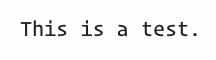
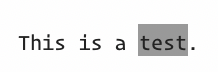

And the resulting Markdown is:
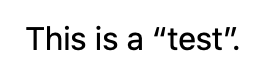
However, one small addendum to this workflow: it only works with double-quotes. It doesn't work with single quotes, though it probably should: If I've highlighted text, then type a single quote, it should single-quote the entire string.
Since I'm an English speaker using U.S. keyboard layouts, does the double-quote behavior work with the double-quote equivalents in other languages?
https://jakubmarian.com/map-of-quotation-marks-in-european-languages/
0 -
I believe that what Joseph Sowa is seeing is related to the system "smart quote" behavior. For my own purposes I disable smart quotes across the system, but especially in a plain text app like nvUltra. That said, we do leave the option for smart quotes, so the autopairing should handle them consistently. I'll do some further testing.
1 -
DJW as far as single quote pairing, it's not part of the default pairing characters. You can add them by going into Preferences->Editing and adding `''` (just a pair of single quotes) to the Smart Pairs list. Close preferences and select text, hitting a single quote should now wrap the selected text. Because the same character is used for apostrophes, you may have some weird side effects from this, though.
0 -
Hi Brett, that's exactly what I was referring to. Thanks for looking into it!
0 -

Joseph Sowa -- macOS handles the smart quote substitution you are referring to, and it is completely separate from anything that nvUltra does (e.g. doubling up on quotes with the smart pair functionality.) . So when you enable smart pairs and type one, nvUltra takes your `"` and inserts `""`. macOS then goes behind nvUltra's back and replaces the first `"` with a fancy version, as a separate action.
If you want smart quotes in the source text, then I would recommend turning off the smart pair functionality for single/double quotes, and handling those manually. This would basically bring you back into line with how they work in other "plain" editors that don't support smart pairs.
0 -
As for making the double quote behavior more "clever" -- the smart pair functionality is implemented in a very abstract manner. You can define any two characters to be the "opener", and "closer", including the same character twice. This allows you to use the same functionality to add support for `"foo"` or `[foo]` or `*foo*`.
This also means that making the implementation too clever for its own good will likely cause other problems or require a real mess of "if-then spaghetti code" that looks for an ever-growing list of edge cases. Neither of which leads to bug-free or maintainable code....
I think the power of the smart pair functionality lies in the simpler cases that people want 90% of the time -- wrap my selected text in the opener and closer, and insert the closer when I type the opener. There will inevitably be edge cases where you want something different ("I accidentally deleted the closing quote I had typed yesterday, and just need to insert one") -- which might require an extra keystroke or two, but this is weighed against the tens/hundreds/thousands of keystrokes saved by using the feature on a daily basis.
If you find yourself fighting with the functionality most of the time, you can always turn it off entirely, or remove certain character pairs that cause you problems (e.g. the recommendation above to remove double quotes if you like using smart quotes in your text.) This will allow you to simply revert to the default macOS behavior of other applications. The choice is yours.
If you have suggestions for new behavior that would work across *all* smart pairs, we can certainly look at it. But keep in mind that the expected behavior for smart pairs in `he said, "..."`, `the choice(s) he made`, `[[foo bar] bat]` will not all be the same.
Thanks for all the input!!
0
Please sign in to leave a comment.
Comments
9 comments