TaskPaper integration
Completed
I have TaskPaper files, such as Books to Read along the notes folder in nvultra. I like to quickly find these plain text files, and then edit them with the TaskPaper (or some other app). However, when making some quick changes in nvultra, it for example formats the standard TaskPaper tab+item as a code block. I don't ask for full TaskPaper support at this point at least, such as clickable checkboxes, etc. But it would help a lot if the TaskPaper files would show in the list format, or at least not format the TaskPaper lists as a code block.
-

We are considering a preference to turn of Markdown/MultiMarkdown syntax highlighting altogether, which would solve your particular issue but limit functionality if you also use Markdown.
But more specifically, can you give an example of a TaskPaper file that is formatting incorrectly for you? I am not as well versed in the TaskPaper format as I am in Markdown, but the files I use and the examples I have seen display properly in nvUltra as is. (In fact, I just resumed using TaskPaper a couple of days ago while testing some revisions to my "todo management system", and integrating it with nvUltra has been great for me -- a couple of features we are testing for the next release makes it even better...)
0 -
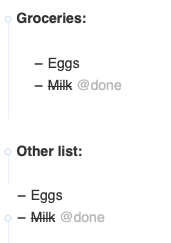
When I edit my lists in the TaskPaper 3 app, the first level list items are automatically indented with a tab character, second level with two tabs, etc. So they're interpreted as a code block in Markdown. However the TaskPaper app works fine also without the tab for first level items, so maybe I'll just remove the first tab from my lists. It would also simplify editing the files on other editors as well. See the image for both options. The first list becomes a code block.
TaskPaper export from OmniFocus for instance adds the trailing tab, but it's not a huge issue. Also for instance TaskPaper "archive" task adds those tabs, etc. Then, also, it doesn't become a code block if there's no empty line between the header and the first item. :)
Thanks!
 0
0 -
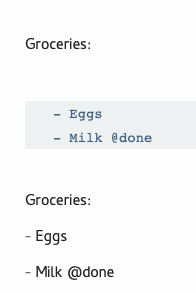
Here's one more pic how it renders in nvUltra. In any case, I agree that it's a great experience already to manage TaskPaper files in nvUltra. I tried for a while to have these lists in OmniFocus, then considered to have them in the new Reminders app, but the plain text / TaskPaper workflow with nvUltra works smooth, at least as long as you work on Mac.
 0
0 -
"We are considering a preference to turn of Markdown/MultiMarkdown syntax highlighting altogether, which would solve your particular issue but limit functionality if you also use Markdown."
As a sidenote, this might be a useful option for other things as well. I definitely wouldn't turn off Markdown rendering entirely, but it'd work well if I could for instance turn off the Markdown syntax highlighting for *.taskpaper, *.log and maybe *.txt, but use it for *.md.
1 -
Yes -- if you insert an empty line between the project name and the tasks "inside" that project, it will be treated as a code block due to the indentation. If you remove the leading tabs, then my understanding is that those items are no longer tasks within the the project, but rather tasks that are siblings of the project. Depending on which TaskPaper features you use, that may or may not be problematic for you.
The solution I prefer is the one used by TaskPaper itself in it's built-in document s(e.g. default contents of a new document) -- don't use an empty line between a project and it's child tasks. I do like having blank lines between top-level projects, so I insert them there, but those don't cause any problems.
As an aside -- I am packaging up some of the saved TaskPaper searches I have created over the years into an expansion file for nvUltra/Composer. For example, `.d` inserts the `@done` tag, and inserts the current date. `.search` inserts my collection of saved searches for use in TaskPaper (I have searches to show items due today, overdue items, items due in the next 2 days, and to show me only "next actions" in the GTD sense (the first available undone action for each project in the file).).
nvUltra will never be a replacement for TaskPaper, but with its flexibility nvUltra can certainly integrate well with TaskPaper.
0 -
I decided against removing the leading tab because of how the TaskPaper is typically used. Yes, you can not insert the line between the topic and first item to prevent it becoming a code block. However also if you insert "notes" below a task, it again can become a code block, depending on empty lines, etc. I'm not expecting nvUltra to become a TaskPaper substitute, but it's very nice to have the TaskPaper files available in nvUltra for quick edits and search, so thanks for the efforts to integrate the format into nvUltra.
0 -
Obviously you should do what's right for you. But it seems that TaskPaper is designed to work just fine without empty lines (the default file includes no empty lines), and empty lines between top level projects do not cause a problem when files are treated as Markdown text.
For me, any notes that are part of a nested list "belong" to the parent object, so omitting empty lines is an advantage, not a detriment.
I'm in the middle of revamping my organizational strategy, and have a folder of taskpaper files allows me to quickly find the projects I am interested in (for other reasons, I want to keep large projects in separate files). New features that are coming soon allow me to quickly open my `.taskpaper` files within TaskPaper to interact with them there as well. So nvUltra becomes a "hub" of sorts that allows me to quickly work the way I need to.
0 -
I noticed there's now the option to "Toggle syntax highlighting for these extensions" with the "taskpaper" default, which option effectively makes it plain text formatted. Thanks, this is quite useful for the TaskPaper files and may come handy for other kinds of files as well.
0
Please sign in to leave a comment.
Comments
8 comments