Toggle Preview
Completed
| ⌃⌘P | Toggle Preview opens the Printer menu. Choosing Toggle Preview feom the menu >Window< --> >Toggle Preview< everything is fine. |
-

Are you certain you're hitting Ctrl-Command-P? That shortcut has no connection to Print functions.
0 -
Yes i am sure. Ctrl-Command-P does nothing, shift-cmd-p evokes the print functions.
0 -

I'm confused. Shift-Cmd-P is *supposed* to open the page setup, which is what you say it does. So it sounds like that is working properly.
And then in your initial post you said that Ctrl-Cmd-P opens page setup, but in last comment you say that it does nothing? Which is correct?
Does the menu for toggle preview show the Ctrl-Cmd-P shortcut? Your initial post leads me to believe it does, but don't want to assume.
0 -
The Users Guide says
⌃⌘P Toggle Preview will toggle the preview. For me it does not. Brett asked if i perhaps haves type ctrl intsead fod cmd. There might come the confusion from. 0 -
Normally i do not work much with shortcuts. By now i have learned, that shift cmd p evokes print functions.
But the Users Guide lists under keyboard Shortcuts:
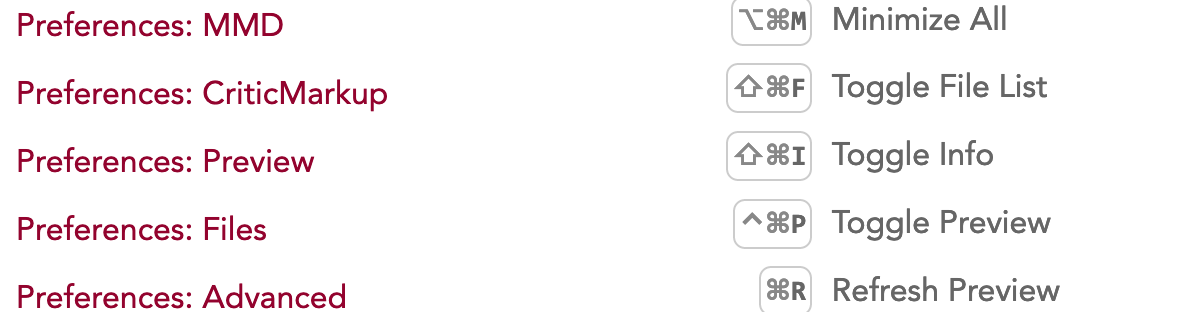
In the menu under Windows the same shortcut. By the way the same is true for nvalt.
0 -
Just to make sure we're not mis-communicating. The shortcut above for "Toggle Preview" is Ctrl-Cmd-P. The shortcut for "Toggle Info" is Shift-Command-I.
The way macOS apps work is that the program (optionally) gives a keyboard shortcut for each menu item. macOS is then responsible for handling those keyboard shortcuts and activating the correct menu item. So nvUltra actually never even sees the shortcut -- it all happens at the OS level. So if it's not working,
If the shortcut is not working for you, it is something with your machine:
1. Some localizations change keyboard behavior, meaning that you have to type a slightly different key combination to result in the same character.
2. Some localizations may have different default shortcuts that conflict with one chosen as a custom shortcut in an app. I'm not sure if your computer has Ctrl-Cmd-P as a default for something else.
3. You can use System Preferences -> Keyboard -> Shortcuts to customize commands and assign whatever you like to any menu command, and see whether something else has been customized.
0 -
I am so sorry. If i had my glasses on, this might not have happened. Brett was rightctrl not shift is the solution.
Thanks for your patience and excuse me for stealing your time
0 -
No worries -- glad the problem is solved!!
0
Please sign in to leave a comment.
Comments
8 comments