Word wrap on numbered list when tab spaced after the number.
Completed
When creating a numbered list in release 33 if you tab after the number and period the text doesn't wrap to align under the list text like it does if you do a dash then tab.
Is this expected behaviour?
-

It does. Can you send an example (text and image) of what is not working for you?
Thanks!
0 -
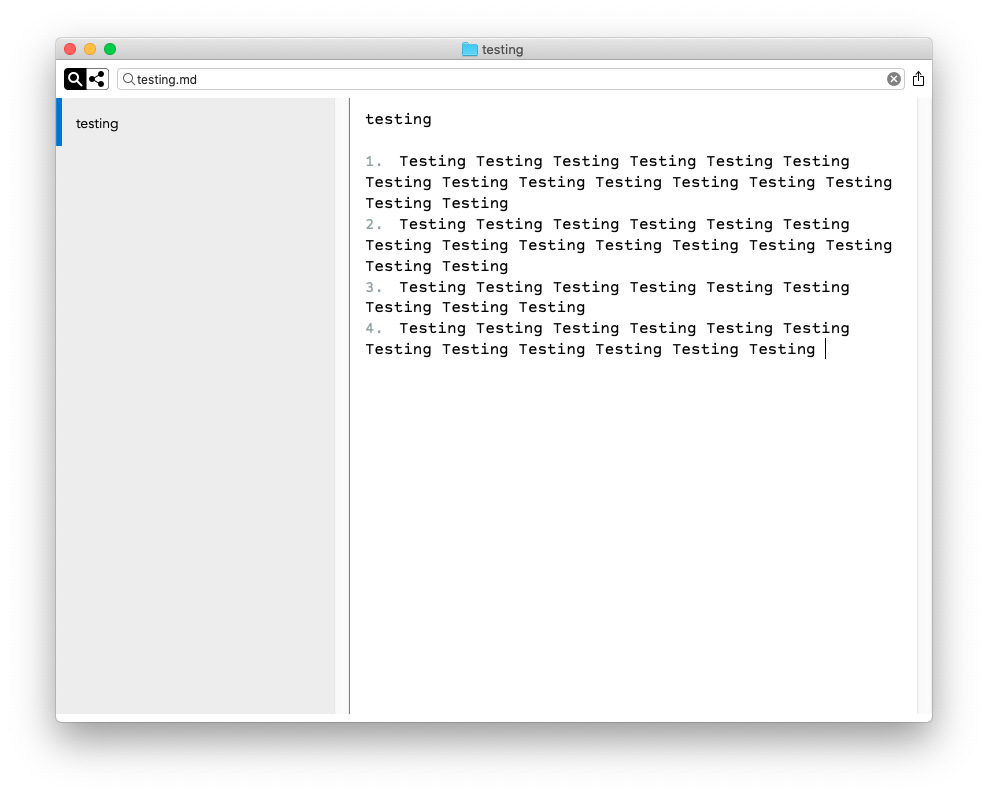 0
0 -
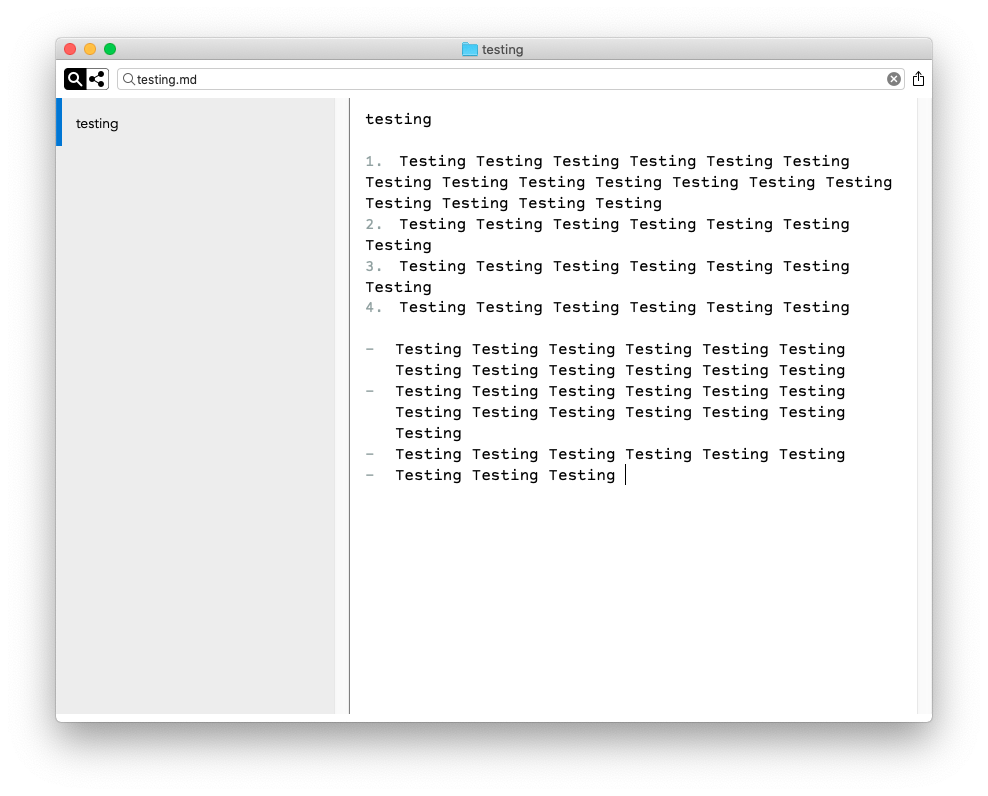 0
0 -
Little confused by your answer as to whether it should or shouldn't.
You probably can see from the spacing but there is definitely a tab after the period following the number.
0 -
If you'll send the actual text you're using I can test it. (I can't test from the image.)
Also, do you have elastic tabstops enabled in the Editing preferences? (Those align tabs between lines, including the "virtual" tabs at the beginning of indented list items.)
0 -

Fletcher,
I can confirm that it is not a function of the text you are using.
Numbered lists with any text does not have the indentation that is shown in bulleted lists.
macosxguru
0 -
Here's a copy of the text.
testing
1. Testing Testing Testing Testing Testing Testing Testing Testing Testing Testing Testing Testing Testing Testing Testing Testing Testing
2. Testing Testing Testing Testing Testing Testing Testing
3. Testing Testing Testing Testing Testing Testing Testing
4. Testing Testing Testing Testing Testing Testing- Testing Testing Testing Testing Testing Testing Testing Testing Testing Testing Testing Testing
- Testing Testing Testing Testing Testing Testing Testing Testing Testing Testing Testing Testing Testing
- Testing Testing Testing Testing Testing Testing
- Testing Testing Testing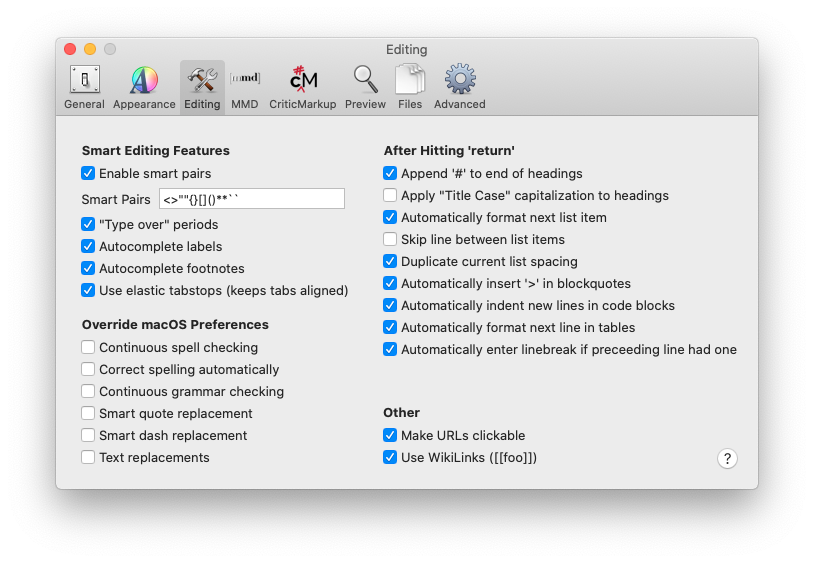
I'm still not clear on what the expected behaviour is?
Should a numbered list with a tab after the period have it's second line fall into alignment with the first tab?
0 -
I can confirm they work.
Please send me text that is not working.
0 -
Jonathan -- The text pasted above has spaces after the list markers, not tabs. So it won't wrap as requested. If the list marker has a tab following it, then wrapped lines will indent (again, assuming elastic tabstops are enabled).
0 -
I think that may be a result of posting in the forum software as they are definitely tabs in nvUltra.
0 -
Jonathan -- you can open a support ticket and attach a text file to ensure what I receive is what you sent.
0 -
Not a problem how/where do I do that? Couldn't see anything obvious on the nvUItra site or the forum site?
0 -
The submit a request link in the upper right.
0 -
Jonathan -- thanks for sending.
The file works fine for me.
You never confirmed that elastic tabstops are enabled for you.
What theme are you using?
0 -
Elastic tabstops is on. Though it seems to make no difference whether it's on or off in regard to whether it affects indentation on either dashes or numbers.
I've tried it with it on and off to be clear.
I've tried it with the default theme, empty theme and Default Dark just to see whether it made a difference.
Should I clear all preferences and see whether that makes a difference?
If so could you remind me on how to do that?
0 -
Can you post screen shots of your preferences? (Appearance, Editing, MMD)?
To delete all preferences `defaults delete com.multimarkdown.nvultra`. But if possible, I would prefer you not do that yet. If it is prefs related, I would like to figure out which combination is the problem.
But yes, disabling elastic tabstops should disable this for all lists -- enumerated and bulleted.
What font are you using (though that will be answered if you post screenshots of prefs)
0 -
It's the font. I changed it to Zilla Slab and it now works correctly.
Interestingly
It works correctly with Avenir, Cambay, SF Pro Display, Taviraj,
Though not with OpenDyslexic3
I had it set to a Fixed Width font, Courier Prime Code. I've only spot checked but it doesn't appear to work correctly with any fixed width fonts.
Please let me know if I can provide further information.
0 -
Huh. It works fine for me with OpenDyslexic3, but not with Courier. What font size are you using?
0 -
And it works with Courier < size 13.
0 -
I was using 16.
I've moved it up to 20 and 25 and it made no difference with fixed width fonts and also made no difference with OpenDyslexic3 either though.
0 -
It works with SF Pro Text. But doesn't work with the following:
AnonymousProMinus-1.003
Belinsky Text
Coordinates
Courier Prime
Courier Screenplay font
Dank Mono
iA Writer DuoSpace
iA Writer Mono
iA Writer Quattro
Inconsolata XL
Input only mono
Lucida Grande
Mono Maison Neue Mono
Nitti (Mono)
Operator Mono
SFMono-Fonts
triplicate
macosxguru
0 -
Found it. Certain fonts were requiring more space than expected for the list enumerators, which threw the math off which disabled elastic tab stops.
Fixed for next release.
Thanks for following through with the additional information!!!
0 -
Not a problem.
Any idea on when that might be?
Also it doesn't look like the change log on the nvUltra website is up to date.
As always thanks for you quick responses and an amazing program.
A please to be able to help it on it's way to release.
0 -
We'll probably push a new version in the next couple of days.
Thanks again for your help.
0
Please sign in to leave a comment.
Comments
24 comments