Problem with with # in tag labels
Completed
I start all my tags with #. This allows me to easily browse my tags within 1Writer on iOS. However, within nvUltra, when I search my tags I often get a result like the following, with duplicate auto-complete entries showing up, one with a #, one without. In example below, I typed "tag:out" to get this result. It makes the tag searching experience somewhat cumbersome.

-

Where are setting your tags (e.g. MMD or macOS)?
0 -
MMD.
0 -
I'll have to think about this. You have sort of an unusual use case, since you're effectively using the tag "tag:outings", rather than "outings" (redundant use of tag inside the tag (whether the word "tag" or the shortcut "#")).
0 -
Oh, that's okay. I'll figure out a way to handle my tagging that doesn't rely on hashtags. Thanks.
0 -

Something seems to be inconsistent with how the tags are being recognized. In my screenshot, not all tags are duplicated (i.e., one listing with hashtag, one without). All of my tags are hashtags, but if you look at my list, #DTE and #touchbase only have one listing--with hashtag. It's also odd that they aren't alphabetized. I thought they were before...
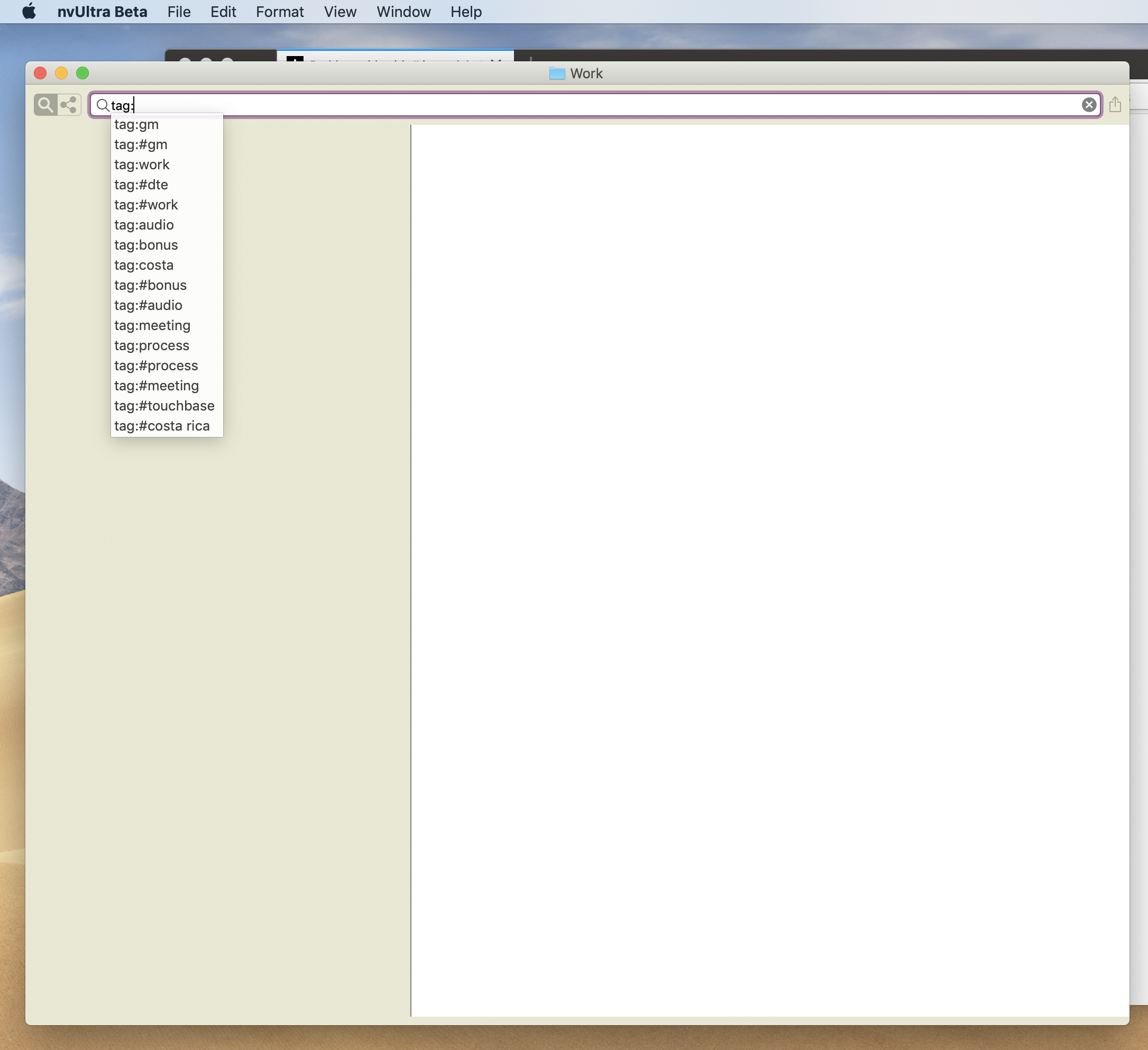 0
0 -
The only way I have been able to have tags show up in the autocompletion database with a leading hashtag is when I created a tag that includes the hash (e.g. `tags: #hashtag`). This was part of testing for earlier in this thread.
Are you sure the tags aren't created that way in your documents? Also, if you changed tags while editing, you may need to close and reopen the folder to reset the tag database.
As for sorting, they have never been alphabetized. They are sorted by best match -- in the case above you have not started typing the tag yet, so they are sorted by length, since a shorter tag better matches the empty string than a longer tag.
0 -
They *all* have leading hashtags...that's why I'm confused about some of them being displayed without a hashtag. Each tag should have one entry, with a hashtag. If I select one of the tags without a hashtag, e.g., audio, and I look through each of those files, all I see are tags with #audio. I have closed and re-opened the folders to no avail.
0 -
Please send some actual files with the tags you are having trouble with.
0 -
Sent.
0 -
Thanks for sending!
You have tags in metadata that have leading hash sign. So the tag you’re using is “#foo”. Or, put another way, it’s equivalent to “##foo”.
You don’t need hash tags in tag metadata. Only if you’re putting a tag randomly in the body of a note outside of the metadata. So in this case your tag is being read twice - once as the metadata tag “#tag” and once as a random tag “tag”.
0 -
Hmm...that still doesn't explain why, in the screenshot above, the dte tag doesn't have two listings. Those tags are hashtags in tag metadata, too.
It's also weird that the Costa Rica tag would be picked up as tag:#costa rica and then tag:costa
0 -
the metadata `tags: #costa rica, foo` would be a two word tag "#costa rica".
the regular text `#costa rica` would be a tag "costa", followed by non-tag text ` rica`.
As for the dte tag, I would need to see the actual file to try and understand why it is only listed once. (Also, be sure to test by searching for `tag:dt` as it may simply be too far down in the autocompletion list to show up, depending on how many tags you have.)
But honestly, the bigger lesson here is that double tagging documents ("##foo" in text or "tags: #foo" in metadata) is going to lead to less than ideal results, as opposed to the conventional "#foo" or "tags: foo".
(Edited to clarify that metadata uses `tags:` instead of `tag:`)
0 -
I see. I just wanted to maintain interoperability with other apps that only use hashtags. Guess I will need to re-think this.
I'm going to send you the file with the dte tag. Turns out, it's only one file, so I'm going to get rid of the tag, but I figure you'd want an example anyway. I tried searching for tag:dt, but there isn't a tag:dte, only tag:#dte.
0 -
Thanks for the additional file, Williper.
It includes something like `#dte, #foo`. In order to minimize false positives, the regular expression looking for unstructured tags in the body of the text excludes punctuation and looks for whitespace after the tag. So `#dte #foo` would trigger a match, but `#dte, #foo` does not.
What other applications require the use of the `#` character within the tag itself, and not as a marker for the beginning of the tag?
0 -
It seems as though it might be worth stepping back out to the 50,000 foot view for a moment. Some of this is opinion and some of this is fact. I'll try to be clear about the distinction.
1. Tags work best when kept simple (somewhat opinion, somewhat fact), and are most compatible across systems (fact) when they are single words. This is one of the great uses for `#CamelCase`, for example. A single word tag is more likely to be cross compatible between systems than `#Camel Case`. This is not to say that tags consisting of multiple words are not allowed in some systems -- clearly they are. And it's not to say that they are "bad". But they won't work well under all circumstances, some of which have arisen here.
2. Similarly, tags are more compatible when they consist of letters and not punctuation (fact). Again, some systems work just fine with punctuation -- I'm not saying they can't be used anywhere. Just that you can run into trouble with some use cases where tags contain non-letter characters. Again -- this is not a value judgment.
3. Tags work best when they are clearly delineated from content. This is why macOS tags are part of the metadata, not the file contents. This is why MultiMarkdown tags are part of metadata. Some systems do not have a way for users to insert metadata, and rely on some other system to indicate that something is a tag instead of ''just content". One of which is the approach popularized with Twitter, marking content like `#foo` to indicate that it is a tag instead of normal content. This approach, however, more easily leads to confusion with things like whitespace (is `#Costa Rica` a tag followed by a word? A two-word tag?) or punctuation (is `##Costa` a valid tag? If so, is `#Costa #Rica` two single word tags? Is it a two-word tag where the second word coincidentally starts with a hash character?) Some of these examples, while seemingly absurd, are illustrative of the complications that arise.
As for MultiMarkdown/nvUltra:
1. macOS tags are supported, and contain whitespace or punctuation. macOS tags with spaces and punctuation won't always work with searching, however, because `tag:Costa Rica` is treated as searching for the tag `Costa` followed by the word `Rica`. Two word tags *can*, however be synchronized between MMD/metadata tags and macOS tags.
2. MultiMarkdown metadata tags are supported. These are comma separated, and can contain whitespace. The same restrictions on search apply however. These tags can contain punctuation, but I don't recommend it for the reasons stated above.
3. Inline or non-structured tags are supported (`This is some text with a #tag`). These cannot include whitespace or punctuation characters, and must be immediately separated by whitespace from surrounding text (e.g. space, enter, return, tab). I think these are the least reliable sorts of tags (mostly opinion), but users wanted to be able to include them so we added support. They can be useful for files that are edited in other programs that don't support MultiMarkdown metadata tags, and where macOS tags are not reliably maintained (e.g. Dropbox sync, or files also used on iOS devices or Windows/Linux machines).
Keeping all of this in mind, recommendations for successful tagging in nvUltra include:
1. Tags should be single words (CamelCase if desired)
2. Tags should not include punctuation
3. Tags should not be "double-tagged" (e.g. `tags: foo` or `#foo`, NOT `tags: #foo` or `##foo`)
(NOTE: My intention is that tags should allow non-ASCII letters. If you find examples where this fails, let us know and we will see if anything can be done.)
You are of course welcome to do whatever you like, but should be aware that your results may be less than ideal. We are happy to consider improvements to the system, but do recommend first understanding what is being done behind the scenes before suggesting changes.
Thanks!!
(Edited to clarify that metadata uses `tags:` instead of `tag:`)
0 -
Thanks for the informative post.
I don't have a companion app in mind, but I think #tags are more common than MMD metadata tags. I thought keeping the tags in metadata, but with a hashtag, would ensure I could reliably use these tags in other apps. Maybe this is a question for Brett...how does he sync tags between nvU and 1Writer, for example? The latter uses #tags exclusively, I think.
0 -
If you want to use #tags, then just don't use them in the MultiMarkdown metadata. Or, use a different metadata key instead of `tags` so they are only recognized via the `#tag` mechanism.
0 -

In answer to your question, I don't use tagging much in 1Writer. Up until Ultra all my tags were coming from nvALT, which didn't show up in 1Writer anyway. So it's all just text search there, which has served me well.
I've switched to using metadata tags in general. I synced my nvALT tags to macOS tags and I let Ultra update the metadata tags as those files come up. I can still do a text search for those tags in 1Writer, should my workflow ever depend on that.
0
Please sign in to leave a comment.
Comments
18 comments