Note contents disappeared
Completed
I downloaded the 1.0.0 beta and added the folder I was previously using with nvALT. It is inside my Google Drive folder synced by Google Backup and Sync. Everything has been working great! I've opened and edited notes, added tags, and done lots of searching.
This morning, I searched for a note that I hadn't yet opened in nvUltra. The note contents appeared briefly, but were then erased. I haven't been able to reproduce it, but I wanted to report it anyway. I *think* the contents were erased before I hit Return, but I'm not sure.
-

Can you describe more exactly what you did? How did you search? Where did you hit return (search bar? note editor?)
Did the contents disappear from the window? From the file itself?
I've been very careful to try and force file writing behavior to occur in such a way as to prevent data loss above all else. I haven't heard of any other reports of data loss from files, so definitely want to figure out what happened.
0 -
Sure, I'll try to add more detail, but let me know if you need anything else. I wish I could make it happen again but it hasn't!
- I hit Command+L and typed in part of the note name, and saw the note contents
- I hit Return from the search bar (quickly after seeing the note I wanted) to enter the note body and I think that's when the contents disappeared. My cursor was in an empty note body. I opened Finder and the file on disk was also emptied and was synced back to Google as empty.
0 -
Was the note truly empty (e.g. 0 bytes), or did it just look empty (e.g. had a single whitespace character)?
0 -
Finder reported it as zero bytes.
0 -
Hmmm....
0 -
I still don't have a good lead on this one, but obviously am concerned if there is something that could lead to data loss.
If you (or anyone else) has this happen again, please report it here with any and all details you can think of.
0 -

I've been using build 33 on High Sierra for a few weeks. Suddenly, this evening, nvUltra Beta deleted the contents of 2 of my notes. They do show as zero bytes in Finder. All I had done was click on the name of the note (in the vertical navigation menu along the left-side) so I could read the content of the note in the right editing/preview pane. (I'm not quite clear on your names for the various views.) This happened to 1 note at 8:39 PM and a 2nd note at 8:49.
I saw that the 2nd of these notes had entirely lost its content on nvUltra Beta and glanced over at my list of notes on 1Writer on my iPhone. I saw that the contents of the 1st note also were gone from 1Writer. Whether I glance at the list of notes in 1Writer or click on that first note, it's obvious that note is devoid of contents. When I look at the list of notes on 1Writer, it looks as though that 2nd note still has its contents, However, when I select the 2nd note in 1Writer, the contents were gone in preview and edit modes.
I got nervous and immediately checked for an update and installed it (build 36).
BTW, I went into Dropbox and restored the 2 notes that had lost their content.
0 -
Nancy, thanks for letting us know.
I still don't have a solid idea of why this is happening. So I'll try to start over and think through it from the beginning.
(And this applies to anyone who has experienced this, or who experiences this in the future.)
1. Can you post screenshots of your all of your nvUltra preferences? (If it is related to prefs at all, I would be most worried about General, Files, Advanced, but I am trying to keep an open mind).
2. Describe your usage habits of nvUltra as much as possible (e.g. I launched it two weeks ago and it has been running continuously; I quit it and restart it every day; I leave my folder window open all the time; I close and open folders frequently; I reboot my computer every day; I haven't rebooted my computer since the 70s; etc)
3. If you notice this, then obviously don't open any more notes in nvUltra. But before you quit the application use Activity Monitor and write down (or screenshot) as much about nvUltra as you can (CPU usage, Memory usage). Also write down as much as you can remember about what you were doing it when it happened.
It sounds as though this doesn't happen, until it does. And when it does, it happens to more than one note. Which makes me wonder about some sort of memory issue like a memory leak. When I last checked there were none, but I will check again. I'll try to think of other potential causes and see whether any seem feasible as well.
I have not seen this issue, nor has Brett, which of course makes it more challenging to track down. So keep any additional experiences/ideas coming so we can fix it!
(And continue to use good back up practices for any beta software, and just with computers in general..... )
0 -
Also, if you can send us the content of the file (before it got erased) that might help to see if there is something that is triggering an issue from that perspective. I don't think this is likely, but stranger things have happened.
0 -
OK, let me know if I'm missing anything!
1. Attached at the bottom
2. I keep nvUltra running continuously, and launch it shortly after rebooting. I close the folder window as soon as I see it and keep only the main window open. I don't usually look at the preview, but I did play around with it when I first got the app. Most of the time it stays hidden (Cmd+H) and I Cmd+Tab to it, type stuff in, then hide it again. I try not to reboot the computer but I do for system updates, so, every couple weeks?
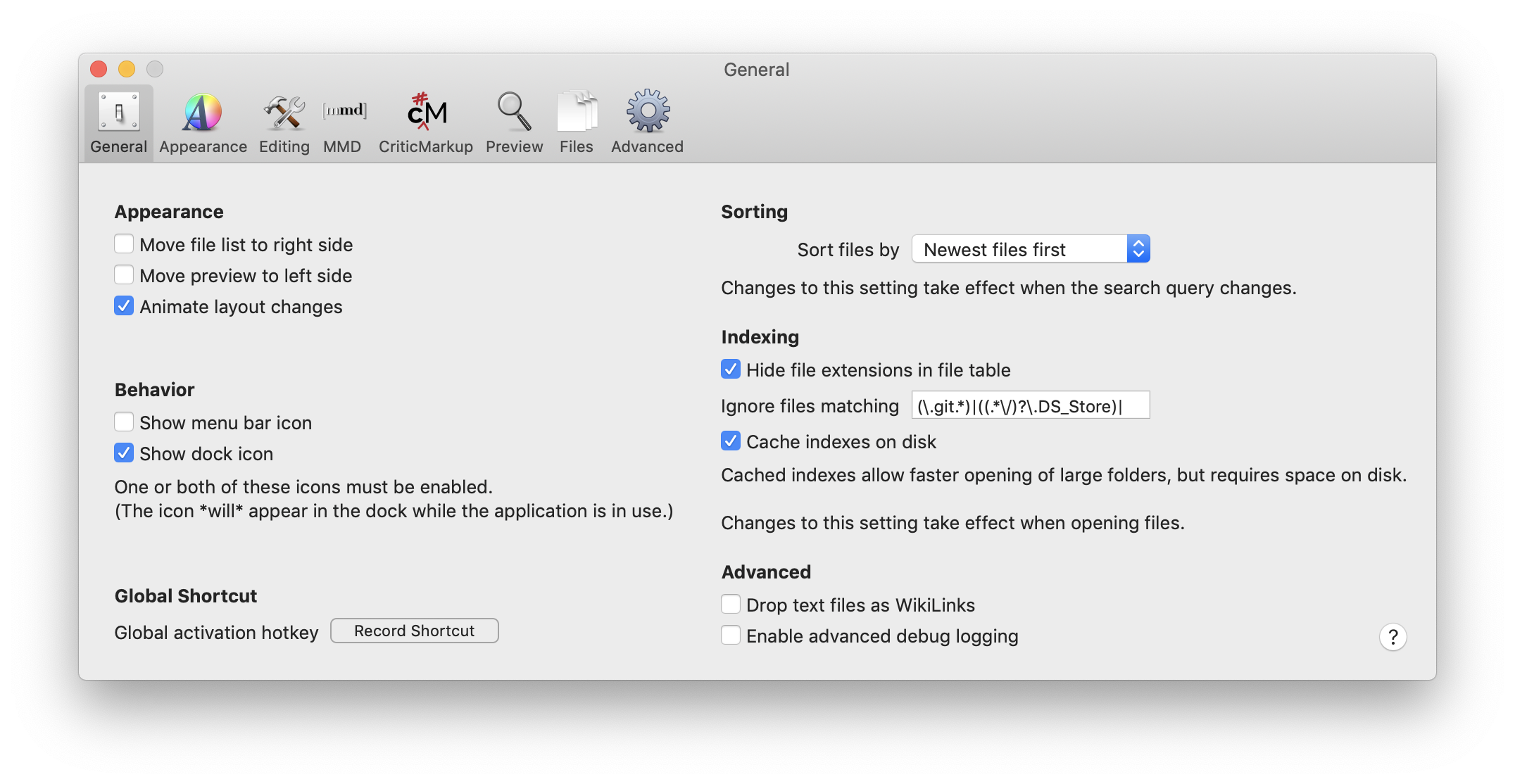
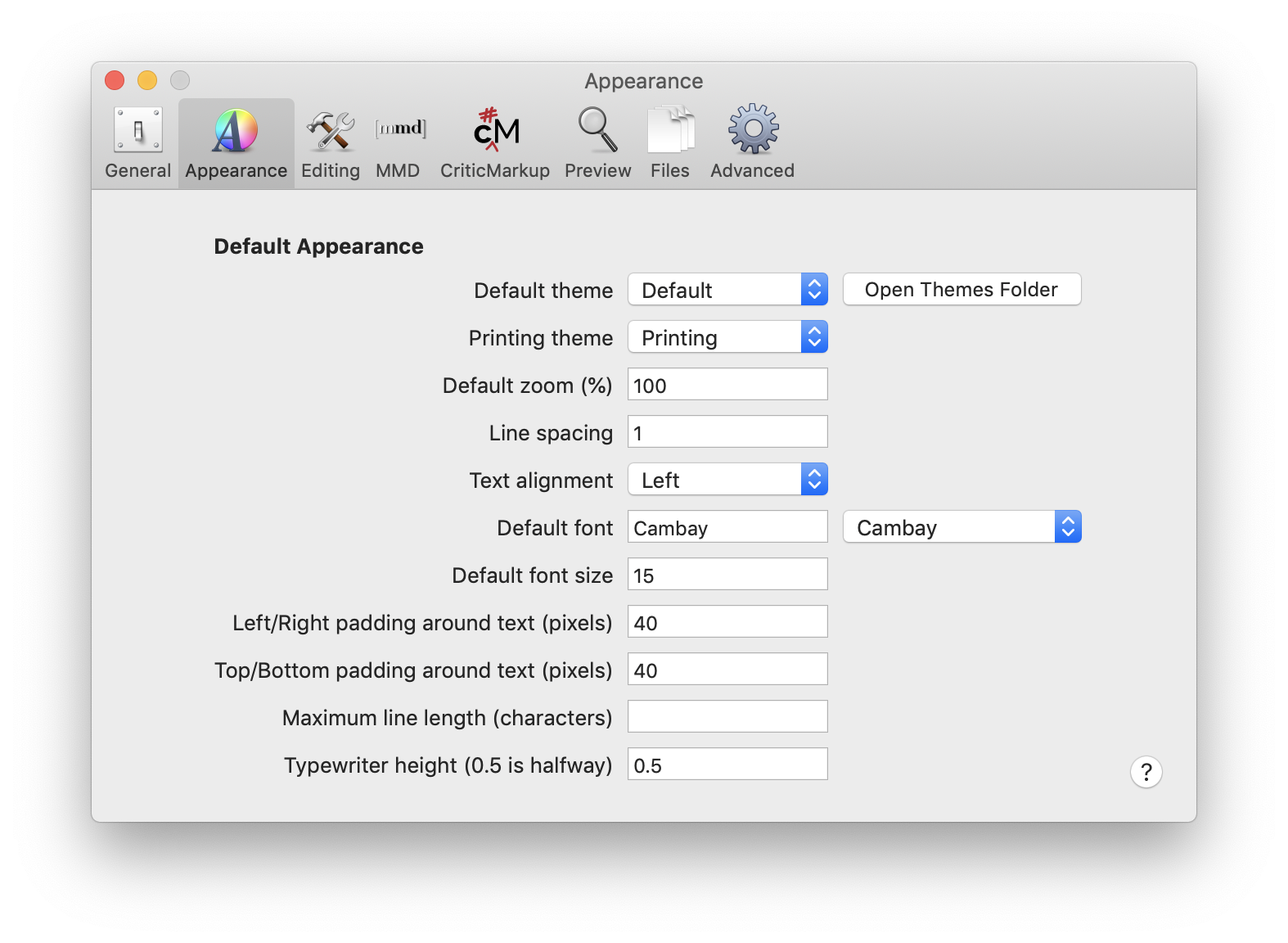
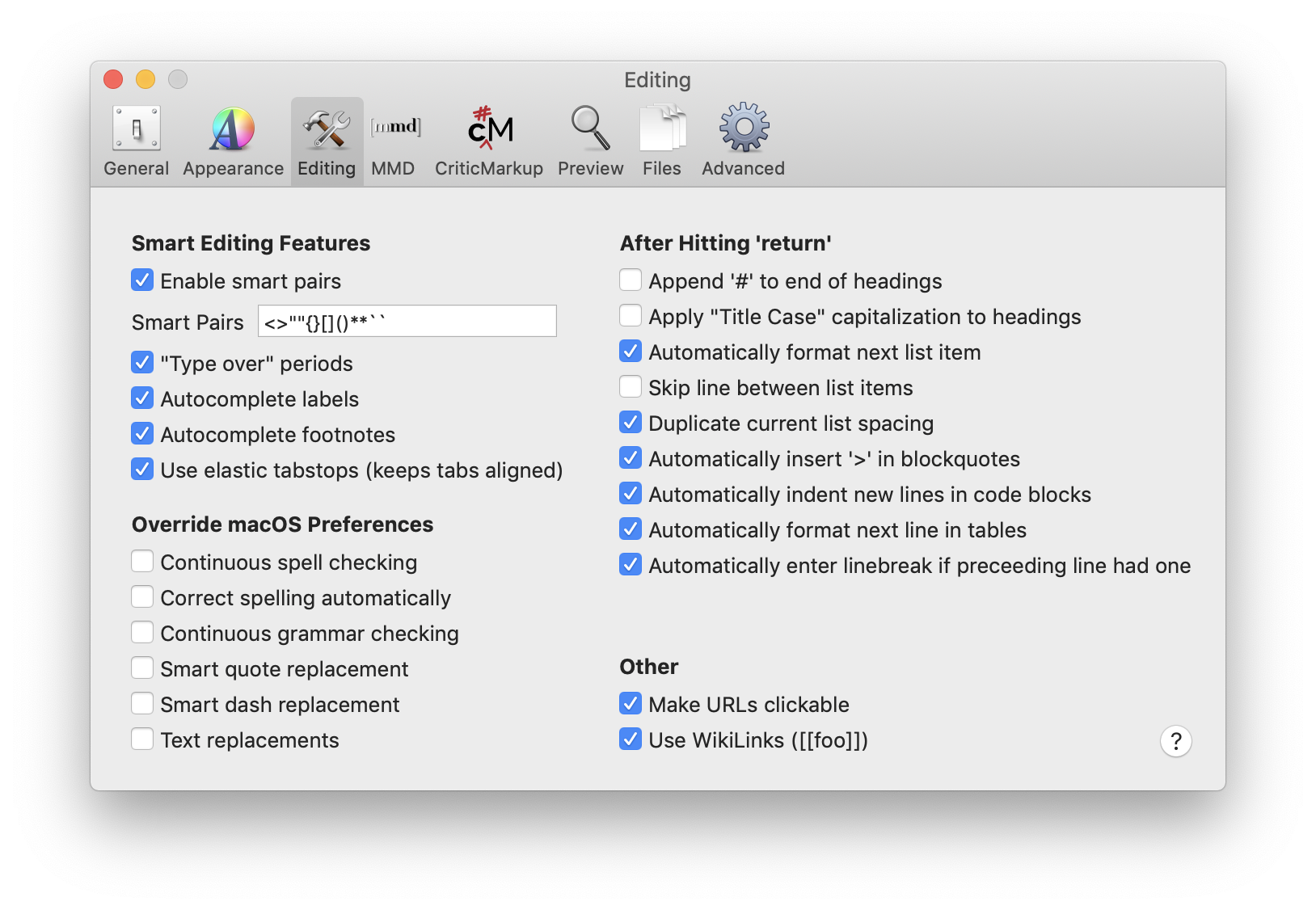
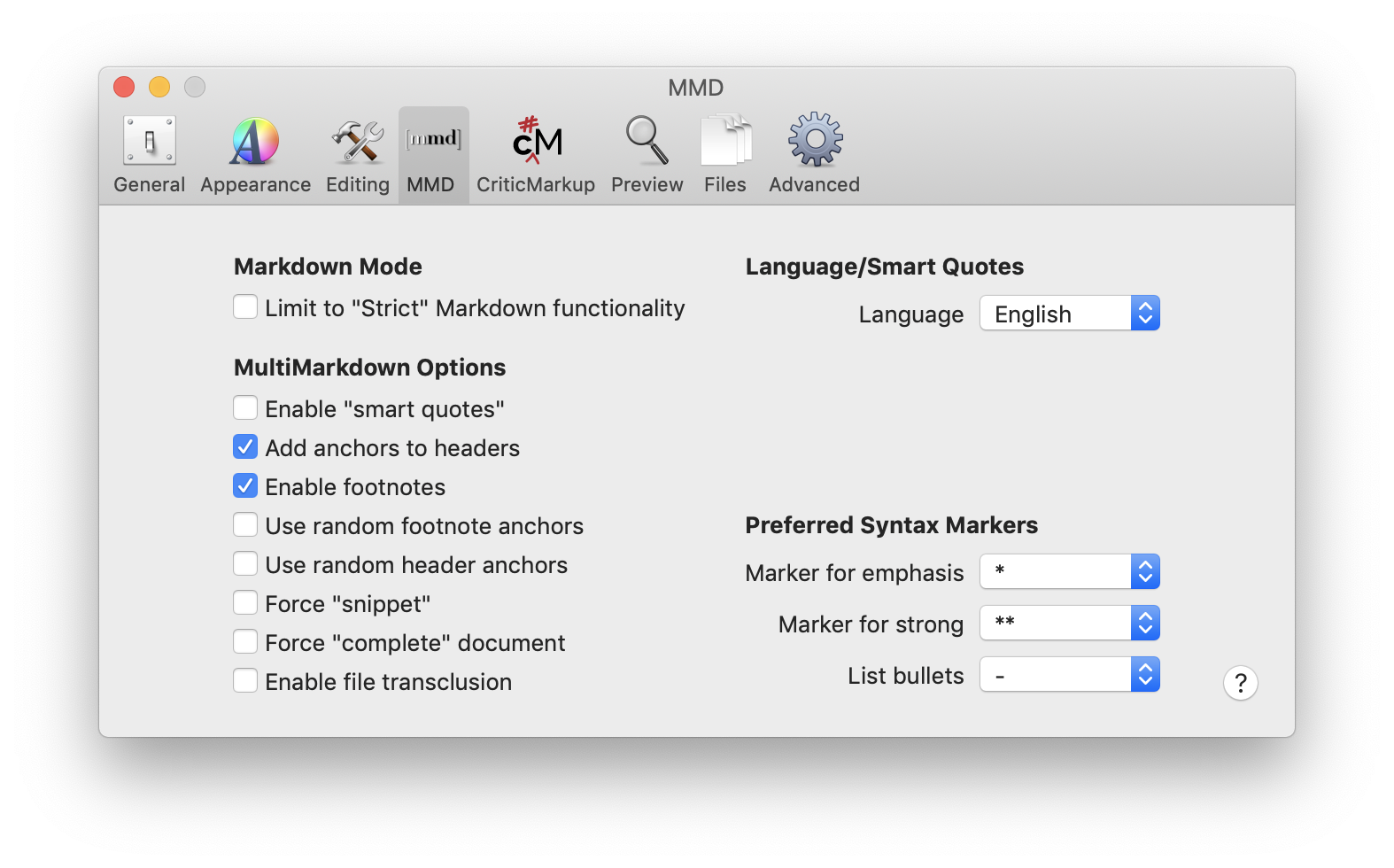
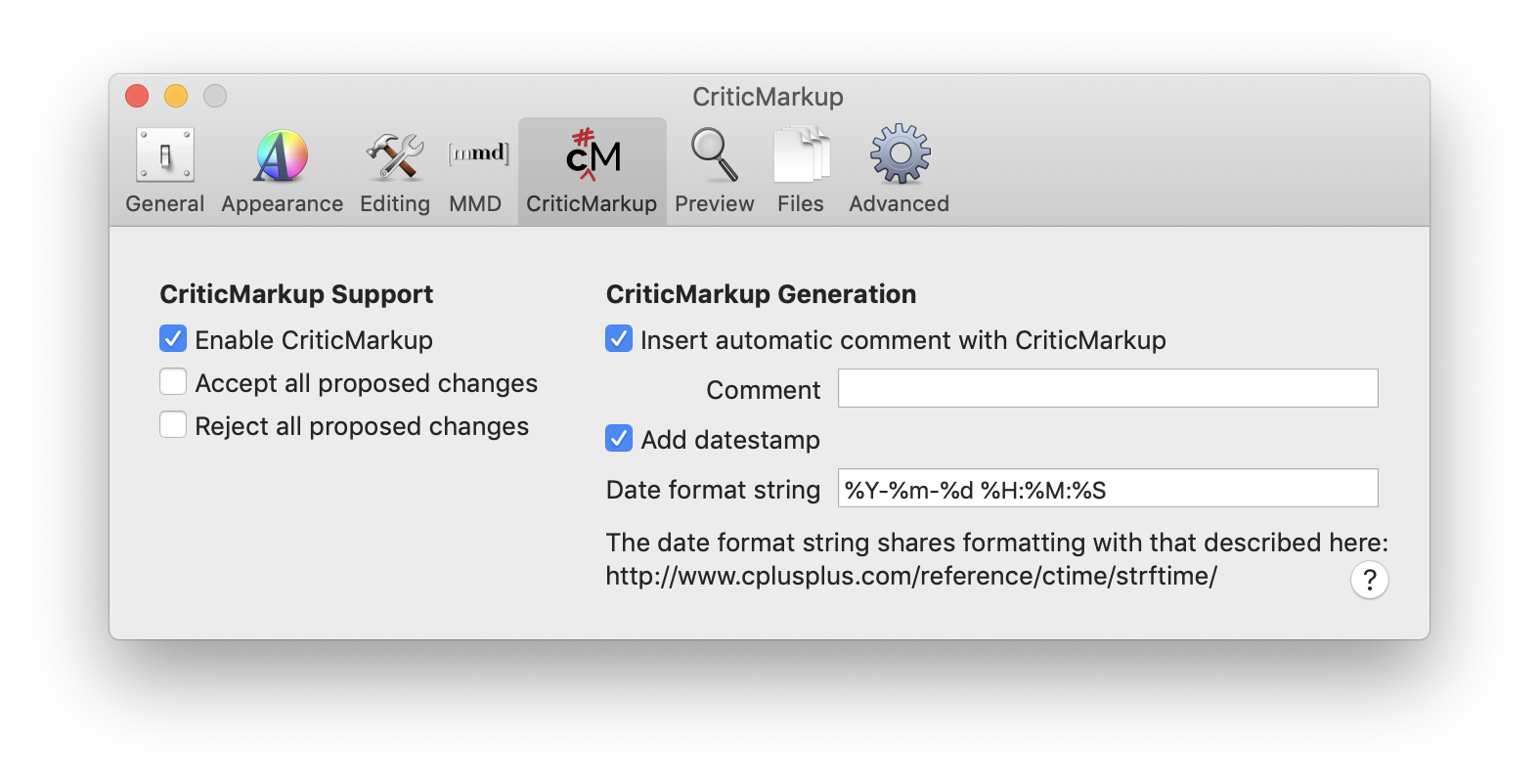
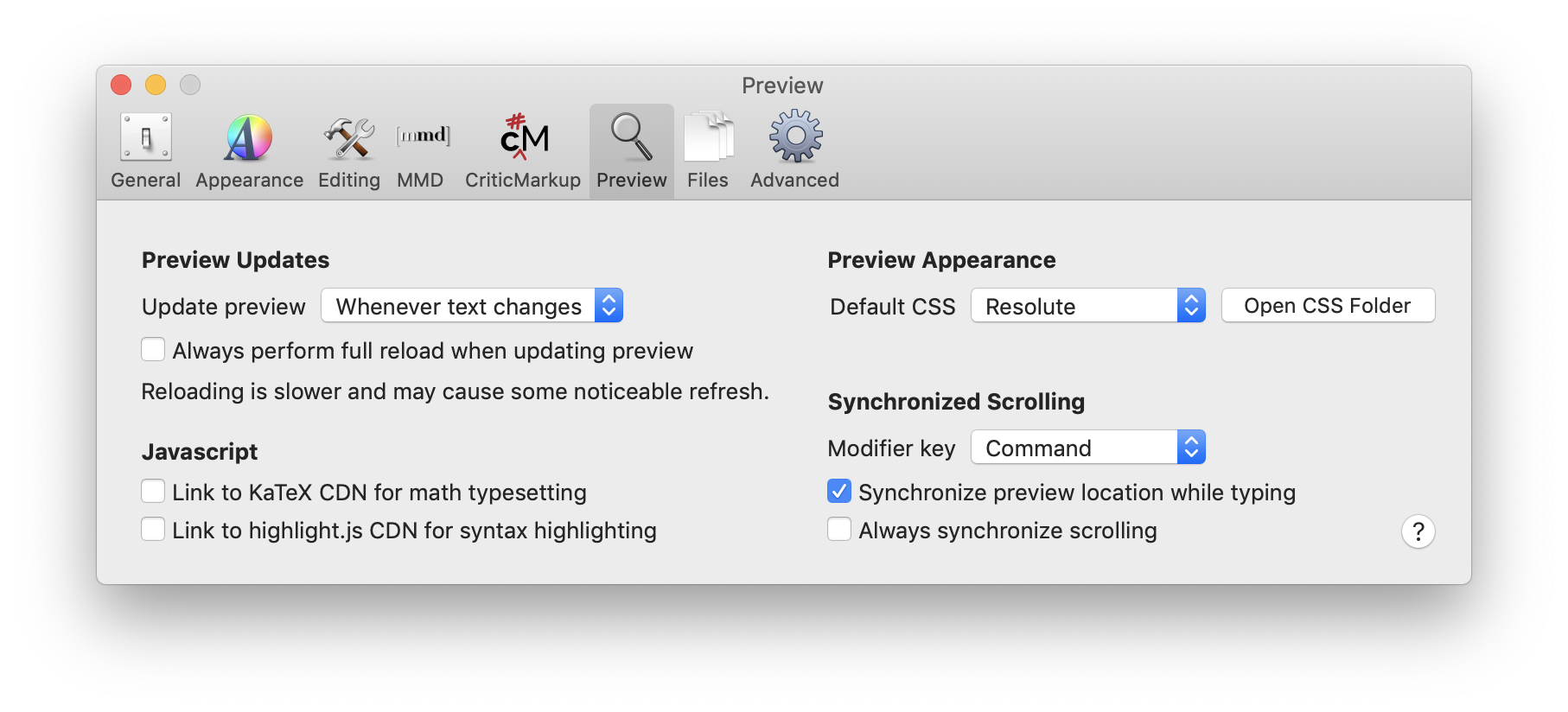
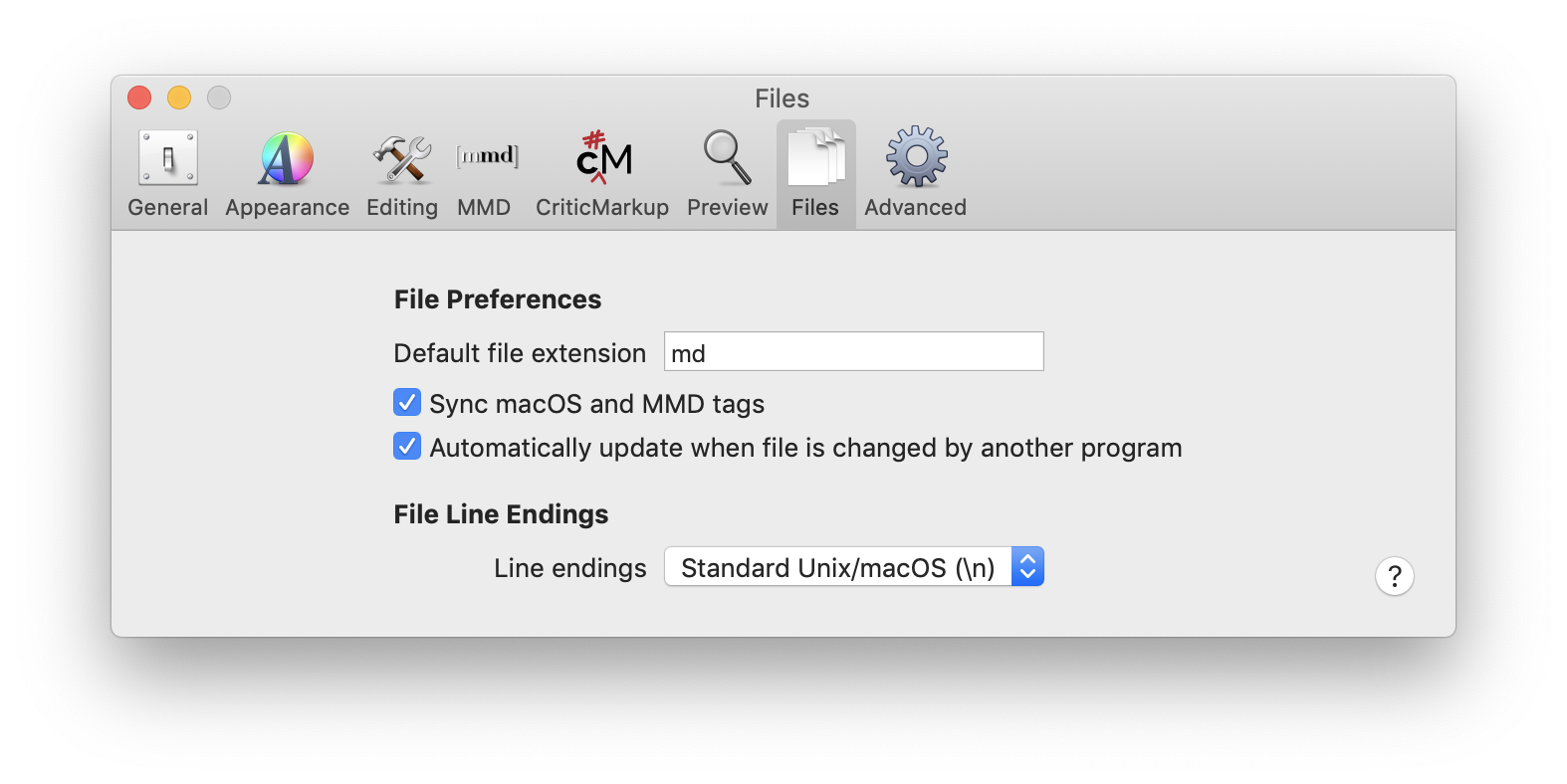
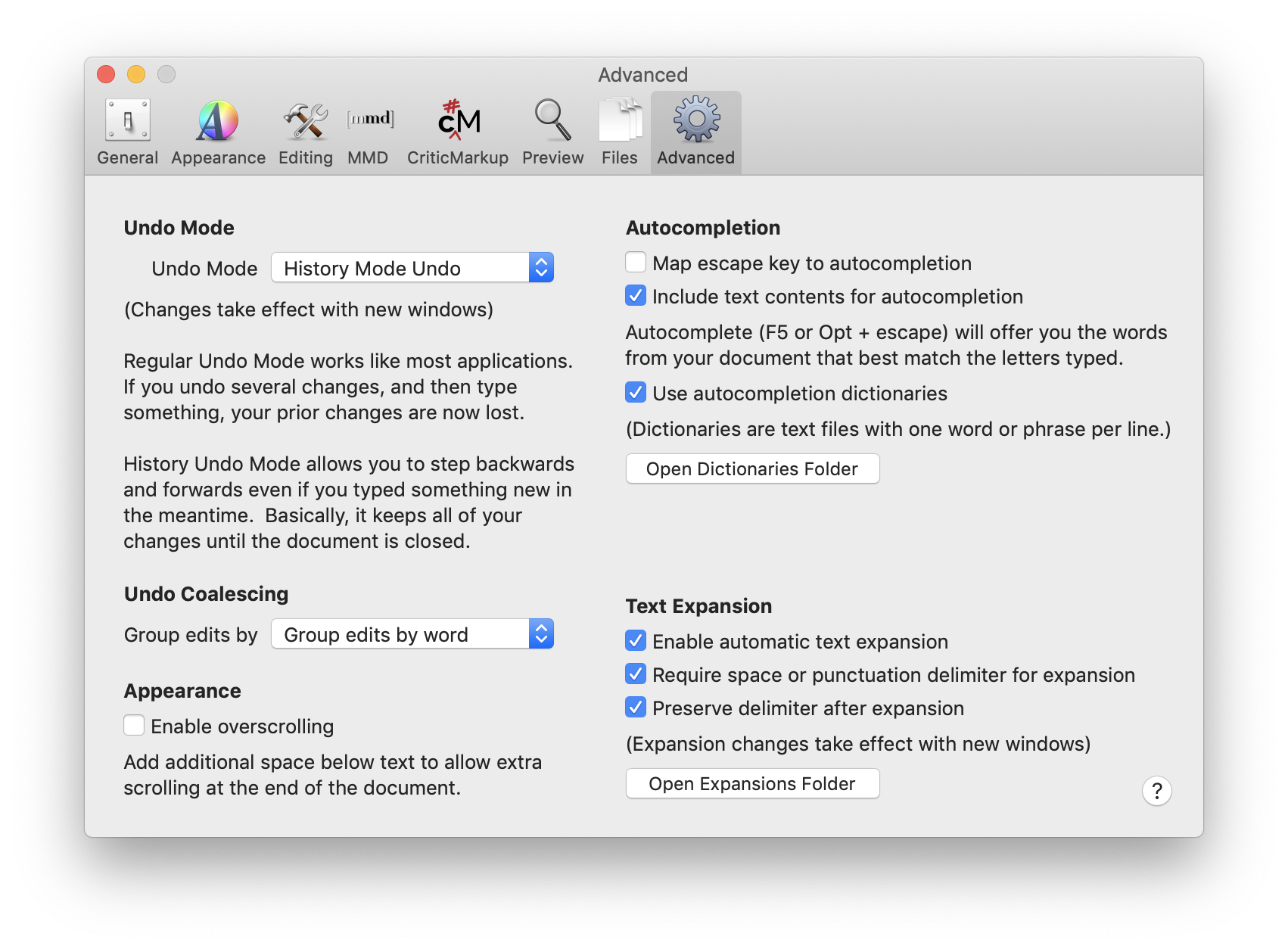 0
0 -
I. I suspect that I didn't change any of the default preferences. My preferences are identical to Adam Stegman's with the following exceptions:
1) Appearance: Line spacing is 1.5 and Text alignment is Justified.
2) Editing: Append '#' to end of headings is selected.
3) MMD: Enable "smart quotes" is enabled and List bullets is *
4) Preview: Default CSS is Github.II. Usage habits: I run nvUltra on both a Mac mini (my main computer) and a MacBook Air (MBA). I also access the same notebook regularly in 1Writer on my iPhone and rarely on my iPad. nvUltra generally is not launched on my MBA unless I need to access it briefly for a particular reason when I'm not near my Mac mini. In fact, I'm teaching at a local university 3 days a week, and have a Keyboard Maestro macro that I run before each day of class that quits all open apps and then launches a few apps that are essential for teaching the class (this does not include nvUltra). So, nvUltra rarely is open on the MBA. On my Mac mini, nvUltra generally is open. I tend to reboot my Mac mini primarily when I run SuperDuper about 1x/week and as needed for specific OS updates to High Sierra. I have to admit that my Mac mini is a bit funky. [That's the computer on which I was accessing nvUltra when 2 notes lost their contents.] I periodically need to re-index certain folders. Also, I reboot it via Terminal. If I use the Restart command in the Apple menu, it goes to a gray screen with a cursor in the upper left corner. It's been like this for about 1.5 years.
BTW, about 1 hour before I used nvUltra on my Mac mini and in so doing lost the contents of 2 files, I had accessed that same folder of notes when I created a new note on 1Writer on my phone. That new note is not 1 of the ones that lost its content; but it's in the same folder on Dropbox.
1Writer and nvUltra were both open at the same time, and often are, but I wasn't looking at the same note on both devices (until after the contents were lost).
III. Activity Monitor info (CPU first followed by Memory):
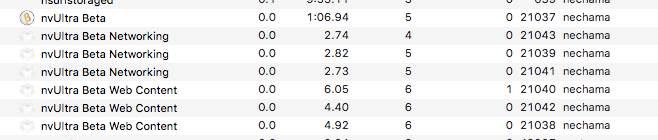
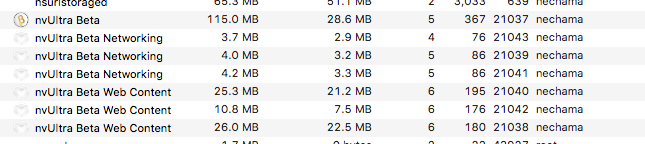 0
0 -
Nancy and Adam -- thanks for all the information! I'll dig through and see what I can find.
0 -
Ok. I think I figured this out. Short version -- when closing a note, there is a race condition that could potentially result in saving the file again while deleting the contents of the text view before loading the next note. This would only happen under situations that lead to a very narrow window of time for the race condition to occur, which is why it is relatively rare, but could happen multiple times on the same computer under similar situations.
If this is in fact the cause, it will be fixed for the next release.
Thanks for the help debugging this!
0 -
Wow, that's fast!
I now at least have the app set to automatically check for updates, so it will download the fix once it's available. Meanwhile, I'm grateful for Dropbox and the ability to restore old versions.
When I checked Activity Monitor to find the info for your troubleshooting, I was surprised to see multiple nvUltra processes for Networking and Web Content, considering that at most, 1 note is open at a time. Is this normal?
0 -
That's part of Apple's code -- same thing happens with Safari.
0 -
Thanks for the update! Glad to hear you were able to find something based on such little information. 😬
0 -
I am hopeful that this issue has been fixed. Unfortunately there is no way to confirm that, since it is possible there was more than one cause of the issue.
I am closing this topic, but if this recurs, definitely open a new one and let us know! The last thing we want is data loss!!
(But of course, EVERYONE should be backing up their computer whether they use beta software or not.... ;)
0 -

FWIW, this just happened to me. In my case I was renaming the file in question. Happy to share any logs etc if needed.
(I'm not in range of my backup drive, but I was able to retrieve the file's prior contents on Dropbox.com, after manipulating the URL to point at the prior document name)
0 -
Dan -- what version are you using?
0 -
Not the version you just released :) My app updated to the 1.0.0 beta a couple hours after the issue occurred. So I'll assume it's fixed (and report back if not).
All in all, an amazingly stable beta! That was the only hitch I experienced.
0 -
I'm glad it's generally working well. But of all the bugs that have been reported, this is one that worries me the most since it involves data loss.
0 -

Hi, I just managed to inadvertently overwrite one of my notes. I'm almost certain that this is what happened in Adam's case earlier in this thread.
Basically, you have a note named "note.md", and in the search bar you somehow type just "note" (without the autocompleted md extension) and press return. This creates a new note named "note.md"--overwriting your original note.
Exact replication steps on 1.0.0:
1. create "note.md"
2. type something in it so that you can tell when it's overwritten. e.g. "data"
3. Press CMD+L
4. Type "note"
5. Press DELETE to delete the ".md" autocompletion
6. Press RETURN
Your note has been overwritten.
Usage scenario where someone might make this mistake:
> Be on "note2.md"
> Want to switch to "note.md"
> CMD+L and type "note" => "note[.md]"
> Fat finger some key like semi-colon => "note;"
> DELETE your mistake => "note"
> Press RETURN
0 -
Daniel,
Excellent catch! I have pushed a fix that checks before overwriting a file before *and* after adding a missing file extension.
Thanks for your detailed steps to reproduce what happened!!!!
PS> Sorry you lost a file. I hope you were able to retrieve it from a backup....
1
Please sign in to leave a comment.
Comments
23 comments