Folder Navigator Open in New Tab

Is there a preference or setting to change the behavior when opening a folder from the Folder Navigator? It currently opens a new window with that folder, however I would like it to open as a new tab in the current folder. Is that possible or does that need to be a feature request?
-

Isn't this a function of system settings? The Dock preference pane should have this selected.
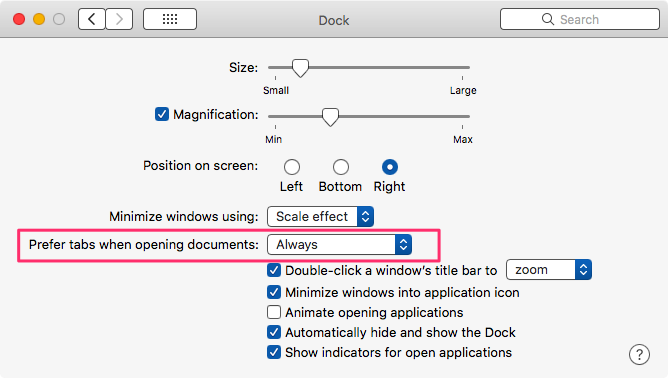
macosxguru
1 -

macosxguru is correct. nvUltra has no built-in capabilities for tabs/tab management, only what is provided by the OS. If System Preferences fail, there's no workaround within Ultra.
0 -
macosxguru - Thanks for the info. Didn't even know about that setting. I was looking for an app setting, not system level but I will use that and see how it works.
Brett, is there any plans for app level control of these settings? Thanks! Loving the new app BTW.
0 -

For now the plan is to stick with default macOS behavior and expectations, so this would be controlled using the usual macOS system settings. But we can keep other options on the table for future updates.
0 -

The ability to open a new tab within the main editor would be beneficial in my opinion. Even if you can search for filenames inline using brackets, often one have to see the content of the file to make sure it is the right one. Having lots of notes named using uid’s and so forth, a tab function would be great for finding the notes you want to link to.
0 -
Unfortunately macOS doesn't offer (built-in) support for tabs for windows like nvUltra that use shared GUI components (e.g. notes list) and per-document components(the editor/preview). This would have to be custom coded. The work to benefit ratio is not very favorable, so this would be a lower priority feature for a future update (behind other features that are of interest to larger number of users), unless macOS offers improved built-in tabbing support OR nvUltra is successful enough to allow us more developer time on non-core features.
0
Please sign in to leave a comment.
Comments
6 comments