File name extension in search field
Completed
nvUlra shows the file name extension (.md) in the search field, which seems to be pointless. nvALT doesn't do this.
-

It's not pointless when you're trying to disambiguate between images and text files, but you can disable it in the General preferences.
0 -
I don't mean the extensions in the file list (BTW: called file tables in the preferences – I had those hidden already), but in the search field (nvUltra to the left, nvALT to the right):
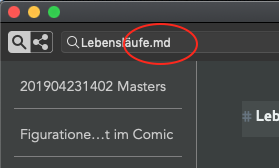
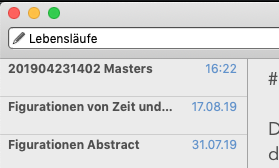
Couldn't find a config switch for this one.
0 -
As for the disambiguation between images and text files: I would prefer to have my images in a subfolder in the opened folder.
0 -
Ah. I misunderstood.
In this case, the search field contents and the actual file name are tightly coupled (when hitting return to edit or create a new file for example.) If you have files with different extensions (e.g. `txt` and `md`) removing it from the search bar would be problematic.
Unless some fundamental changes happen in the way nvUltra handles filenames, the extension is unlikely to disappear from the autocompletion.
As for folders, you are of course welcome to put images in any subfolder you like.
0
Please sign in to leave a comment.
Comments
4 comments