[BUG] Erratic insertion point
Completed
I'm not sure what triggers this, but I've seen this issue multiple times now. The insertion point seems to shift slightly so that it no longer indicates where it actually is, if that makes sense. In the attached example, pressing Space on the keyboard actually adds a space after the letter o vs. a space after the letter n and then shifting the o over.
-

Do you use the zoom functionality?
macOS handles displaying the cursor -- perhaps it is getting out of sync in some way?
If you can help me replicated it I can try to further test, but it works fine for me even when I zoom.
0 -
I do change the text zoom throughout the day, but I can't reliably reproduce this. I know it has happened to me a few times now. I'll try to be more mindful of what I'm doing the next time it happens.
0 -
I haven't seen it, but I don't use the zoom function frequently or under different circumstances. If you figure out any pattern, it would be appreciated!
0 -
I think I figured it out. If you have a space after a word, and your insertion point after the space, you should be able to replicate it by pressing Shift-Option-left arrow.
edit: Ok, that doesn't work 100% of the time, but I'm fairly certain it happens when I use option and arrow keys to navigate my text.
0 -
Shift-Option-Left arrow selects from the cursor to the beginning of the line, so the caret disappears. Are you sure that's what you meant to write?
0 -
Using option and the left/right arrow keys moves the caret word by word for me. Using shift then selects word by word. Option and up/down arrows navigates by paragraph. Using shift in combination would then select the paragraph. I tend to use option with the left/right arrow keys a lot, and also in combination with shift. Option-left/right doesn't move the cursor to the beginning of the line unless I option-left and it's the only word on the line.
0 -
I misspoke, but either way the caret disappears when using shift.
Randomly trying Opt-left/right (with/without Shift) doesn't cause any issues for me, even when I zoom the text to different sizes.
What OS version are you using?
0 -
Oh, in that case, even when holding shift the selection will end in the middle of a letter, making it harder to see where the selection ends.
Yeah, it's erratic. I can't replicate it every time. It just happens from time to time as I move around my notes.
I'm running 10.14.6.
0 -
What font are you using?
0 -
It has happened with Comic Code and IBM Plex Mono.
0 -

Moving over here ( per Brett ) from my post:
Experiencing the same erratic curser alignment issues. Sometimes the curser lines up in between characters — this is expected, and sometimes the curser is directly placed over the character causing confusion as to what character it's near.
It's been like this since first install and through subsequent updates. This is not happening in any other application ( VSCode, iA Writer, MultiMarkdown Composer, Drafts, TextEdit )
I believe I am seeing the same issue on my home Mac, but I need to confirm. I don't believe anything in Preferences was changed. I can attach screenshots of settings if necessary.
I am not using zoom or assistive settings. I am syncing to an iCloud folder.
Update: I changed line spacing to 1 ( default 1.5 ). This reduced the size of the curser and I no longer had the curser tracking issue in the new note, or the note I sent the video.
If I go back and change line spacing back to 1.5 there is [currently] still no tracking issue.
0 -

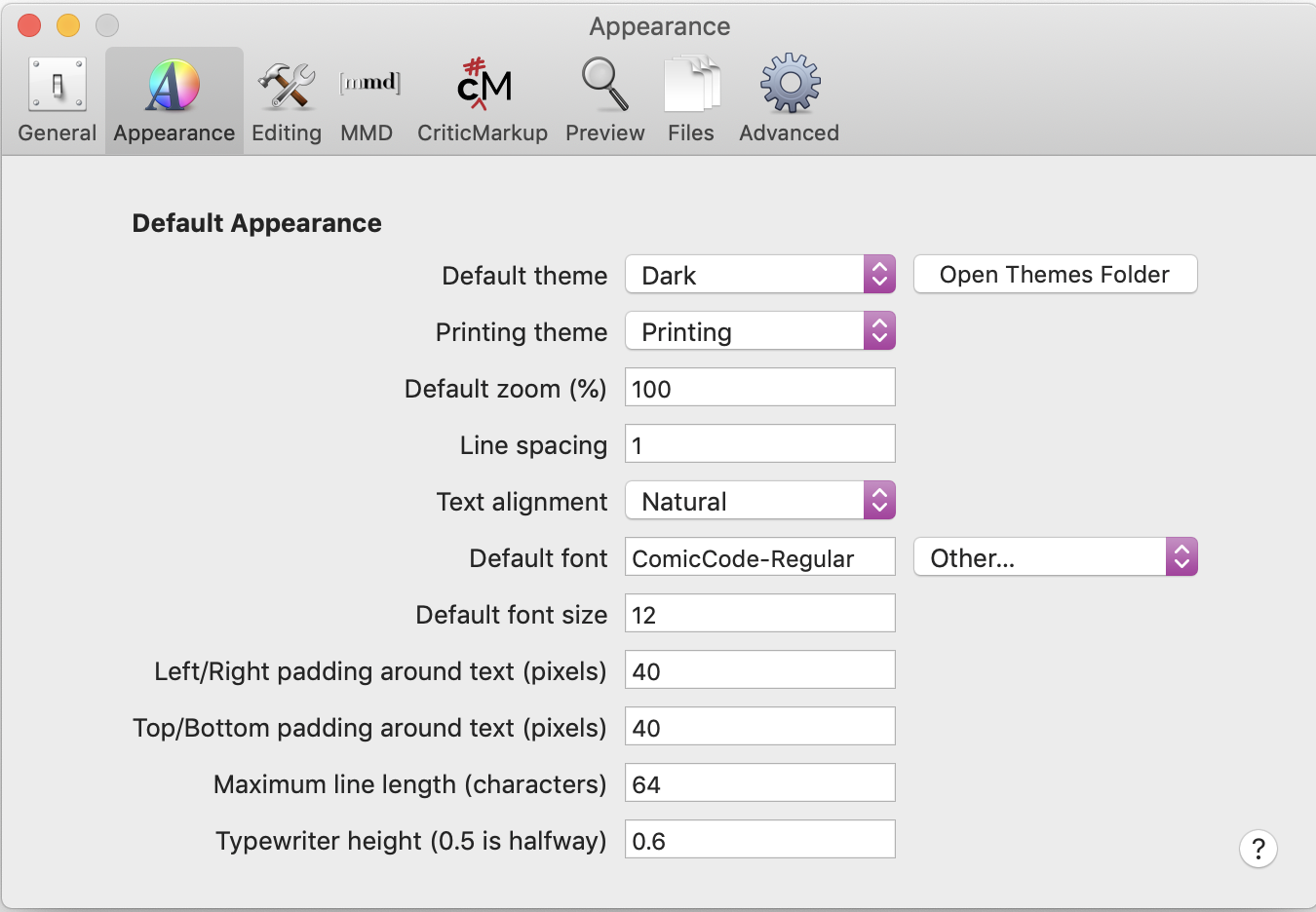
Here are the screenshots requested. I'm next doing the defaults delete com.multimarkdown.nvultra as requested.
0 -
Unrelated, I think, but whenever I use the terminal to change defaults it takes multiple app launches to register.
0 -
At some point, I forget exactly when, Apple migrated to more of a persistent database for defaults rather than strictly using the preferences files. (In other words, the file on disk is not the source of truth -- the database is). It is sometimes picky about when it chooses to update things. Sometimes a machine reboot gets things working better. This is not a nvUltra thing, but a macOS thing.
0 -
Williper -- Try using a "normal" font for a while -- something that is built into the system, or one that is in preferences pop-up list (since we embedded those). Maybe it's something glitchy about the font character widths?
Mark -- What font do you use?
0 -
Will do.
0 -
I haven't seen this issue again since resetting the preferences and using Menlo. I've since slowly added all of my preferences back, and I still haven't seen it. It could be an issue with the fonts I was using--Comic Code, and IBM Plex Mono. I don't see this issue using those fonts in Ulysses, though.
0 -
I ( also ) haven't had this issue return.
For me, it was rectified after `defaults delete com.multimarkdown.nvultra`. However, I wanted to keep testing both work and home Macs to verify.
Fletcher, I have not used anything but Cambay since the beginning. All settings are default with the exception of assigning a Global activation hotkey. I may move over to Fira Code to test.
0 -
Williper -- do you use some sort of Zoom in Ulysses? My suspicion with fonts would be that something was not calibrated correctly in the font, such that zooming the textview leads to inaccurate measurements of horizontal offsets.
Mark -- I have not seen it with Cambay, though I don't use the zoom function that much. But if you're using the same font I use, and also not using zoom, that does not support the hypothesis above.
I don't have a good alternate theory on this yet....
0 -
Yes, I use zoom in Ulysses. I'm going to try to switch back to my personal fonts to see if the issue returns. I haven't experienced it again.
0 -
I have still not been able to reproduce this. If you have not had it recur, then either it was something wonky with your systems, or something wonky with the code that got fixed somehow, or some other strange gremlin.
If it reoccurs, then please open a new topic so we can properly track this.
Thanks!!
0
Please sign in to leave a comment.
Comments
21 comments