[BUG] App renders white text on a light background
Completed
The Problem
The app renders white text against a light background in the search bar
Steps to Reproduce (unless it's literally just me):
- Launch app
- Open a Notebook
- Start typing
- Confirm the text color is white against a light background
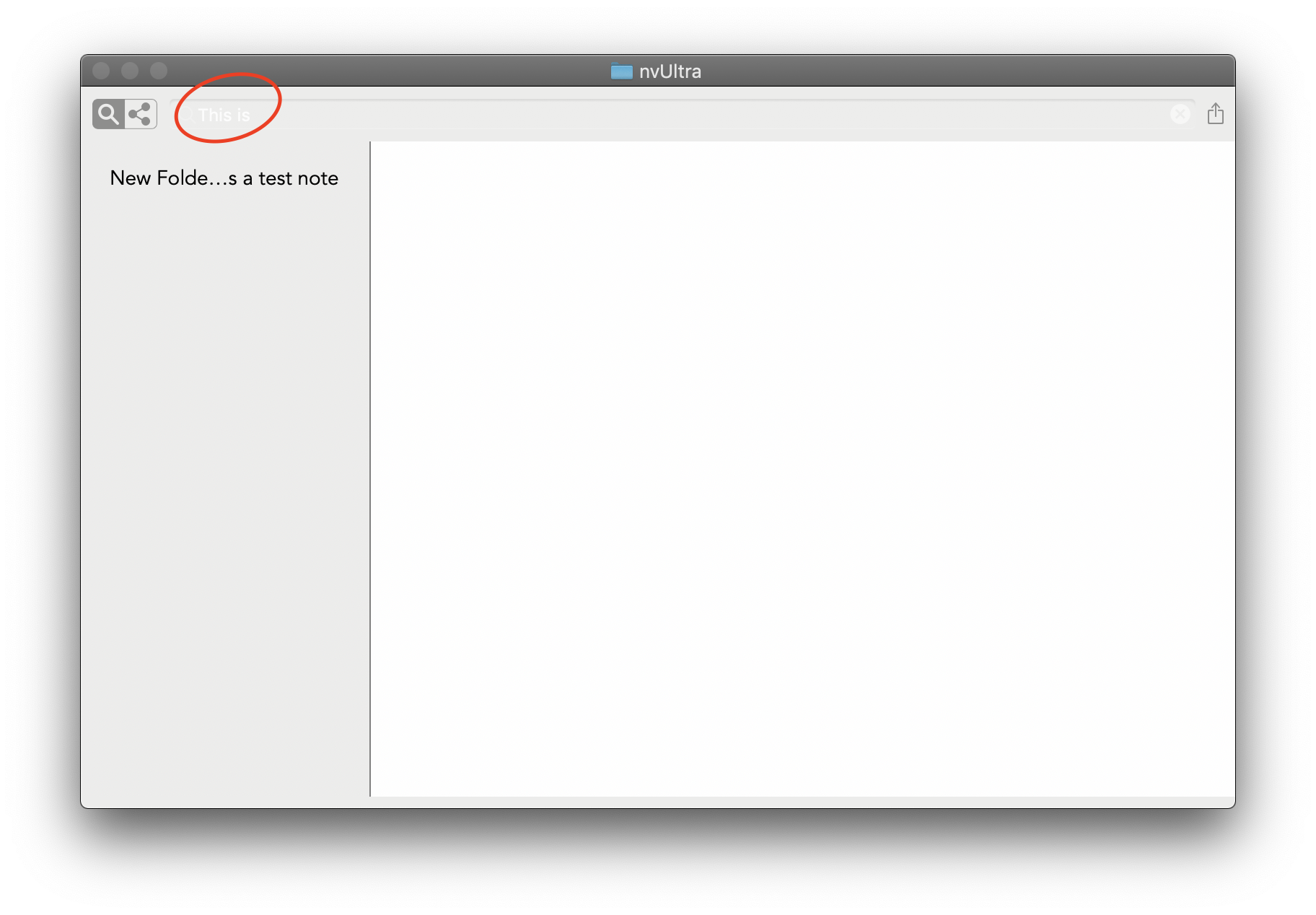
Specs:
- Version 1.0.0 (27)
- macOS 10.14.5
- System-wide dark mode enabled
-

Change themes -- the theme you are using (Default) is not very Dark mode friendly. Default-Dark would work better.
0 -
Default themes have been tweaked to work better regardless of color mode.
0 -
Question:
If I follow these steps, the app does not visibly change themes:
- Open preferences
- Click the "Appearance" Tab
- Click the "Default Theme" dropdown
- Select a theme other than the one I was currently using
It's only after I close a window and open a new one that the theme changes seem to take effect. Is that disconnect—that theme settings only affect windows created after the theme is set—intentional?
0 -
The preferences change the *default* theme for new windows. If you want to change the *active* theme, use the menu bar.
0 -
@Fletcher I didn't even see that menu option. I'm so sorry!
0 -
No worries!!
0
Please sign in to leave a comment.
Comments
6 comments