Ordered lists - extra space created in editor window
Completed
When I create an ordered list "1. test" and hit return, in the editor window it adds an additional space between the lines. Not earth shattering but makes a page unnecessarily long
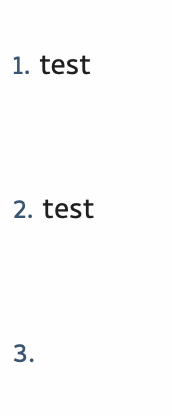
-

Under Preferences->Editing do you the option "Skip line between list items" checked?
0 -
unchecked and interestingly, if I start a new list with a space before it - I get the space. If I start it with text about, then it has no space between lists
0 -

Did you uncheck "Duplicate current list spacing"?
0 -

I also get the extra line between items even after setting
Preferences->Editing do you the option "Skip line between list items"
and unchecking the "Duplicate current list spacing"
I relaunched the app as well but keep getting the extra line.
0 -
You enabled "Skip line between list items" or disabled it? If you don't want a line, you need to uncheck "Skip line between list items"
0 -
I had the box checked. No lines added after unchecking, as suggested.
I misread it. I interpreted 'skip' to mean, "don't add lines between items", when it really means to add a line between items.
to me, skip means to avoid or not do/have, eg skip a meal.
My recommendation would be to change text to be more precise, something similar to this:
"add a line between items"
0
Please sign in to leave a comment.
Comments
6 comments