[BUG] Rendering Equations
Completed
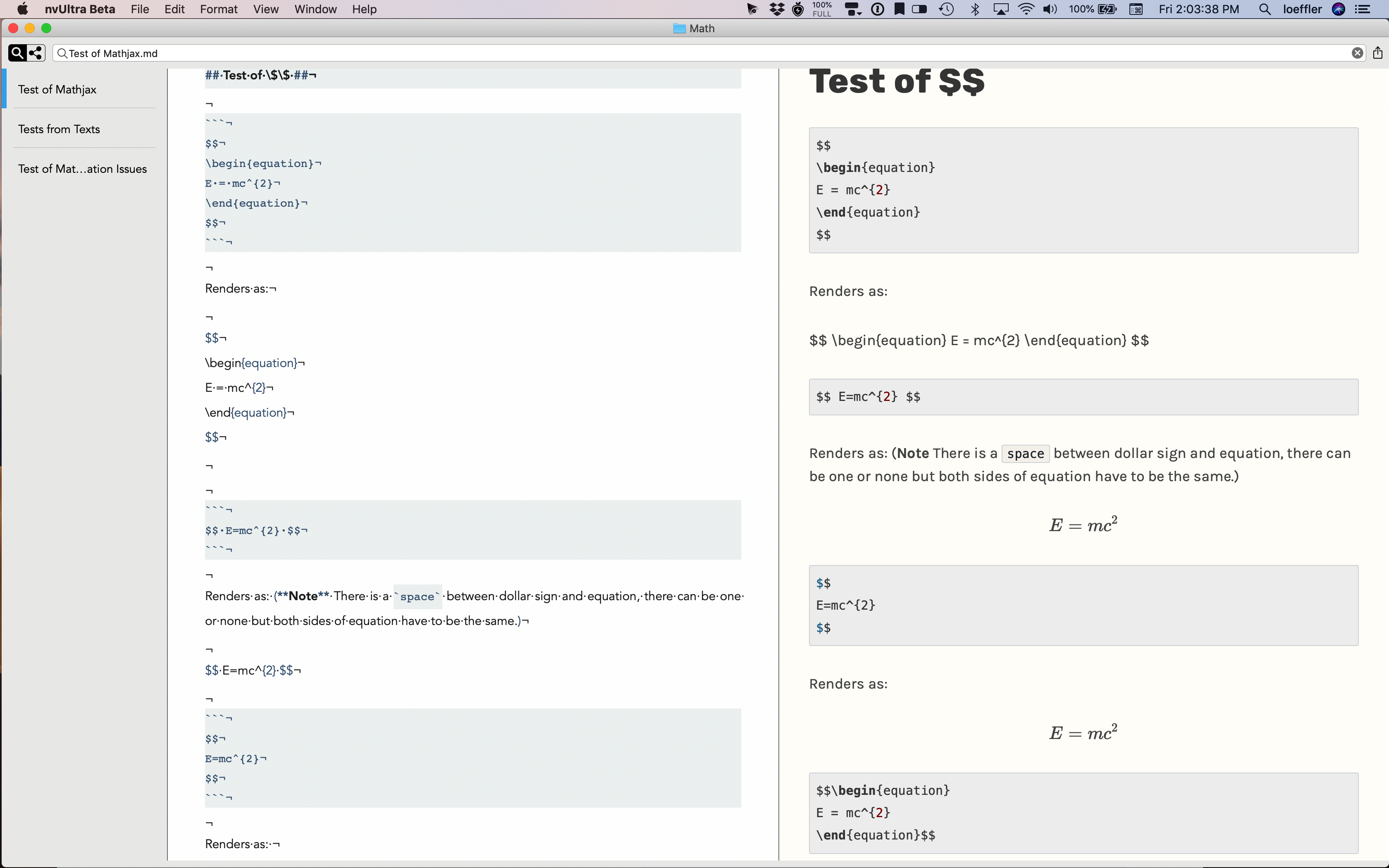
I use equations quite a bit. The latest Beta, 26, does not work as well as either Multimarkdown or Marked 2. I have attached example file and a sheet shot of part of the rendering issues in nvUltra. I like using the MathJax feature for files where I don't need to use LaTeX. Note, this file renders fine in both Multimarkdown and Marked 2.
Just checked and the equations render correctly in mweb and notebooks 2 as well.
Darn, not easy to attach file or screenshot so I'll try embedding file.
********* Start of File
Title: Test of Mathjax in nvUltra Beta
Author: David Loeffler
Date: Jul 15, 2019
# [%title] #
Version 1.0.0(26) Beta of **nvUltra**
> Note: All of the equations render correctly in **Marked 2** and **MultiMarkdown**
## Einstein’s Mass-Energy Equivalence Equation##
I am testing the rendering of the famous E=mc^2 equation using the build in MathJax library.
### Test of inline.
The following line contains two ways of delimiting an in-line equation. I need to **refresh** to get preview so show the equations correctly or the full reload whenever file is saved or changed.
`Einstein's Equation: $E=mc^{2}$ or \\(E=mc^{2}\\)`
renders as:
Einstein's Equation: $E=mc^{2}$ or \\(E=mc^{2}\\)
## Test of \$\$ ##
```
$$
\begin{equation}
E = mc^{2}
\end{equation}
$$
```
Renders as:
$$
\begin{equation}
E = mc^{2}
\end{equation}
$$
```
$$ E=mc^{2} $$
```
Renders as: (**Note** There is a `space` between dollar sign and equation, there can be one or none but both sides of equation have to be the same.)
$$ E=mc^{2} $$
```
$$
E=mc^{2}
$$
```
Renders as:
$$
E=mc^{2}
$$
```
$$\begin{equation}
E = mc^{2}
\end{equation}$$
```
Renders as:
$$\begin{equation}
E=mc^{2}
\end{equation}$$
From here on I am using `\\[...\\]`
`\\[E=mc^{2}\\]` renders as:
\\[E=mc^{2}\\]
```
\\[
E=mc^{2}
\\]
```
Renders as:
\\[
E=mc^{2}
\\]
```
\\[
\begin{equation}
E=mc^{2}
\end{equation}
\\]
```
Renders as:
\\[
\begin{equation}
E=mc^{2}
\end{equation}
\\]
***** End of File
Paste screenshot.
-

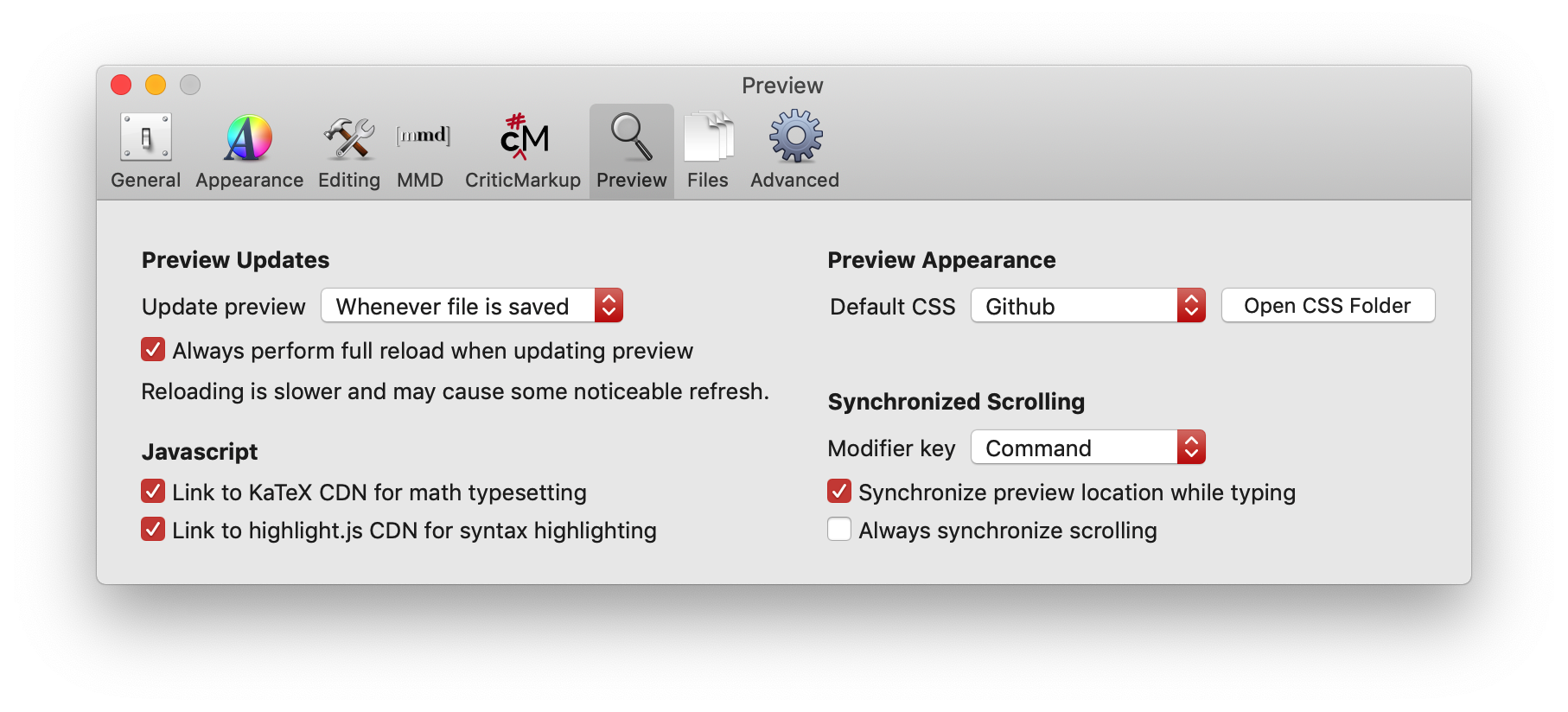
Under Preferences->Preview in the Javascript section, do you have KaTeX enabled?
0 -
Yes I did. See preferences pane below.
Note: I have been using 1Blocker with Safari and it blocked some content like comments from this site. I have "whitelisted" the site and things are working okay now.
 0
0 -
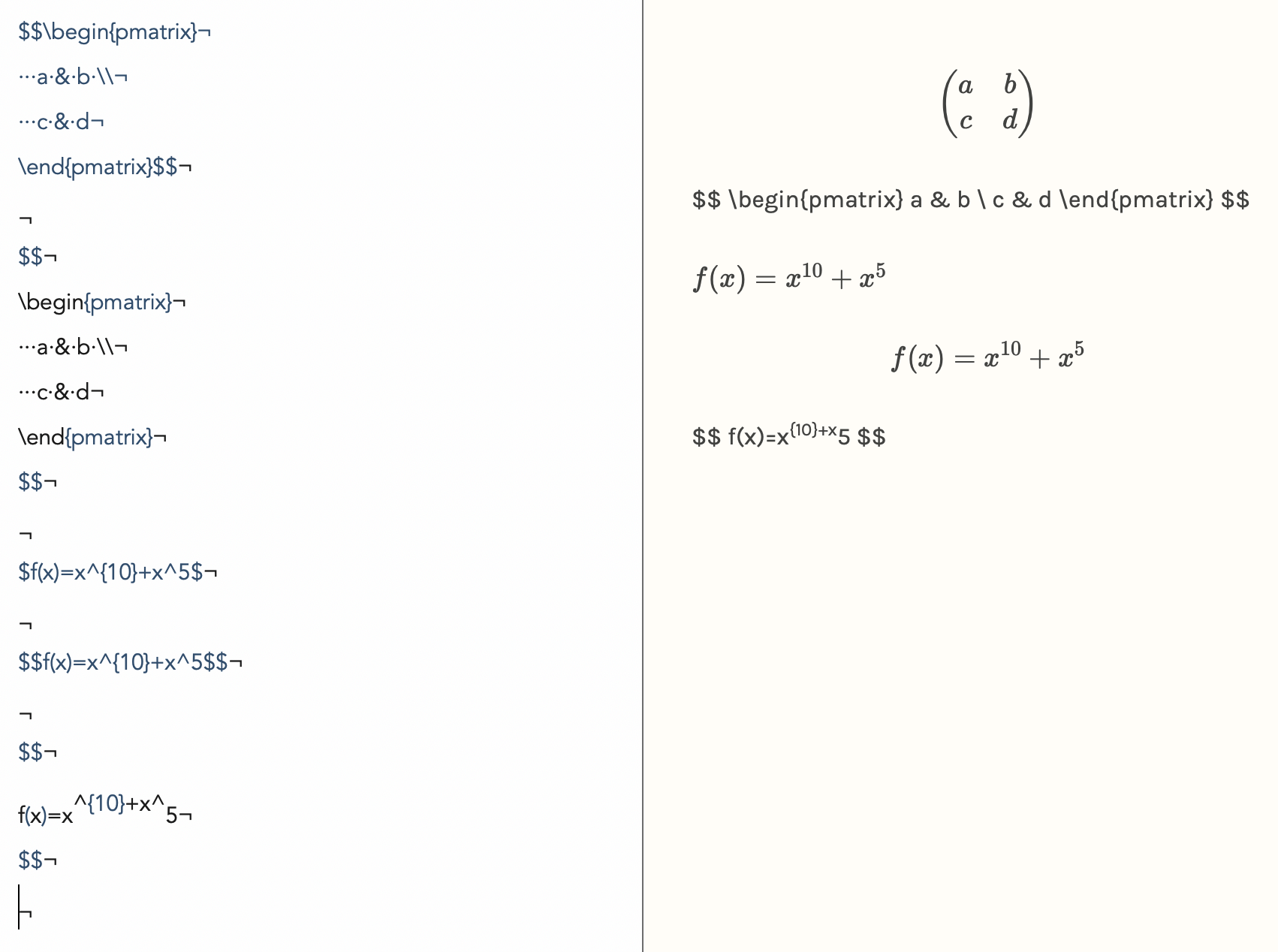
Here is another example directly from KaTeX site that does not seem to work right. The top expression is correct. Note the $$ are on the same line as \begin and are directly after \end. Notice too that the last equation fails to render correctly when the $$ signs are on the line directly above and below the equation. If I ask nvUltra to render the file all the equations appear correctly. There is some mismatch between how equations are rendered. If I ask nvUltra to edit the file in Multimarkdown Composer the equations in the preview pane are also not rendered correctly and the second one seems to ignore the \\ for line feed in the second equation.
-------START
$$\begin{pmatrix}
a & b \\
c & d
\end{pmatrix}$$$$
\begin{pmatrix}
a & b \\
c & d
\end{pmatrix}
$$$f(x)=x^{10}+x^5$
$$f(x)=x^{10}+x^5$$
$$
f(x)=x^{10}+x^5
$$---------END
Snapshot of the nvUltra screen.
 0
0 -
For now I am going back to use \\(...\\) for $...$ and \\[...\\] for $$...$$. This works as expected. Maybe there is a configuration for KaTeX to make $'s work better?
0 -

You've got `$$` on lines all by themselves, so not valid MMD math... Fix that and all should be fine.
Otherwise, MathJax may have been fixing some things that KaTeX doesn't?
0 -
Same with spaces between `$` and the math content. Remove those, and you'll have valid MMD math again.
0 -
I have a question about the version of KaTeX - it appears 0.10.1 is used and the latest release is 0.10.2 that has been out since May.
KaTeX renders equations faster than MathJax but does not yet seem as stable.
I'm going to run some more experiments. I have liked using mWeb for math stuff and NoteBooks 2 has just been released and unlike mWeb it supports Multimarkdown. I have some other apps that support Multimarkdown and some that do good job at math rendering and will be reporting back.
0 -
There's nothing special about using the built-in KaTeX setting -- it just adds header information to link to the javascript. You can do the same thing with metadata in order to use whatever script and version you like:
https://fletcher.github.io/MultiMarkdown-6/syntax/metadata.html#htmlheader
I haven't tested KaTeX extensively to determine whether it covers "everything", but performance-wise it is much faster than MathJax which allows for smoother refresh in the preview when typing.
When I first looked, there wasn't a "latest version" URL for KaTeX, and I still don't see one. I'll try to keep digging.
0 -
Look at https://katex.org/versions.html
It has latest version and release notes plus previous 2 releases.
The path to the versions is not obvious from the home page. On home page (https://katex.org) I clicked on Installation button then in upper left corner It shows the latest version as a link to the versions page.
Rendering is faster. I have gotten to the point with MathJax of only rendering on save and that is a full refresh.
0 -
I guess I'm looking in the wrong place -- I don't see any CDN links on that page?
0 -
Sorry about that. Check this site:
https://libraries.io/npm/katex
I copied links to KaTeX over e ones nvUltra wrote and loaded new html file and it worked with version 0.10.2 of KaTeX.
These are the lines:
<link rel="stylesheet" href="https://cdn.jsdelivr.net/npm/katex@0.10.2/dist/katex.min.css" integrity="sha384-yFRtMMDnQtDRO8rLpMIKrtPCD5jdktao2TV19YiZYWMDkUR5GQZR/NOVTdquEx1j" crossorigin="anonymous">
<!-- The loading of KaTeX is deferred to speed up page rendering -->
<script defer src="https://cdn.jsdelivr.net/npm/katex@0.10.2/dist/katex.min.js" integrity="sha384-9Nhn55MVVN0/4OFx7EE5kpFBPsEMZxKTCnA+4fqDmg12eCTqGi6+BB2LjY8brQxJ" crossorigin="anonymous"></script><!-- To automatically render math in text elements, include the auto-render extension: -->
<script defer src="https://cdn.jsdelivr.net/npm/katex@0.10.2/dist/contrib/auto-render.min.js" integrity="sha384-kWPLUVMOks5AQFrykwIup5lo0m3iMkkHrD0uJ4H5cjeGihAutqP0yW0J6dpFiVkI" crossorigin="anonymous"
onload="renderMathInElement(document.body);"></script>I am still having some issues with a few equations and will report if it is KaTeX issue.
0 -
All the links I see, including the ones you used, are still hard-coded to a specific version of KaTeX, though, right?
0 -
Yes. When I create an HTML file from nvUltra the links are to version 0.10.1 of KaTeX. I found the links for version 0.10.2 and replaced the 0.10.1 in the HTML and they seem to work the same.
I am also working with Texts.io & Typora and they use MathJax. The math equations/notations in my test file work fine. Texts creates a simple HTML file with to MathJax. Typora produces an HTMLl file without a call to MathJax but uses MathJax to create SVG of all equations. Typora activas auto numbering of equations. (both Texts and Typora use Pandoc). I'm going to be conducting more experiments with IA Writer, Byword, mweb, notebooks 2, and some others. Right now there are 2 equations in my test file that does not render with KaTeX.
I like the speed of KaTeX so I'm going to why it is not working in a couple of cases.
0 -
Ideally, there would be a "latest" version, but I guess that would break the SHA verification....
I've updated to version 0.10.2, but this will have to be done manually when KaTeX is updated.
0 -
Also, I think I was linking to both the full and minified versions of CSS/JS for some reason. I now only link to the minified versions.
0 -
At this point, is this now to the point where nvUltra works properly and the issue is more whether KaTeX has bugs?
If so, I'll close this issue, but if there is something I need to do, I can leave it open.
Thanks!
0 -
You can close it. I will have some suggestions for Multimarkdown Composer. The only thing for nvUltra is a suggestion that you give people the option of using either MathJax or KaTeX. KaTeX does not seem as complete as MathJax but that might only affect a small number of users.
0 -
David,
Will consider that, but we have to consider and balance:
1. Complexity of preferences -- everything we add furthers the complexity. Ultimately I would rather take away when possible instead of adding new ones. One can dream... ;)
2. With Composer one of the requests/suggestions/complaints had to do with the limited ability of MathJax to perform when rapidly refreshing the preview. KaTeX, as you note, is MUCH better in this regard.
3. KaTeX bugs -- feel free to let me know further details about the limitations of KaTeX. My suspicion is that most (not all) users benefit from #1 and #2, but "pro" users like yourself may be more impacted by this one??
0
Please sign in to leave a comment.
Comments
18 comments