Index by including file types

Hi,
Right now, a folder opened in nvUltra is indexed by excluding files:
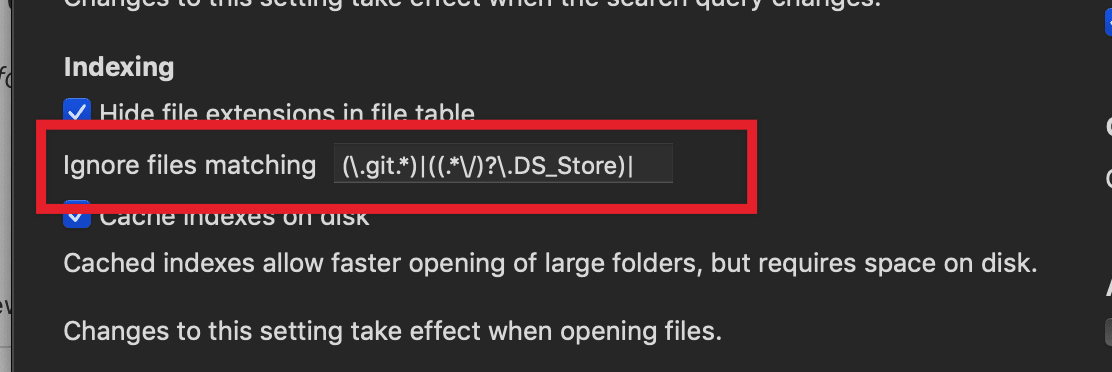
I think ik would be great, it is possible to index files by **including** file types: like (*.md)|(*.txt)|(*.jpg)|(*.png).
When indexing files by including file types you can open a "large" multi-level project folder. In current version opening a project folder almost all files are indexed.
-

Came here to say something similar — right now .taskpaper files can be viewed in the editor but can't be edited.
0 -

Thanks for the suggestion. We'll look at it for a future version!
F-
0 -
Ian, I can edit Taskpaper text files just fine. nvUltra can edit any file that is recognized as a `public.text` file by macOS. On my system, `com.taskpaper.text` is recognized as such. You can use `mdls your_file.taskpaper` to see what your computer thinks the file is, and to make sure that one of the recognized types is `public.text`.
If not, you'll need to figure out which application is causing the trouble. (An unfortunate limitation of Apple's UTI system...)
F-
0 -
Somehow my taskpaper files are `public.data` — haven't figured out why but converting them to `public.text` did the trick. Thanks!
0 -
Maybe it is an option use a .nvultra file per folder where you can set some (overwriting) settings, like exclude_files, include_files, theme. And when include_files is set exclude_files is ignored (and v.v.). Something like .tmproperties in TextMate.
So expert users can set such files ....
0 -

I'm struggling to find a way to convert my .tasks files from public.data to public.text so that nvUltra can edit them.
Ian, can I ask how you managed it? I've tried to register the extension with a dummy app, but that doesn't seem to be working.
0 -
Nevermind, helps if I read the instructions correctly. Got it changed thanks to this and now I can open .tasks files in nvU.
0
Please sign in to leave a comment.
Comments
7 comments