Preview lines in sidebar and format sidebar

What I really like about nvALT is the preview lines in the sidebar. Will this option (including date) be available in nvUltra?
Right now it is not possible to change the font size and padding of the sidebar (like now it is possible for text via preferences). Would be great we can also customize this via preferences!
== feek
-

Thanks for the suggestions.
We'll consider both of these for future updates.
F-
0 -

I too would really like the option for preview text in the Sidebar.
4 -

I would love to be able to tweak the sidebar/file list. I don't like the font, and I feel like there's a lot of wasted space.
3 -

+1 for preview text & modification dates in the sidebar, and the ability to adjust sidebar font/appearance.
For the latter, nvALT's options to always show grid lines and/or alternating row colors would be welcome.
And while you're at it, you might also consider displaying tags in the sidebar too, like nvALT.
2 -

+1 for all of the above - preview text, modification dates, font/appearance, possibly grid lines/alternating row colors.
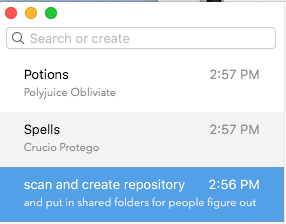
I think the way FSNotes does it is fairly good:
 6
6 -

+1 For the preview lines.
0 -

+1 for having dates in note lists
1 -

+1 for these to. One of the most useful features for scanning large numbers of files.
0 -

+1 for me - unusable without it
0 -

I have just returned to trying the beta after a break, and I would like to second the request made above for alternating row colours in the file list. It would make my life easier.
In addition to that, I would find it helpful if the selection marker were more than just a narrow tab at the side. Personally, I would prefer some sort of highlighting or darkening of the whole row. My colour vision is poor -- not to mention that my vision in general is that of someone approaching seventy -- and a bit of help is welcome.
0 -
1. Since the table is only a single column, I'm not sure that alternating row colors accomplishes much. It seems that the primary benefit of alternating colors is to help quickly scan across a row and ensure you don't lose your place when moving from one column to the next. Since these tables only have a single column, that doesn't apply here (unless you filenames with a ton of spaces in the middle of them perhaps? :) . We'll consider it, but no promises on that part.
2. The width of the indicator can be configured -- it is set using the `NVTableSelectionIndicatorWidth` default (https://nvultra.com/help/advanced-features#hiddenpreferences). That said, if you set the indicator too wide, and don't adjust the indention to compensate, it colors over the text. That will be fixed for the next release, so you could set that width to 10000, which would ensure it covers the entire column even in full screen mode.
1 -

+1 for both dates and preview lines.
0 -

I don't agree with your reason against alternate row color .
I tweaked the row sizes using the hidden preferences to match as close as possible the beauty of nvAlt.
but the one thing I could't is alternate color.Thus with low row-height and narrow spacing the alternate color would improve legibility a lot.
Please provide at least a hidden pref for this ...
0 -

+1 for the nvalt-style preview lines, they are invaluable
0
Please sign in to leave a comment.
Comments
14 comments