Code Block Display Bugs in Editor
Completed
There are two bugs I am running into, specifically when using the tabbed line code block syntax.
Both bugs are induced by beginning a new paragraph, typing return once, and then typing tab once. If you attempt to begin a code block this way the code will not be formatted as code, rather as a tabbed line in the current paragraph.
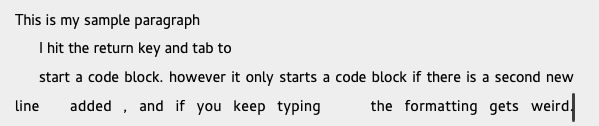
For the first bug, after the first indented line is entered and return typed the editor will begin a second line that keeps the editor text displayed as expected; however, adding a third return/tab combination breaks the justification of the text within the editor.
example of bug 1:
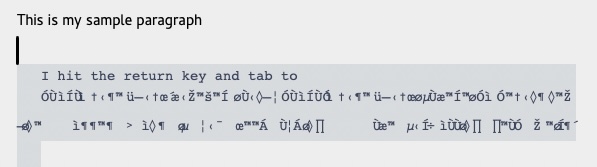
The second bug occurs when, after you have realized the code formatting is not occuring as expected you then return to the end of your written paragraph (prior to the code block) to add another new line. Once you have entered the new line the first line of the code block in the editor appears correctly, however the remaining characters turn into an encoded formatting that isn't human readable. This misformatting can be corrected if you remove the new line inserted.
My Specs:
OS: Sonoma 14.6
Machine: Apple M1 Max - 64 GB
Thank you!
-

This first part is not a bug – that is Markdown. You need a blank line to allow a code block to begin. Otherwise you are simply continuing the initial paragraph.
The second part is related to an issue mentioned in the last couple of updates. Briefly, editing certain long structures (e.g. long lists) caused a “jump” when typing a space. This is another edge case that was not caught by the fixes I applied.
This example is now fixed for the next release. Thanks!
(In the meantime you can reopen the file to see the text as it actually is.)
0
Please sign in to leave a comment.
Comments
1 comment